

April 7, 2026
Social Media Content Moderation: A Practical Guide
X minuto de lectura

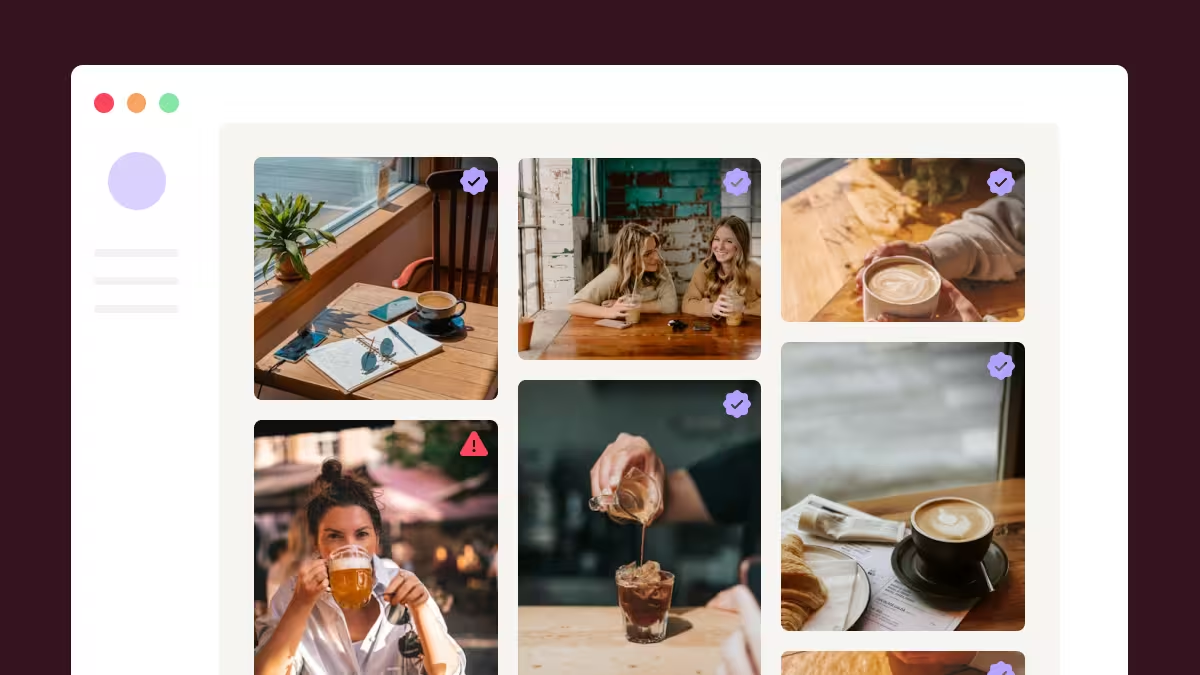
Infraestructura social que se amplía con usted.
Empieza tu prueba gratuita o deja que te mostremos la plataforma en acción.
The moment you start using real customer content for your brand, you lose control. People tag your brand, post reviews, share photos, and join your campaigns without first asking for approval. That content builds trust faster than anything you publish.
But it also comes with risk.
Not everything that shows up under your hashtag or in your mention belongs on your website or event screen.
That’s where content moderation comes in, and both brands and consumers prefer moderated social media content.
In this guide, we break down how social media content moderation works, the main approaches teams use, and how Flockler’s Garde AI handles it in practice.
Why Social Media Content Moderation Matters for Brands
Brands and organizations collect social content from public hashtags, mentions, and brand accounts to display it on websites, apps, event screens, and digital signage. This content refreshes automatically, which keeps digital experiences fresh and authentic.
The trade-off is that not every post pulled from a hashtag or public mention will align with your brand guidelines.
Here are three reasons why social media content moderation should be part of every UGC workflow:
Protecting Brand Reputation

A single inappropriate post on your social wall can undermine months of brand-building. Starbucks experienced this when their #SpreadTheCheer campaign was hijacked with negative messages in the UK. Without moderation, those posts would have appeared alongside the brand's own content.
Content moderation helps filter and protect your brand across every surface:
- Website embeds and homepage social feeds
- Live event screens and conference displays
- Retail digital signage
- Intranet and internal communication feeds
Meeting Regulatory Requirements
Content displayed on your website is your responsibility. Several regulations now require active steps against harmful content:
- EU Digital Services Act (DSA): Fully enforced since February 2024. Requires businesses to remove illegal and harmful content or face penalties.
- UK Online Safety Act: Sets similar standards for platforms and businesses serving UK audiences.
- FTC Endorsement Guides (2023): Clarify disclosure rules for brands displaying influencer and creator content.
These regulations affect any business displaying aggregated social content, especially those operating in or serving European audiences. Social media content moderation helps you screen content before it goes live.
Maintaining Content Quality and Relevance
Hashtag feeds are particularly vulnerable to noise. If you run a campaign using #YourBrandSummer, you will likely pull in:
- Spam accounts posting unrelated promotions
- Low-quality images that don't match your brand aesthetic
- Off-topic posts from users who happen to use the same hashtag
Moderation ensures that only relevant, high-quality content reaches your feeds. This keeps your UGC displays useful for visitors and aligned with your campaign goals.
3 Approaches to Social Media Content Moderation
Most social media content moderation automation tools use one or a combination of these methods. Each has different strengths depending on your content volume, team size, and risk tolerance.
1. Manual Moderation
With manual moderation, a team member reviews every incoming post before it goes live. Posts land in an inbox or queue, and the moderator approves, hides, or deletes each one individually.
When it works well: Low-volume feeds, sensitive industries (healthcare, education, government), or campaigns where every post needs human review.
Where it falls short: It does not scale. A team running 15 or more active social feeds across multiple platforms will spend hours each week reviewing posts. Human error increases with volume, and posts can sit unreviewed for hours or days.
2. Automated Rule-Based Moderation
This approach uses predefined rules to filter content. Common filters include keyword blocklists, user blocklists, and minimum engagement thresholds. Content that matches a blocked keyword or originates from a blocked user is automatically hidden.
When it works well: Filtering out known spam patterns, blocking specific users, or removing posts that contain certain words.
Where it falls short: Rules are rigid. They cannot assess the visual content of an image, detect tone, or understand context. A keyword filter might block a post about "wine and cheese night" if "wine" is on the blocklist, even when the post is perfectly appropriate for a hospitality brand.
3. AI-Powered Moderation
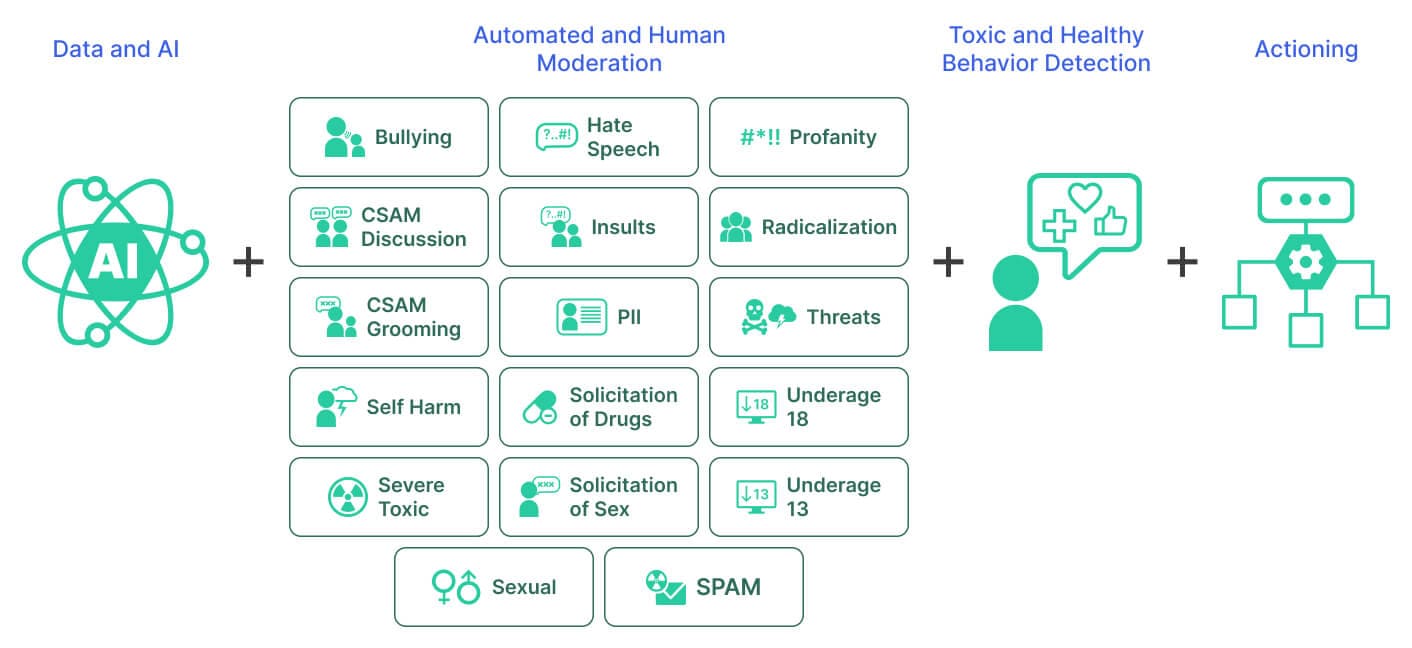
AI moderation uses machine learning to analyze both text and images. It goes beyond keyword matching by:
- Assessing visual elements and detecting explicit imagery
- Evaluating whether a post fits the context of your brand feed
- Screening for offensive language, spam, and misleading claims
When it works well: High-volume feeds, multi-platform campaigns, or any scenario where content is too varied and fast-moving for manual review alone.
Where it falls short: AI moderation currently works best on text and images. Video content still requires manual oversight in most tools. Context-dependent content (sarcasm, cultural references) can occasionally be misflagged.
The most effective setup for most brands is a combination: AI handles the first filter, and a human reviews the flagged or borderline posts.
How Flockler Handles Social Media Content Moderation

Flockler is a social media aggregation platform that collects content from 13+ platforms, including Instagram, TikTok, YouTube, Facebook, LinkedIn, X, Pinterest, Bluesky, and Google Reviews. Brands use Flockler to display this content on websites, apps, event screens, and digital signage.
Content moderation is built directly into Flockler's workflow. When you create an automated feed, you choose a moderation mode before any content goes live:
- Automatic publishing for brand-owned feeds
- Manual inbox review for full editorial control
- Garde AI moderation for AI-powered screening
Automatic Publishing
New posts from your automated feeds go live on your layouts as they arrive. No manual review is required. This mode works best for feeds pulling from your own brand accounts, where you control the source content.
Manual Moderation (Inbox Review)
New posts from automated feeds are sent to an inbox in the Content tab. Your team reviews each post, and either approves it or hides it before it appears on your social wall or in an embed. This gives you full control over what goes live.
Garde AI Moderation
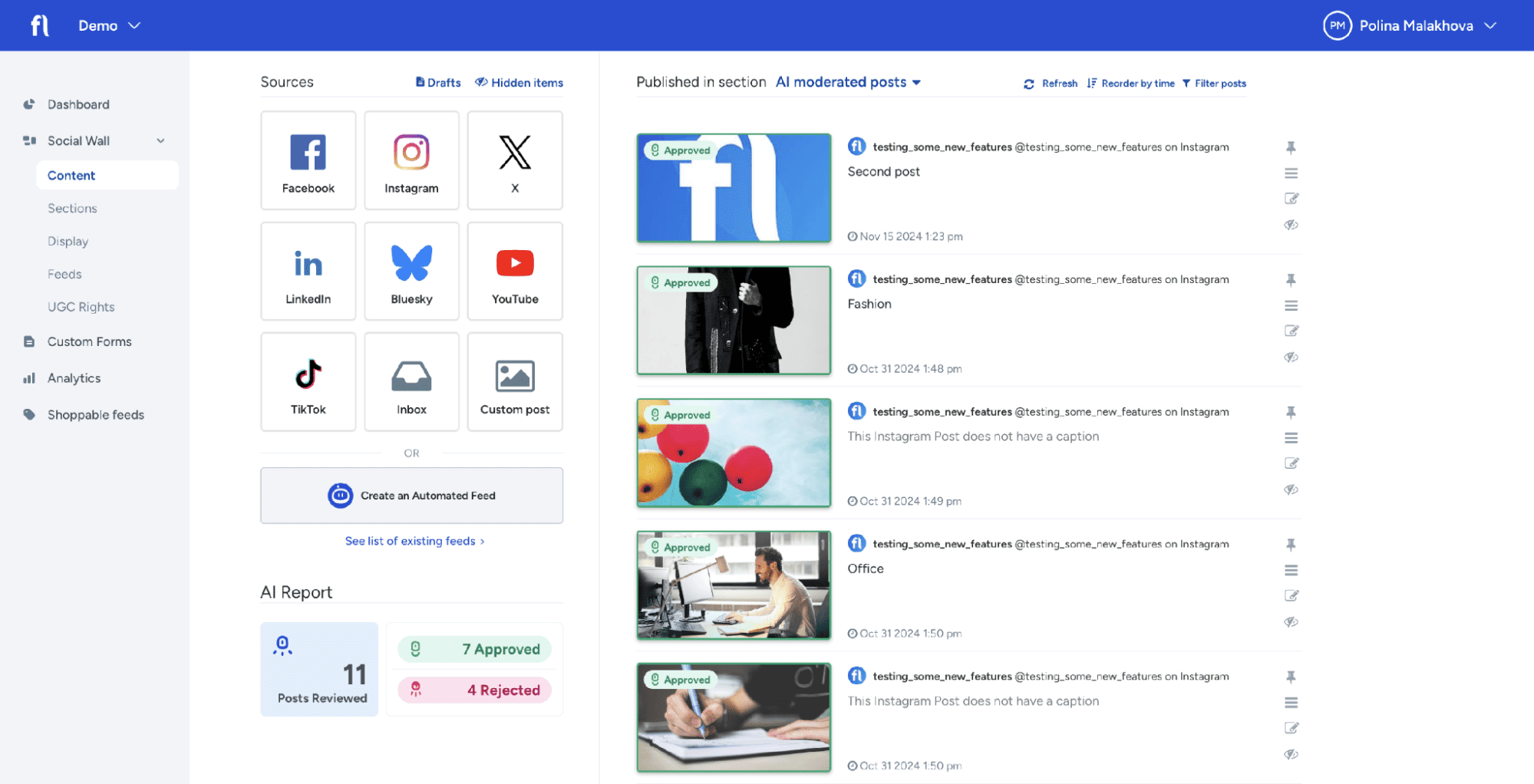
Garde AI is Flockler's built-in AI content moderation tool. When enabled, it automatically reviews incoming posts and filters out content that does not meet brand-safety standards. Approved posts are published automatically, while rejected posts are saved under Hidden Items for manual review.
Here is how Garde AI works in practice:
- Step 1: Create an automated feed in Flockler and select your content source (e.g., an Instagram hashtag, a TikTok account, a YouTube channel).
- Step 2: Toggle on "Moderate with Garde AI" in your Flockler dashboard.
- Step 3: Garde AI reviews each incoming post, screening text and images for offensive language, explicit imagery, references to violence, alcohol, drugs, spam, and other off-brand content.
- Step 4: Approved posts are published to your section and layouts with a blue checkmark badge. Rejected posts are saved with a minus badge under Hidden Items, where you can manually review and override the decision.
Garde AI currently supports images and text. If your feed includes videos, only the text portion is reviewed by AI moderation. The visual content of videos requires manual review.
Garde AI Plan Availability and Limits
Garde AI is available on the following Flockler plans:
- Business: $195/month (annual billing), 15 feeds
- Pro: $325/month (annual billing), 30 feeds
- Premium: Custom pricing, 60 feeds
- Agency: Custom pricing, configurable feeds
Each pricing plan includes a limit of 300 AI-moderated posts per calendar month. The limit resets on the first of each month. If you reach it, your moderation mode switches back to manual until the next cycle.
A limited number of Garde AI credits are also available during Flockler's 14-day free trial. All plans, including the Basic plan ($110/month annual), include automatic publishing and manual moderation by default.
5 Use Cases for Social Media Content Moderation With Flockler
Here are five use cases for social media content moderation where Flockler's moderation tools make a real difference:
Hashtag Campaigns
When you run a branded hashtag campaign, Flockler pulls in every public post using that hashtag. This is great for volume, but it also means spam, irrelevant posts, and potentially harmful content can enter your feed. Garde AI screens incoming posts before they reach your social wall, so only relevant, brand-safe content goes live.
E-Commerce Product Pages
Displaying customer photos and reviews on product pages increases buyer confidence. Research shows that products with reviews are more likely to be purchased than those without. Flockler lets you aggregate and moderate this content before it appears alongside your products.
Live Events and Conferences
Event social walls display real-time posts from attendees and speakers. Content moves fast at events, making manual moderation impractical. Garde AI filters out inappropriate posts in real time, ensuring your event screens stay clean and professional.
University and Education Websites
Universities like Harvard use Flockler to showcase student life through social feeds on their websites and campus screens. Content moderation is especially important in educational settings, where the audience includes prospective students, parents, and alumni.
Agency and Multi-Brand Management
Agencies managing social feeds for multiple clients need moderation workflows that scale. Flockler's Agency plan supports volume-based pricing and a unified dashboard. Garde AI reduces the manual effort required to moderate content across dozens of client accounts.
How to Build a Content Moderation Workflow
Here is a practical workflow that works for most brands using Flockler:
Define Your Brand-Safety Rules
Start by listing what types of content are acceptable and what should be blocked. Create three lists:
- Allowlist: Trusted creators, partners, and brand channels whose content is always approved.
- Denylist: Words, phrases, and emoji sequences that should be blocked automatically.
- Watchlist: Terms that need human review because context matters (e.g., product names that overlap with common words).
Choose the Right Moderation Mode per Feed
Not every feed needs the same level of moderation. Feeds pulling from your own brand accounts can use automatic publishing. Hashtag feeds and public mentions should be moderated using Garde AI or manual moderation. Match the moderation mode to the risk level of each content source.
Review Rejected Content Regularly
Garde AI saves all rejected posts under Hidden Items. Check this section weekly to spot false positives and adjust your moderation criteria. This gives you insights into what types of off-brand content your hashtags attract, which can inform your UGC strategy.
Combine AI and Manual Review for High-Stakes Feeds
For sensitive campaigns, product launches, or regulated industries, use Garde AI as the first filter, then follow up with a manual review for approved posts. This two-layer approach catches the most harmful content while giving your team final approval authority.
Set Up Moderation Before Your Next Campaign Goes Live
Most brands wait until something goes wrong before thinking about moderation. You can get ahead of that with four quick steps:
- Audit your current feeds. Check every social feed on your website right now. If anything off-brand is showing, your moderation needs to be tightened.
- Write your allowlist, denylist, and watchlist. Even 15 minutes of listing trusted accounts and blocked keywords gives your setup a strong foundation.
- Pick the right mode for each feed. Brand accounts can publish automatically. Hashtag feeds should run through Garde AI or be reviewed manually.
- Test with real content. Flockler's 14-day free trial includes Garde AI credits. Run it on one active feed to see what gets approved and what gets flagged.
FAQs
What Is Social Media Content Moderation?
Social media content moderation is the process of reviewing and filtering user-generated content before it appears on your website, app, or digital display. It includes checking text, images, and videos for offensive material, spam, misinformation, and off-brand content. Moderation can be done manually, through automated rules, or with AI tools.
How Does Garde AI Moderate Content in Flockler?
Garde AI reviews incoming posts by analyzing both text and images for offensive language, explicit imagery, spam, and other content that does not align with brand-safety standards. Approved posts are published automatically. Rejected posts are saved for manual review. You can override any decision Garde AI makes.
Which Flockler Plans Include Garde AI?
Garde AI is available on Business, Pro, Premium, and Agency plans. Each plan includes 300 AI-moderated posts per month. If you hit the limit, your account switches to manual moderation until the next calendar month. A limited number of credits are available during the 14-day free trial.
Can Flockler Moderate Video Content?
Garde AI currently supports text and image moderation. For feeds that include video content, only the text caption is reviewed by AI. The visual content of videos requires manual review through Flockler's inbox moderation mode.
What Happens When Garde AI Rejects a Post?
Rejected posts are saved under Hidden Items in the Content tab of your Flockler dashboard. Each rejected post is marked with a blue badge and a minus sign. You can review these posts at any time and manually approve them if the rejection was a false positive.
Maria Prakkat is a SaaS content marketing and SEO strategist with experience across SEO, GEO, and social media aggregation. She writes in-depth, research-backed content that helps businesses understand and apply solutions like social media aggregators, UGC platforms, and content distribution tools to improve visibility and engagement. Her work focuses on clarity, relevance, and long-term impact.
Infraestructura social que se amplía con usted.
Empieza tu prueba gratuita o deja que te mostremos la plataforma en acción.



