
March 25, 2019
How to Display Facebook Feed on Your Website In 2026
X minute de lecture

Une infrastructure sociale qui évolue avec vous.
Commencez votre essai gratuit ou laissez-nous vous montrer la plateforme en action.
If you want to display Facebook feed on a website, the goal is rarely just "show some posts." Marketing teams use it for social proof on product pages. Event teams use it to keep landing pages active. Agencies use it to ship branded social walls for clients in a day. Enterprises use it to push feeds across hundreds of regional sites at once.
With Facebook still reaching 3.07 billion monthly active users and 2.11 billion daily active users, that content is too valuable to leave sitting just on facebook.com. The right setup pulls it into your owned channels automatically and keeps it on-brand.
This article walks through what works in 2026, the limits of native widgets, and how to use Flockler's Facebook feed widget and enterprise API to display Facebook content where your audience is.
Why Display a Facebook Feed on Your Website?
A Facebook feed on your website does three things a static page cannot: it stays current, it shows real activity, and it builds trust without extra content production. There are more advantages of having a Facebook feed:
Turn Page Content Into Always-On Social Proof
Visitors trust other people more than brand messaging. Nearly 80% of consumers say user-generated content highly impacts their purchasing decisions, making it 8.7 times more impactful than influencer content. A Facebook feed lets you show that proof exactly where buying decisions are made, including on product, landing, and pricing pages.
If you manage the Page, you can also pull in Facebook reviews and recommendations and display them as a social proof tool on key conversion pages.
Fight Declining Organic Reach
Organic reach on Facebook has been declining for years. The content your team works hard to produce often gets buried in the News Feed within hours. Embedding it on your own website gives that content a second life on a channel you control. It also feeds website visitors back to your Page, where engagement signals can extend reach again.
Keep Pages Active Without Extra Work
A homepage with a live Facebook feed feels different from a static block of copy. New posts appear automatically, so the page stays fresh without your team having to touch the CMS. For event sites and campaign pages, this matters even more because activity is the message.
Native Facebook Plugin vs Third-Party Tools
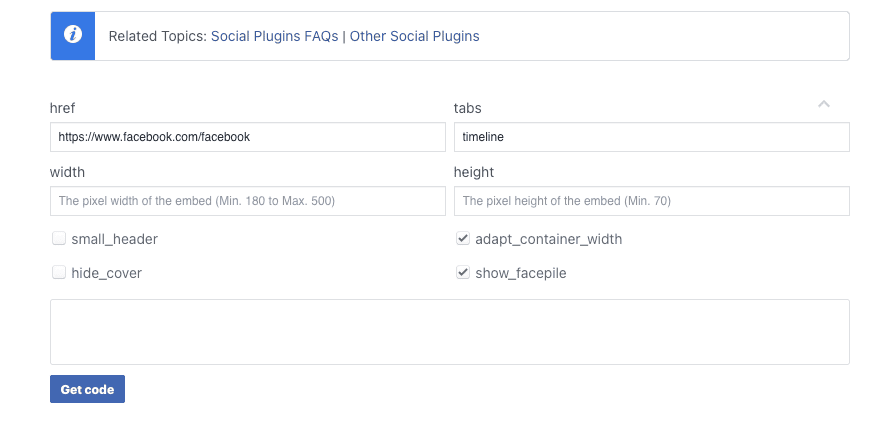
Meta's old Page Plugin is still available, but it has real limits for serious use. Anyone considering how to display a Facebook feed on a website should understand the gap before picking a path.
What the Native Page Plugin Gives You
The native plugin displays recent posts from a single Page in a basic iframe. It is free, and it works for a simple "follow us on Facebook" block in a website footer. That is roughly where its usefulness ends.
Where It Falls Short
The native plugin has no design flexibility beyond a few size options. You cannot moderate which posts appear. You cannot combine Facebook posts with content from Instagram, X, YouTube, or TikTok. You cannot filter by keyword or hashtag. You cannot pull in Page reviews. And you cannot deploy the same feed across hundreds of sub-brand sites from one dashboard.
For a small business with one page and one Facebook account, this is fine. For an enterprise, an agency, or any organisation treating social content as a real channel, it falls apart quickly.
What a Social Media Aggregator Adds
A social media aggregator like Flockler turns a Facebook Page into a fully customizable feed you can embed anywhere. You get moderation, design control, multi-source feeds, filtering, analytics, and an API for custom or large-scale deployments. The same subscription powers feeds on websites, intranets, digital signage, and event screens.
How to Display a Facebook Feed on Your Website With Flockler
Here is the workflow for getting Facebook feed live on any website using Flockler. Setup typically takes 10 to 15 minutes for the first feed.
Step 1: Connect Your Facebook Page
Sign in to Flockler and open the Sources panel. Select Facebook and connect your account. Flockler uses Meta's official API, which requires authentication through a personal Facebook account that is an admin of at least one Page. Flockler never accesses or stores personal posts, messages, or profile data.
Step 2: Choose the Page and Content Type
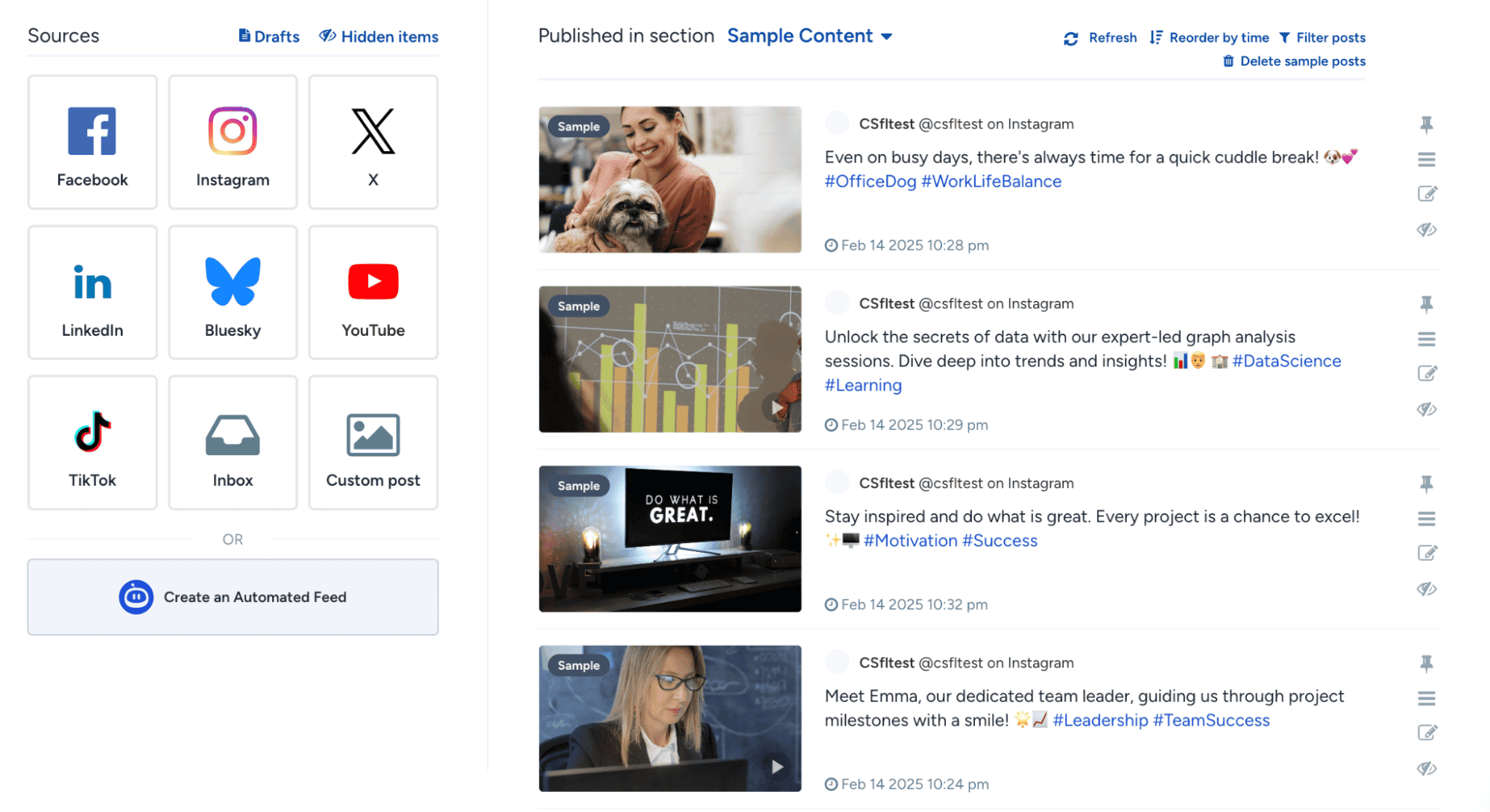
Select the public Page you want to pull from. You can choose to pull Page posts, and for Pages you manage, you can also pull mentions, reviews, and recommendations as separate content streams. Add a keyword or hashtag filter to show only specific posts.
Step 3: Set Moderation Rules
Pick the moderation mode that fits the feed. Auto-publish sends new posts live as soon as they arrive. Editor mode queues them for review. Garde AI, available on Business plans and above, filters out spam, profanity, hate speech, and explicit content automatically before publishing.
For brand-owned Page posts, auto-publish usually works well. For UGC or community-driven feeds, editor mode or Garde AI is safer.
Step 4: Pick a Layout and Customise the Design
Flockler includes four standard layouts you can create in unlimited quantities on any plan:
- Social Wall for homepages, campaign pages, and event hubs
- Grid for product pages and gallery sections
- Carousel for limited vertical space, like header sections
- Slideshow for digital signage, lobby screens, and full-screen displays
Customize colors, fonts, spacing, and post styling in the visual editor to match your brand. No CSS is required, though custom CSS is available on every plan.
Step 5: Generate the Embed Code and Add It to Your Site
Copy the embed code and paste it into any website builder, including WordPress, Shopify, Webflow, Squarespace, HubSpot, and custom HTML sites. The feed is responsive and updates automatically as new Facebook posts come in.
That is the full workflow for a single feed. For organisations managing dozens or hundreds of feeds, the API path covers that, which we will get into next.
How to Display a Facebook Wall on Your Website (For Events and Campaigns)
When marketers say "display Facebook wall on website," they usually mean a social wall layout, a multi-column grid of posts that updates live. This format works best for events, campaigns, and high-traffic pages.
What Makes a Facebook Wall Different From a Standard Feed
A standard feed shows posts in a single column. A wall spreads them across a grid that fills more space and feels more like a community board than a corporate update. Walls are ideal for:
- Live event pages where attendee activity should feel visible
- Conference and trade show landing pages
- Campaign hubs that combine brand and audience content
- Lobby screens and digital signage at venues
Setting Up a Facebook Wall in Flockler
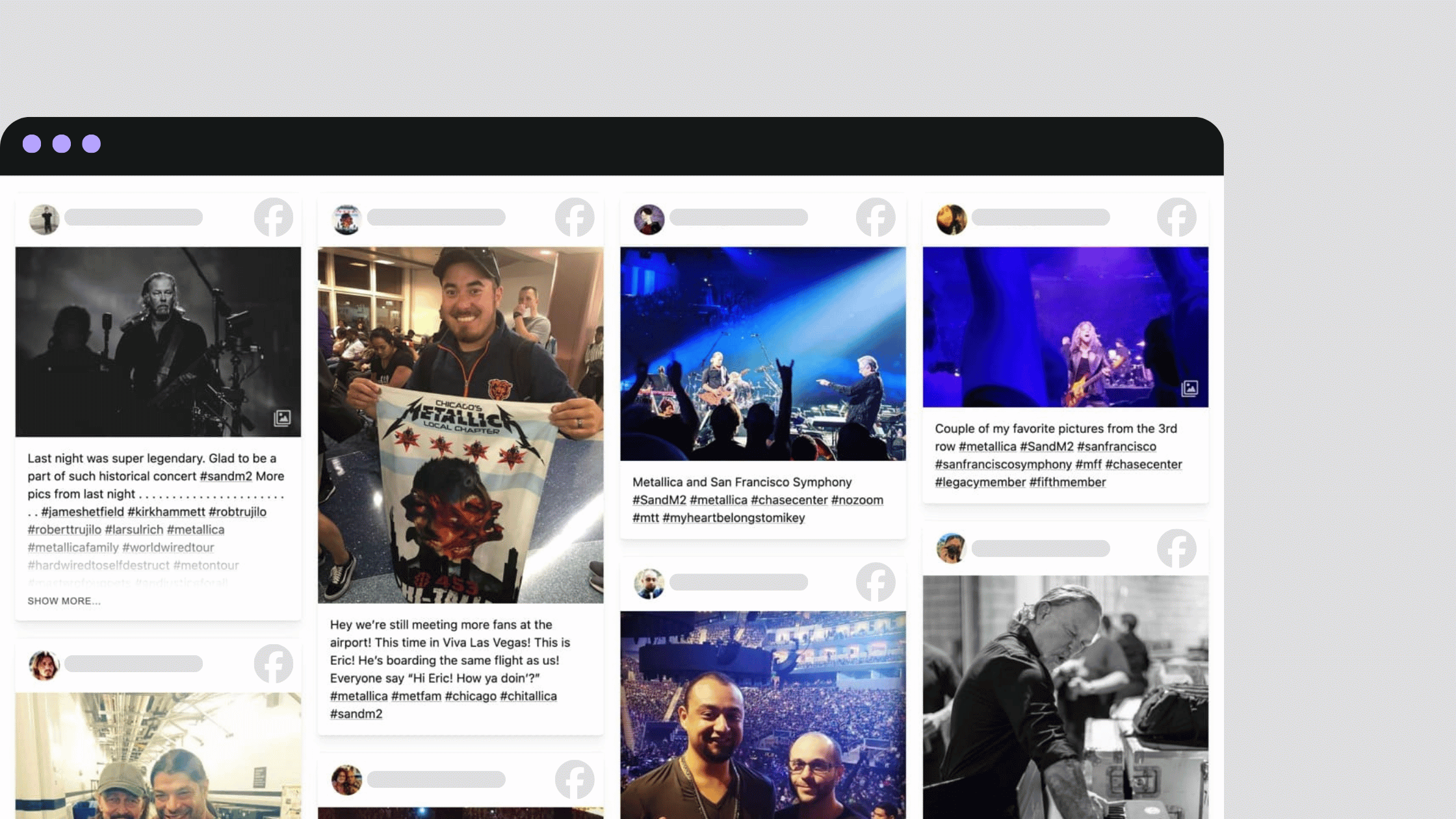
Inside Flockler, create a Wall layout, point it at your Facebook source, and customise the column count, spacing, and colors. You can mix Facebook content with Instagram, X, TikTok, YouTube, LinkedIn, Bluesky, and more on the same wall. Combining channels is what makes a wall feel like real community activity rather than a single-platform feed.
You can also see how other organisations have approached this in our gallery of social media wall examples.
How to Display Facebook Events on Your Website
For event marketers, a social media wall usually covers two scenarios: showing posts from an event-specific Page or showing live attendee activity on an event landing page.
1. Display Posts From a Facebook Event Page
Flockler can pull Page posts from any public Page, including Pages set up for specific events or annual conferences. Add the Page as a source, set a keyword filter for the event name or hashtag if needed, and embed the feed on your event landing page.
2. Display Live Audience Activity at Events
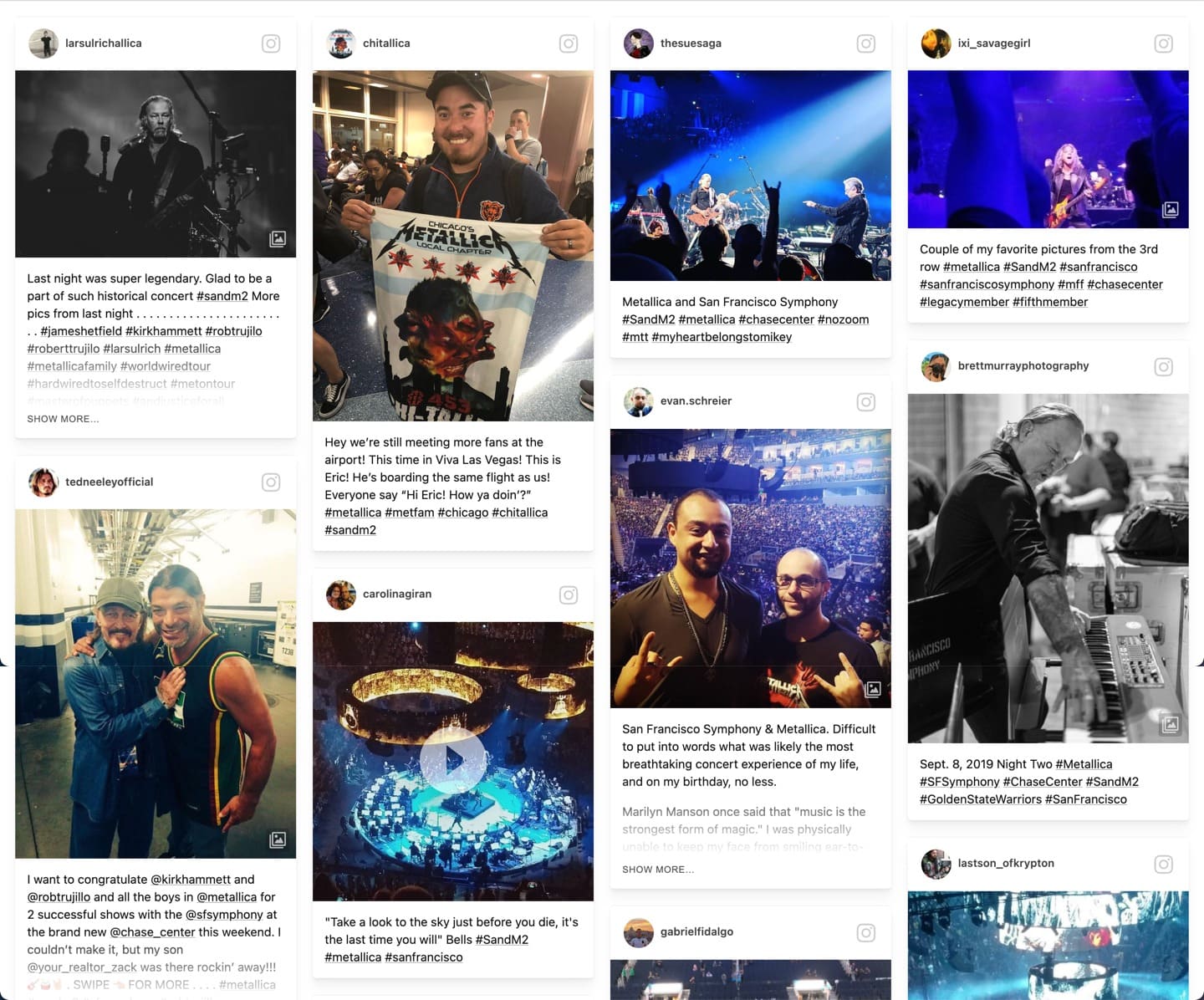
For live events, the bigger opportunity is the wall-on-a-screen at the venue. Display a live Facebook feed alongside Instagram and X content on lobby screens, stage backdrops, or sponsor activation booths. As attendees post throughout the day, the wall keeps updating, encouraging more participation and greater visibility.
Both setups work well for conferences, trade shows, sports events, music festivals, university open days, and customer summits.
For Enterprise Teams: Deploy Facebook Feeds at Scale
Once you are managing Facebook content across multiple brands, regions, or product lines, embed codes alone slow you down. This is where Flockler's Content API takes over.
The Bulk Feed API
The Bulk Feed API lets you create Facebook feeds programmatically. You can spin up 100+ feeds in a single API call, which matters when you are launching feeds across thousands of product pages, store locations, or regional microsites. Pricing scales with active feeds, not API calls or content volume, so costs stay predictable.
Use Cases for Enterprise API Access
- Multi-brand organisations push branded Facebook feeds across hundreds of regional sites from one integration
- Retail and ecommerce display Facebook reviews and Page content on product pages at scale
- Media and publishing pull Facebook content into editorial sites and content hubs
- Manufacturing and B2B display Facebook updates across corporate sites, partner portals, and dealer microsites
What Enterprise Plans Include
API access is available on Premium and Agency plans. Enterprise teams also get a dedicated account manager, a 98% uptime SLA, security questionnaire and compliance documentation support, GDPR-compliant data handling, and priority response times. Full developer documentation is at developers.flockler.com.
For Agencies: Manage Facebook Feeds for Multiple Clients
Agencies have a different problem: many clients, many Facebook Pages, tight margins. Flockler's Agency plan is built around this exact workflow.
One Dashboard for Every Client
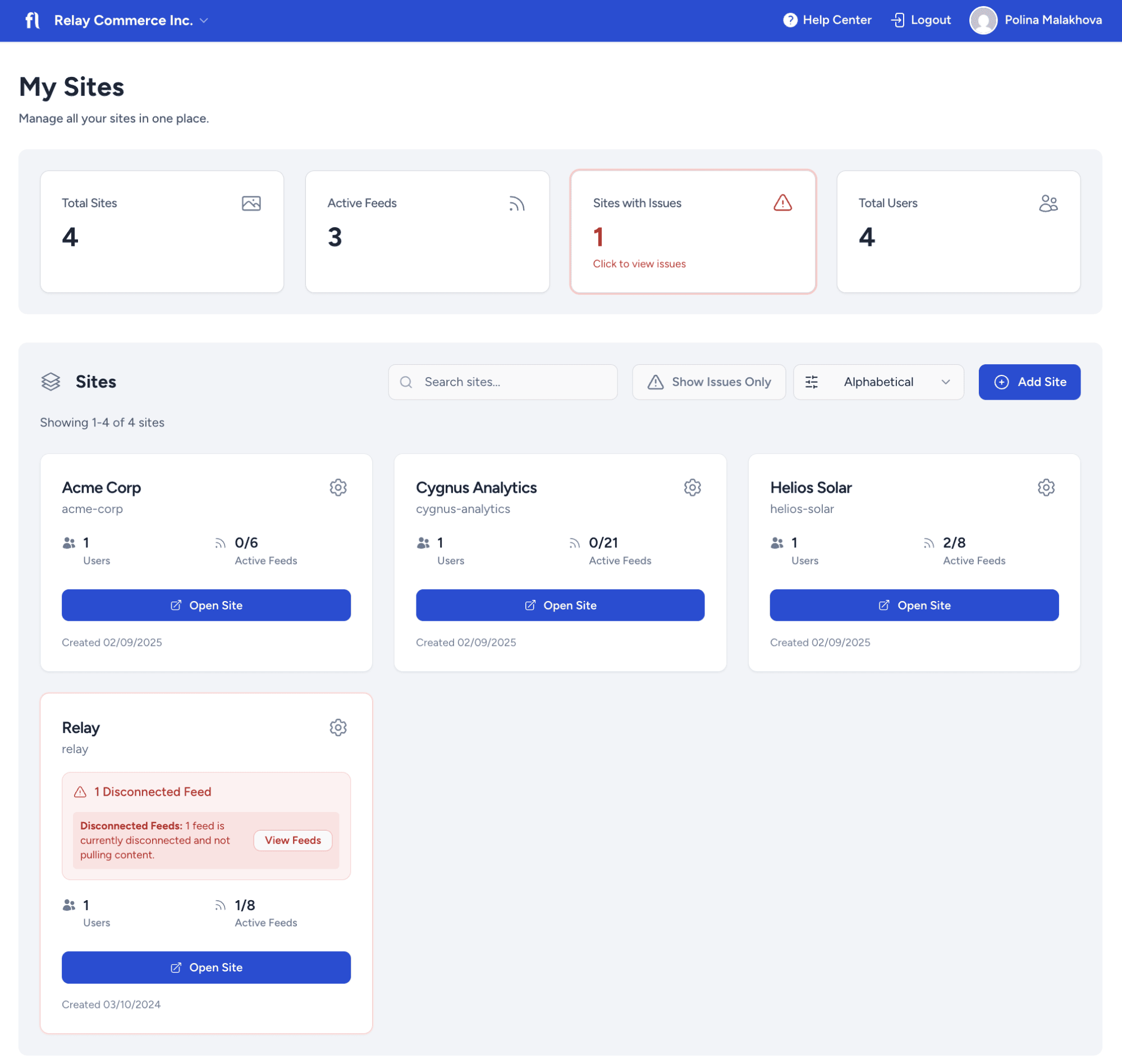
The My Sites dashboard gives one centralised view of every client account. Switch between client workspaces with one click, monitor feed health, and onboard new clients in minutes without juggling separate logins.
Branded Feeds Without Per-Client Charges
The Agency plan supports unlimited client accounts. Build a branded Facebook feed for each client, match their colors and fonts, and embed it on their site. Pricing is per active feed, providing agencies with a markup-friendly model that scales with the client portfolio.
AI Moderation at Scale
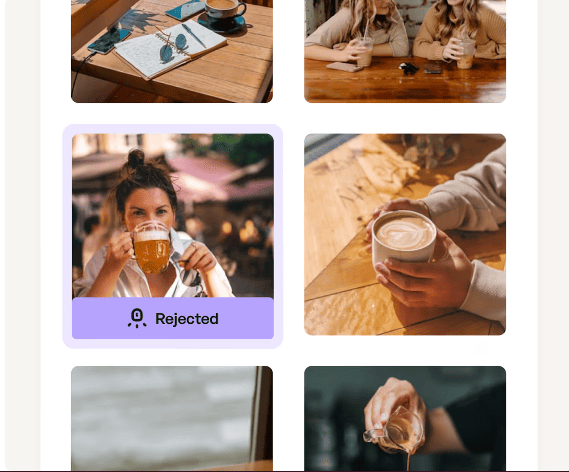
Manually moderating Facebook feeds across 20 clients is unsustainable. Garde AI automatically filters spam, profanity, and inappropriate content before posts go live, so client feeds stay brand-safe without daily oversight.
Role-Based Access for Clients and Internal Teams
Give your content managers full edit access. Give junior team members view-only access. Give clients access to their own feeds without seeing other accounts. This keeps client work clean and avoids cross-account mistakes.
What to Look for When Choosing a Facebook Feed Tool
If you are evaluating tools to display a Facebook feed on your website, here are the criteria that actually matter at scale:
- Multi-platform support: Facebook rarely lives on a wall alone. Check for Instagram, X, TikTok, YouTube, LinkedIn, Pinterest, and RSS.
- Moderation depth: Manual queues, keyword blocks, username blocks, and AI moderation should all be available.
- Layout flexibility: Walls, grids, carousels, and slideshows cover most needs. Custom CSS and API access cover the rest.
- Accessibility compliance: Feeds should meet WCAG 2.1 AA and EAA standards. AI-generated alt text matters for image-heavy feeds.
- Pricing model: Per-feed pricing scales better than per-widget or per-page-view pricing.
- API access: Bulk feed creation and Content API access matter once you pass a few dozen feeds.
- Support: Live chat, email, and a dedicated account manager for enterprise and agency tiers.
Flockler Pricing for Social Media Feeds
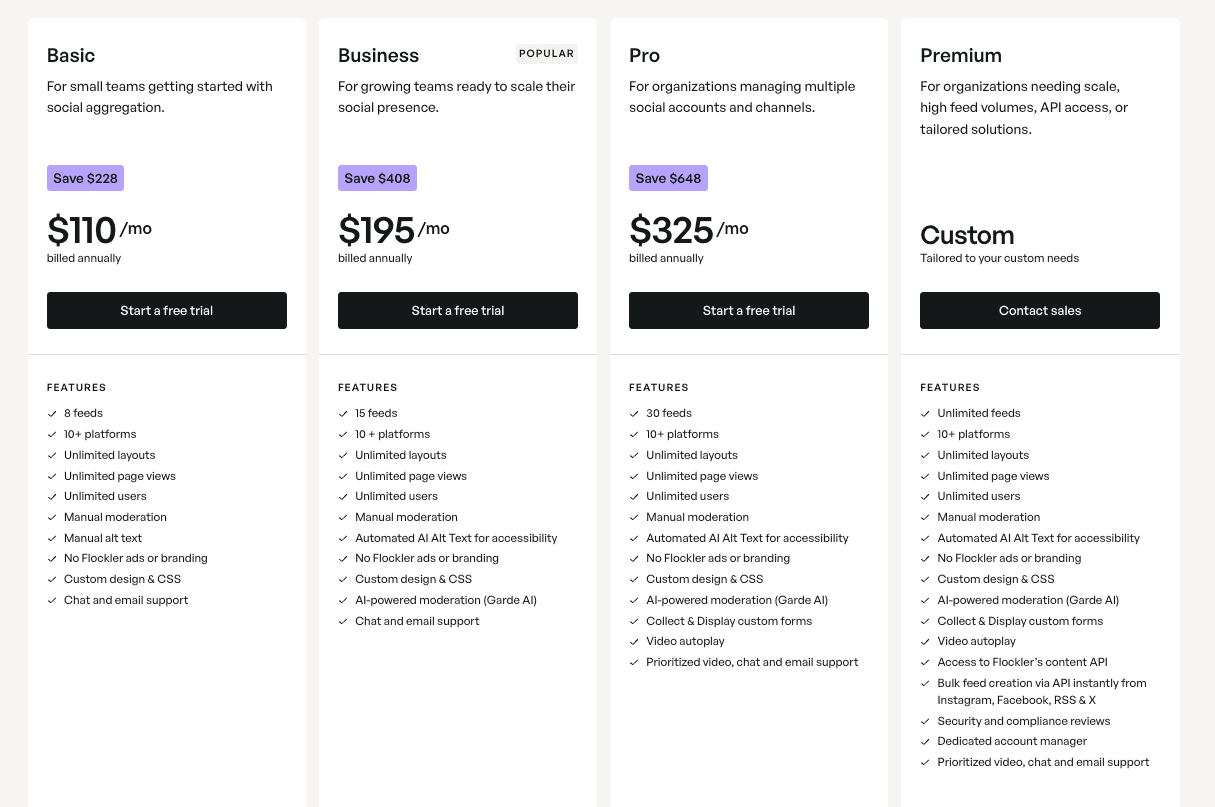
Flockler subscriptions all include unlimited layouts, page views, and users, plus 10+ platform integrations. The differences are in feed count, AI moderation, and API access.
- Basic at $110/mo billed annually: 8 feeds, manual moderation, custom CSS
- Business at $195/mo billed annually: 15 feeds, Garde AI moderation, automated alt text
- Pro at $325/mo billed annually: 30 feeds, Collect & Display custom forms, video autoplay
- Premium custom pricing: unlimited feeds, Content API access, Bulk Feed API, dedicated account manager
- Agency: custom pricing for unlimited client accounts, markup-friendly model, one-click client onboarding
All plans include a 14-day free trial with no credit card required.
Common Mistakes to Avoid When Displaying Facebook Feeds
A few patterns often arise when teams launch Facebook feeds and don't get the results they expected.
Embedding One Generic Feed Everywhere
A single feed dropped on every page dilutes its value. Create separate feeds for different placements: brand posts for the homepage, reviews for product pages, hashtag content for campaign hubs, and live activity for event pages.
Skipping Moderation on Open Sources
If you are pulling from public Pages or keyword feeds, posts you didn't expect will eventually show up. Always set moderation before going live, even if it's just keyword and username blocks plus Garde AI.
Ignoring Mobile Layout
Most website traffic is mobile. A feed that looks great on desktop but breaks on a phone wastes the placement. Flockler feeds are mobile-responsive by default, but always test layouts on real devices before launch.
Forgetting Accessibility
If your feed is image-heavy and has no alt text, you lose users on assistive technology and you risk compliance issues, especially in the EU. AI-generated alt text on Business plans and above handles this automatically.
Display Facebook Content Where It Matters Most
A Facebook feed on your website is one of the easiest ways to turn social activity into measurable impact on pages that actually convert. Whether you are running a single-brand site, scaling across hundreds of regional pages, or managing a portfolio of agency clients, the tooling should match the work.
Flockler covers both ends, from a no-code Facebook widget for a single site to a Content API built for enterprise deployments and agency portfolios. The fastest way to see if it fits is to set up your first feed and embed it on a live page.
Start your 14-day free trial, or talk to the team about enterprise and agency requirements.
FAQs
Can a Facebook Feed Be Displayed on a Website for Free?
Meta's free Page Plugin lets you embed a basic feed from one Page, but it offers no moderation, design flexibility, or multi-platform support. Flockler offers a 14-day free trial of its paid plans, with no credit card required, which is the easiest way to test a full-featured setup before committing.
Does Displaying a Facebook Feed Require a Developer?
No. Flockler generates a copy-paste embed code that works with any website builder, including WordPress, Shopify, Squarespace, Webflow, and HubSpot. Developers are only needed for fully custom layouts, which is what the Content API on Premium and Agency plans is built for.
Can Facebook Posts From an Unmanaged Page Be Displayed?
Yes. As long as the Page is public and your connected Facebook account is an admin of at least one Page of your own, you can pull posts from any public Page. Reviews and mentions are only available for Pages you manage.
Can a Facebook Hashtag Feed Be Displayed?
No. Facebook's API does not support automated hashtag tracking. You can pull content from any public Page and use keyword filters to narrow what appears in the feed.
How Do You Display a Facebook Wall on a Website for an Event?
Inside Flockler, create a Wall layout, connect the relevant Facebook Page as a source, and add Instagram, X, or TikTok sources for the same event hashtag if you want a multi-channel wall. Embed the wall on your event landing page and display the same feed on screens at the venue.
Can Agencies Display Facebook Feeds for Multiple Clients From One Account?
Yes. The Agency plan includes the My Sites dashboard, which supports unlimited client accounts with role-based permissions, one-click client switching, and markup-friendly pricing built for resale.
A true growth operator with extensive experience across crowdsourcing, affiliate programs, and social media aggregation. Brooke is the CEO if Flockler and cofounder of the marketing agency Northweather and has worked with global brands including LEGO. With international experience spanning SaaS, marketing, and product, she brings sharp expertise in strategy, execution, and driving results through global cross-functional teams.
Une infrastructure sociale qui évolue avec vous.
Commencez votre essai gratuit ou laissez-nous vous montrer la plateforme en action.



