

November 9, 2021
10 Trending Instagram Feed on Website Examples to Check Out
X minuto di lettura

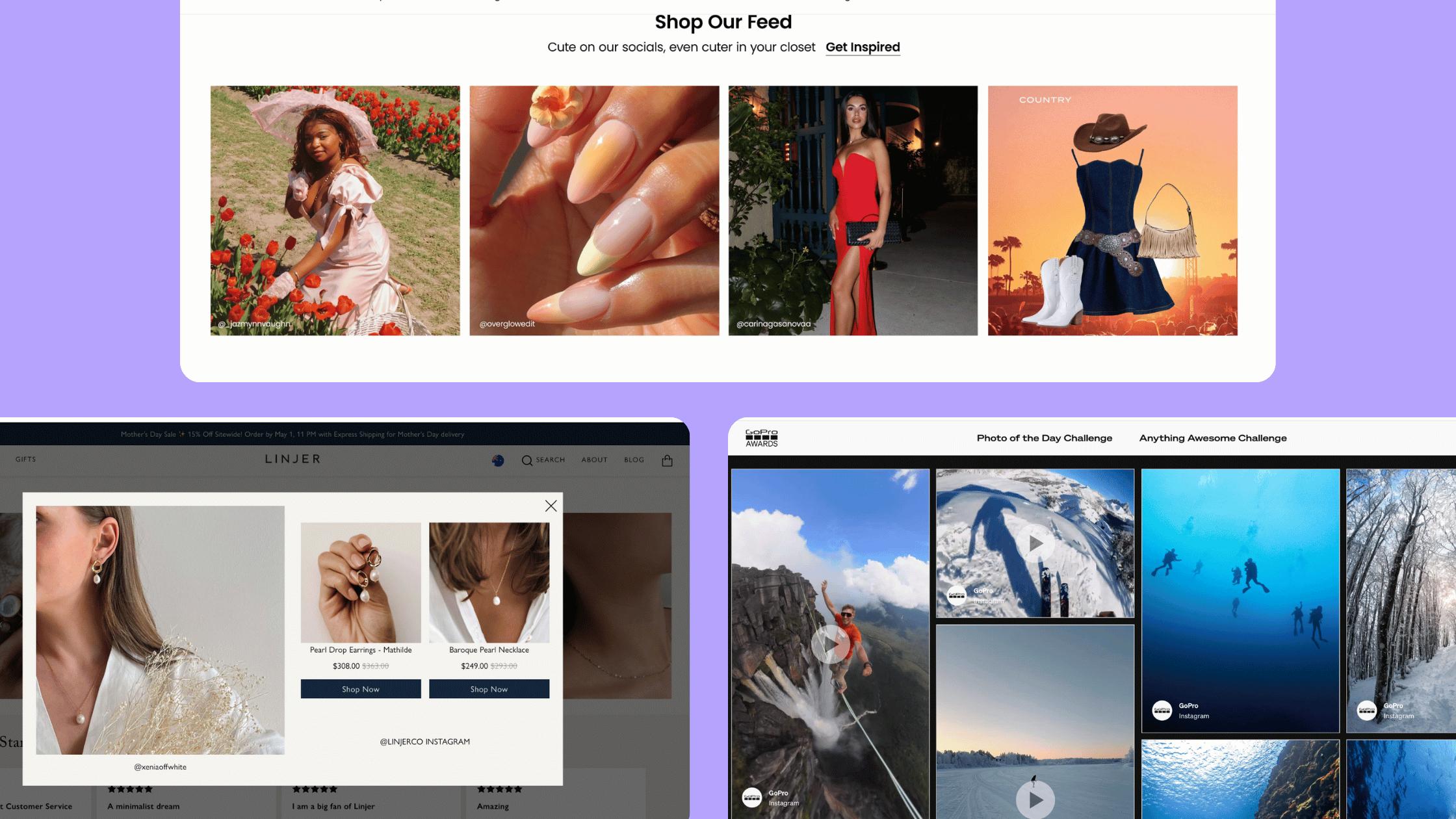
Infrastruttura sociale che si adatta a te.
Inizia la tua prova gratuita o lascia che ti mostriamo la piattaforma in azione.
You've probably already seen Instagram feeds embedded on websites. Webshops use them to add social proof to product pages. Beauty brands fill homepages with customer photos. Universities show student life to prospective applicants. The format is everywhere now, and there's a good reason for it.
In fact, social posts featuring user-generated content drove 10.38 times higher conversion rates than non-UGC posts. Visitors also spend 90% more time on websites that feature UGC. Numbers like that explain why brands keep adding Instagram feeds to their sites.
In this blog post, we’ll walk you through 10 Instagram feed-on-website examples from trending brands. You'll see what each brand does on its site, why the approach works for them, and how you can apply the same thinking to your own setup.
Why Brands Embed Instagram Feeds on Their Websites
An Instagram feed on a website is a section that pulls in posts, Reels, or Stories from Instagram and updates automatically. The content can come from your own brand account, a hashtag campaign, customer mentions, or a mix of all three.
Most blogs and small businesses use the standard Instagram embed for individual posts. Brands working at scale use social media aggregator tools like Flockler to gather Instagram content into one place, moderate it, and display auto-updating feeds on websites, digital screens, and intranets. The setup takes only a few minutes, and the feeds refresh every 5 to 15 minutes after that.
Brands use Instagram feeds on website in the following ways:
- On homepages to show fresh content and brand personality
- On product pages, add social proof from real customers
- On careers pages for employer branding
- On event pages and digital screens to show live audience content
- On press and PR pages to keep media contacts up to date
The use cases vary, but the goal is usually the same. Keep the website fresh, add credibility through real customer voices, and turn social content into something that works on the website too.
10 Instagram Feed on Website Examples (Real Use Cases)
Before jumping into examples, one thing to keep in mind is that there isn’t a single “correct” way to embed an Instagram feed on a website.
The difference shows up in where the feed is placed, what content is pulled in, and how closely it aligns with the page’s goal.
Here are 10 of the best Instagram feed on websites that you can take inspiration from.
1. Alo Yoga: Customer Photos on the Homepage
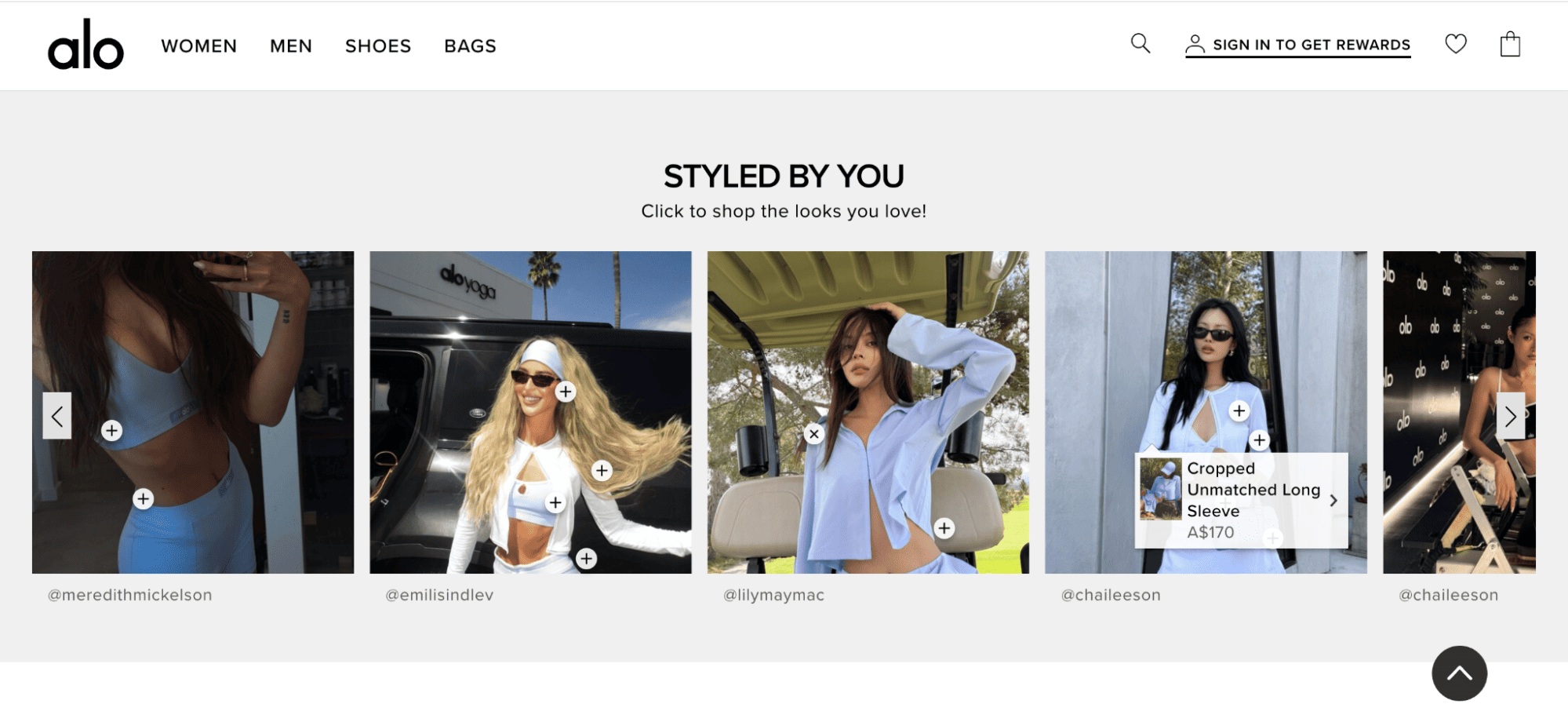
Alo Yoga uses customer-styled looks across its homepage and runs a dedicated "Styled by You" shoppable feed section where every customer photo links to the products in the image. The brand sources content via branded hashtags and Instagram tagging, then features the best customer posts in places where shoppers actually see them.
This is a great example of using Instagram content for social shopping. Visitors see real people wearing the products, and they can shop the looks with one click. For apparel brands on Shopify or any e-commerce platform, this is one of the most effective ways to use Instagram on a website.
2. Lulus: A Shoppable "Shop Our Feed" Section
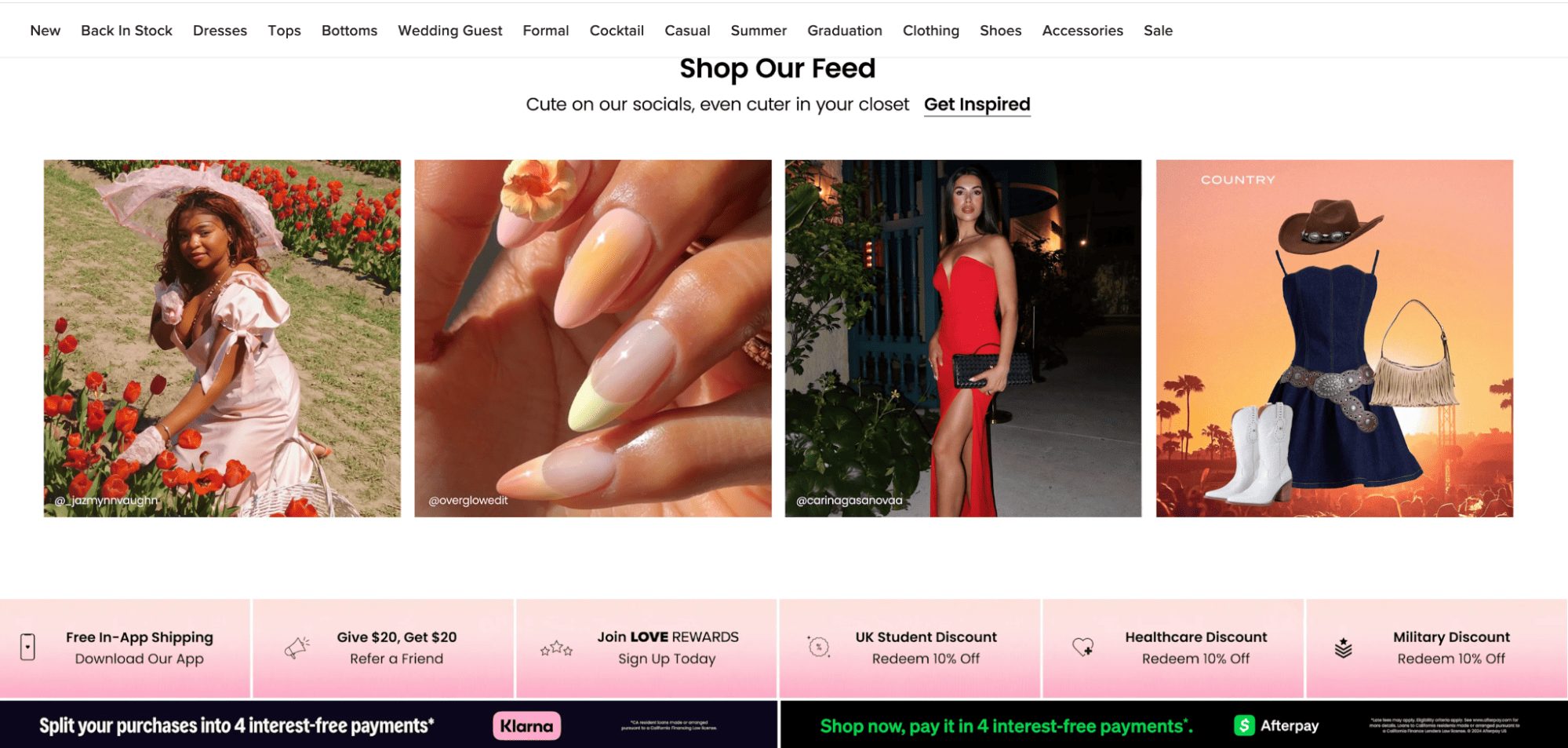
Lulus, a popular DTC fashion brand, runs a "Shop Our Feed" section on its website with the tagline "Cute on our socials, even cuter in your closet." The grid features customer-tagged posts from creators alongside curated lifestyle imagery.
The Lulus approach treats customer content as inspiration rather than advertising. The "Get Inspired" button invites visitors to browse, and the layout positions every photo as a styled outfit idea. For fashion brands, this format bridges Instagram-led discovery and on-site conversion.
3. Linjer: Shoppable UGC With Tagged Products
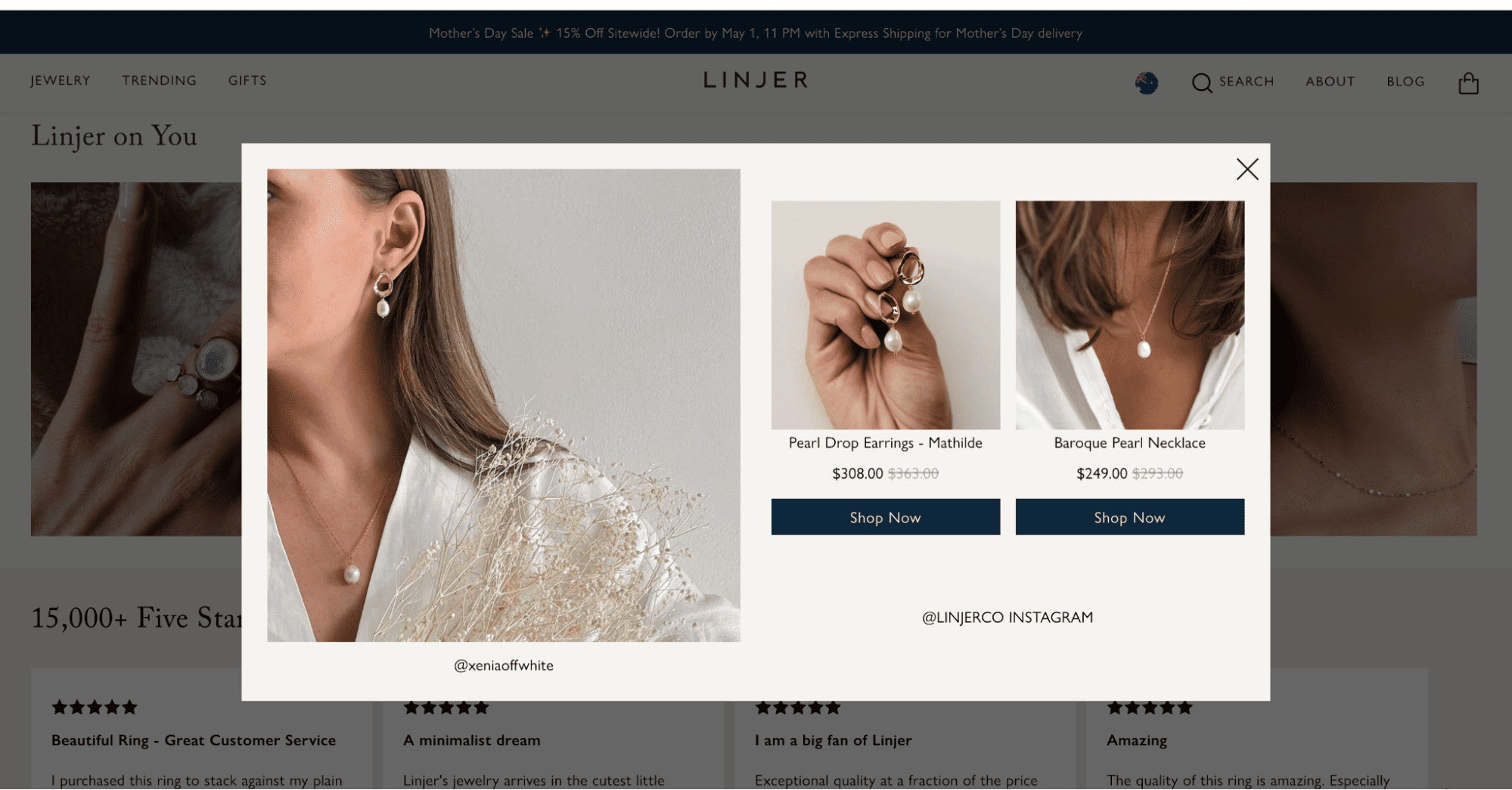
Linjer, a Scandinavian-inspired jewelry brand, embeds a "Linjer on You" Instagram gallery on its site. When a visitor clicks on a customer photo, a pop-up opens with the exact products tagged. Each product shows the price, sale price, and a "Shop Now" button.
Linjer combines customer content with product discovery in a clean, lightweight format. The pop-up keeps visitors on the gallery while making it easy to jump to a product page. For jewelry, accessories, and any high-consideration purchase, shoppable feeds like this turn inspiration into a clear next step.
4. GoPro: Curated Influencer and Customer Content
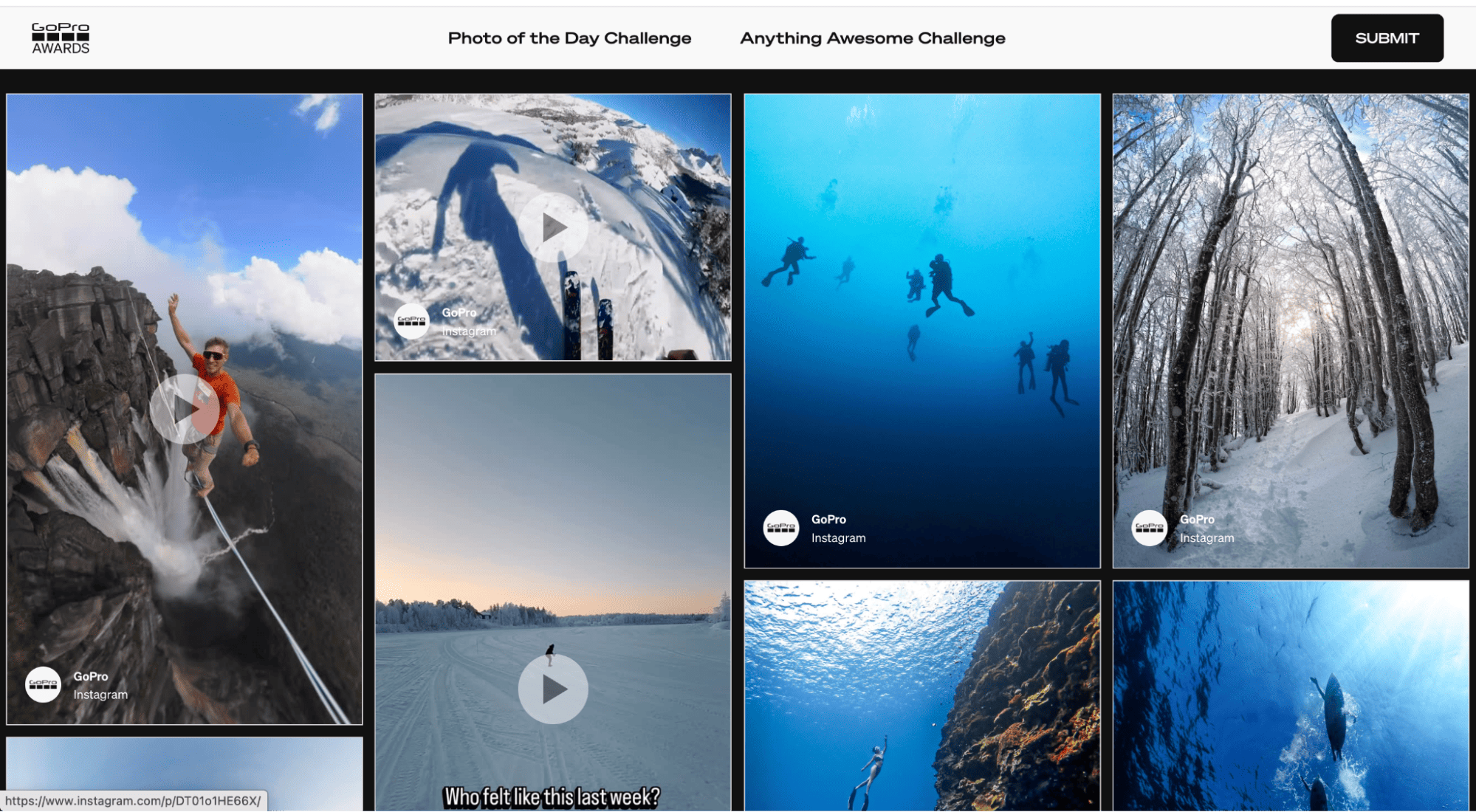
The GoPro Awards page shows a curated Instagram feed of customer and influencer content tagged with #GoProAwards. Anyone can submit their entry, and the best ones are rewarded with cash and product prizes. The feed uses a wall layout on desktop to preserve the original aspect ratios of Reels, photos, and videos, and switches to a carousel layout on mobile.
What makes the GoPro Awards setup work is the public reward. By featuring creators (and paying out cash and gear), GoPro keeps the submissions flowing year after year. For brands that want to build a content engine but don't have to staff it, this model is worth studying.
5. Victoria's Secret: "Follow Our Story" Customer Showcase
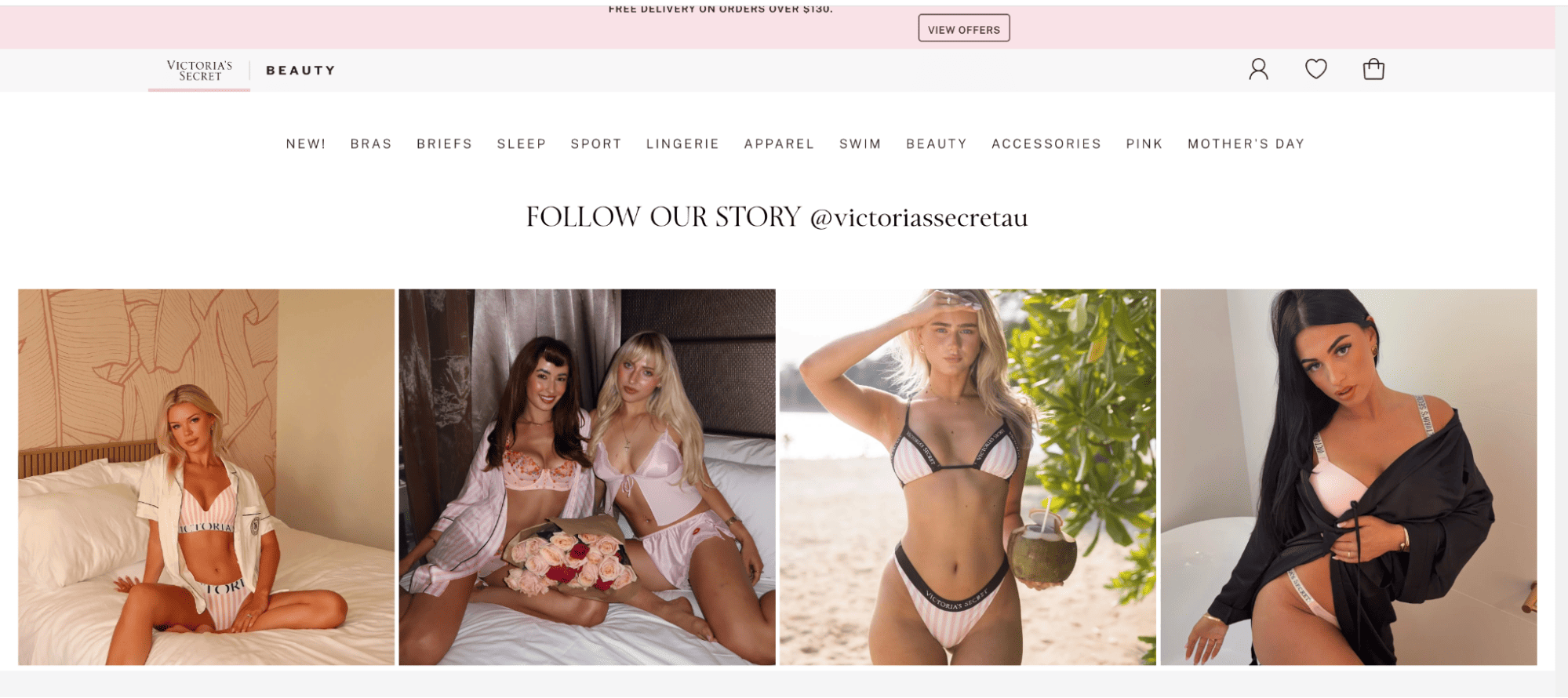
Victoria's Secret runs a "Follow Our Story @victoriassecretau" section on its website. The grid layout features customers wearing the brand's lingerie, sleepwear, and swim collections in real settings, from bedrooms to beaches.
Big global brands often default to studio-only photography, which can feel polished but distant. Victoria's Secret balances that with customer-led photos that add warmth and show the products on real people. For any brand with a strong Instagram following, a section like this adds personality at almost no cost.
6. Reina Olga: Customer Swimwear in a Horizontal Scroll
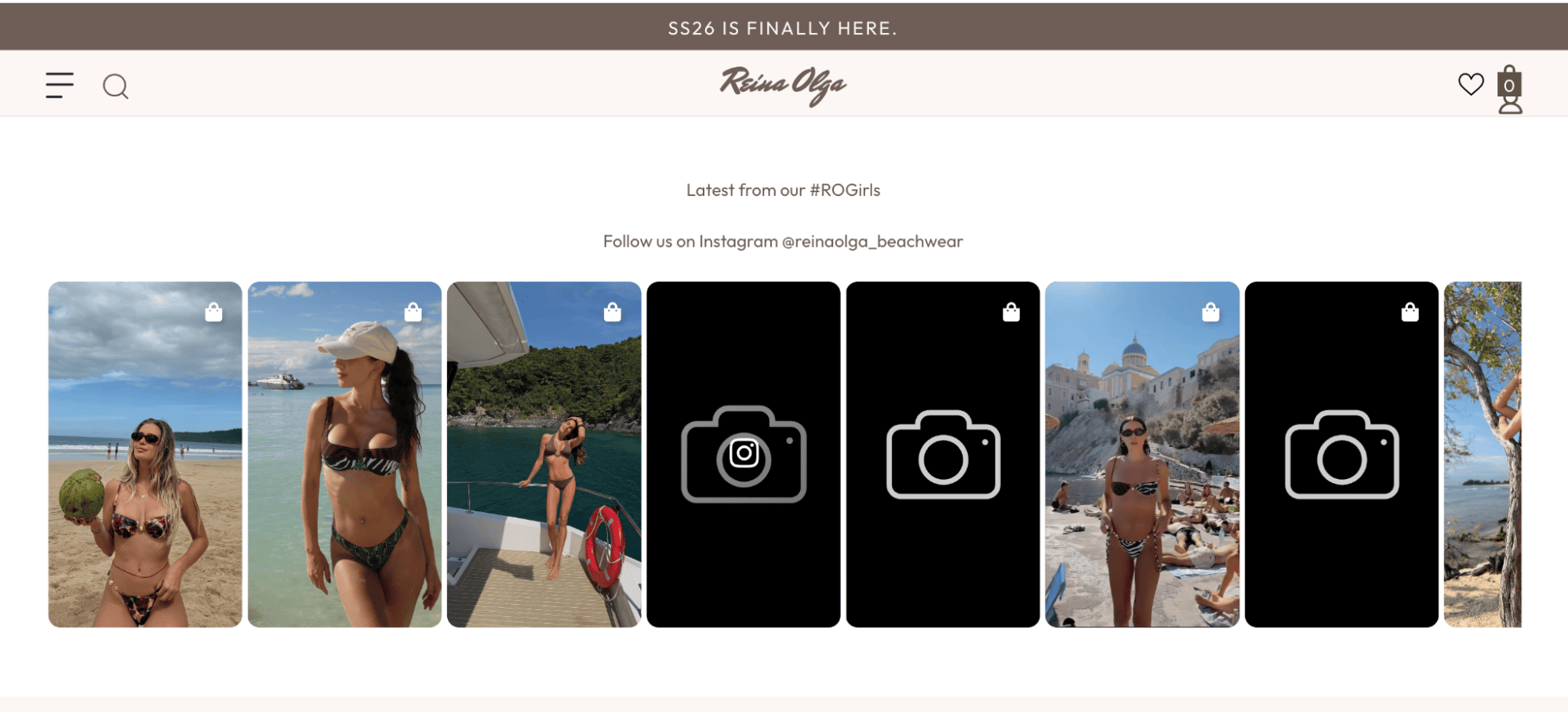
Reina Olga, an Italian swimwear brand with around 296,000 Instagram followers, runs a "Latest from Our #ROGirls" section on its website. The horizontal-scrolling feed shows customers wearing the brand's swimwear in real settings, from beaches to yachts. Some posts also have a shopping bag icon, which means visitors can shop the look directly.
Swimwear is a high-stakes purchase. Buyers want to see how the suit looks on different bodies before they buy. Reina Olga's feed solves that problem with customer content. For fashion and apparel brands, this is one of the clearest ways to use Instagram on a website to support buying decisions.
7. Peppermayo: Lifestyle Feed With "Steal Her Style" CTAs
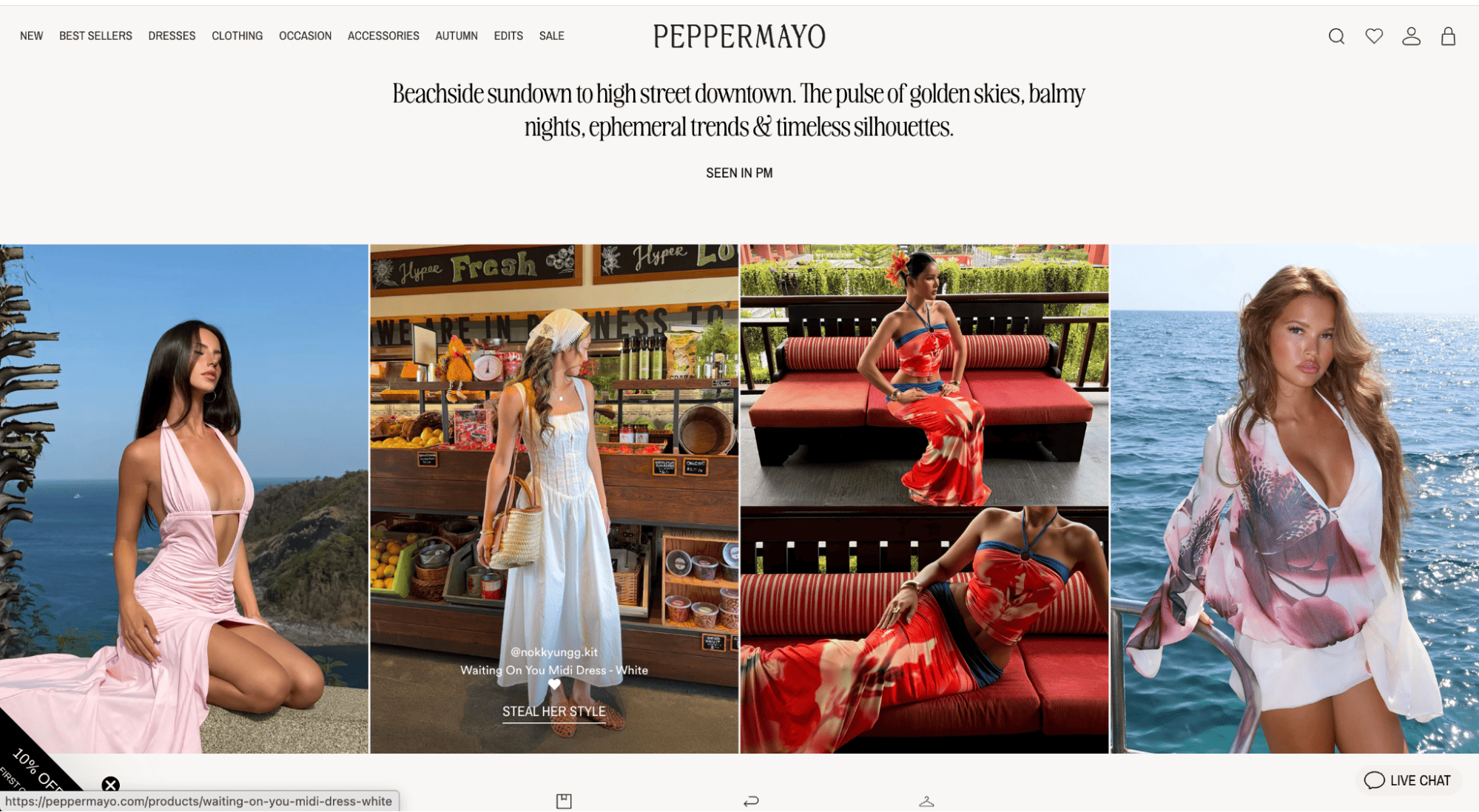
Peppermayo runs a "Seen In PM" section on its website that mixes campaign visuals with customer Instagram posts. Each image features a clear "Steal Her Style" CTA tied to the specific product shown, like the Waiting On You Midi Dress.
Peppermayo keeps the product front and center without losing the lifestyle feel. Visitors get real outfit inspiration, and the CTA gives them a direct way to act on it. For fashion brands, this format works because it answers two questions at once: how it looks in real life and where I can buy it.
8. Kylie Cosmetics: TikTok-Style Video Feed With Shop Tags
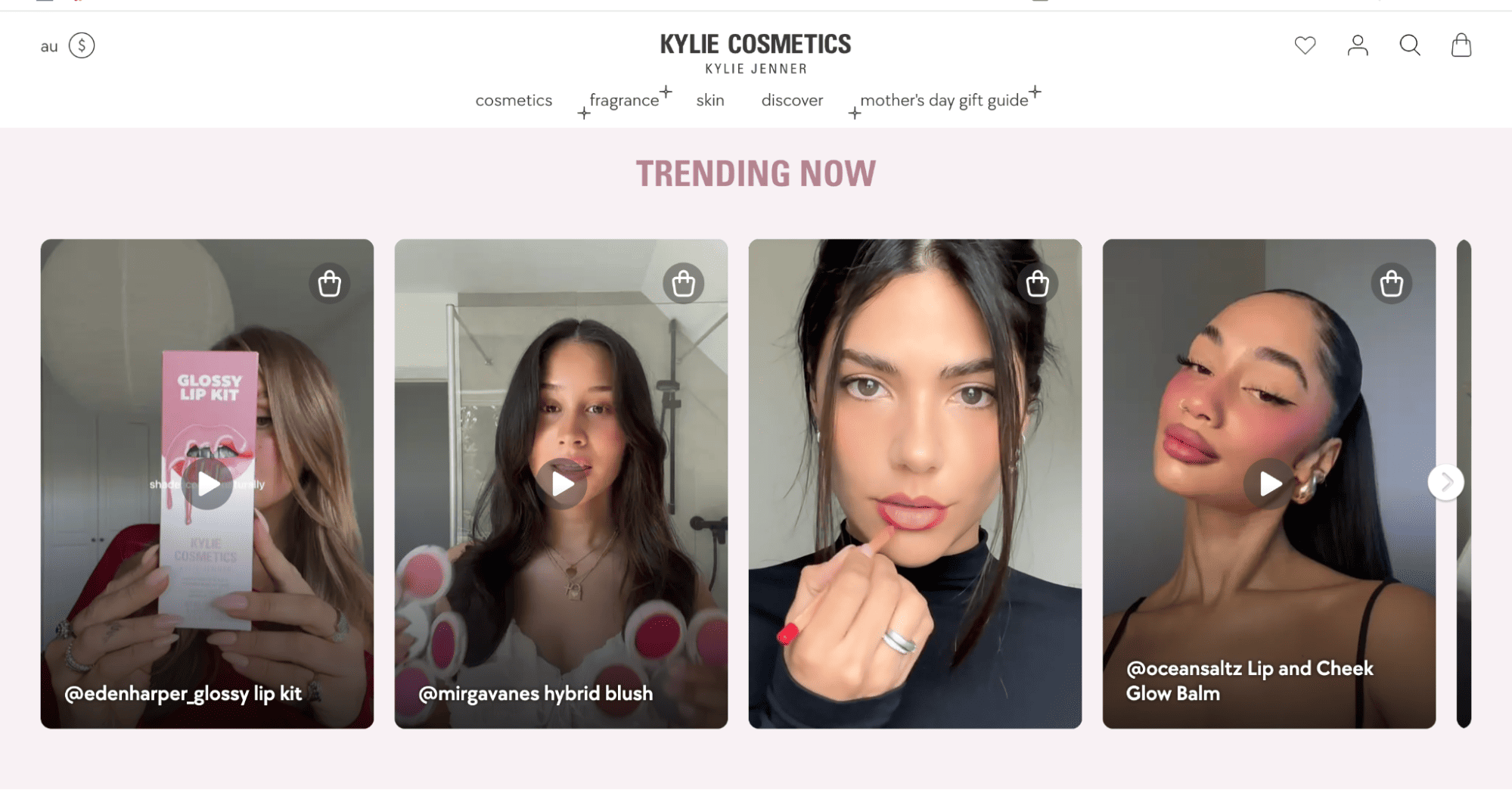
Kylie Cosmetics runs a "Trending Now" video carousel on its website featuring creators who use and review products such as the Glossy Lip Kit and Hybrid Blush. Each video has a small shopping bag icon in the top-right corner, so visitors can tap directly to the product page.
Beauty often needs to be shown in motion, not just in still photography. The Kylie Cosmetics carousel keeps the feed scannable while the shop tags make every video shoppable. For beauty brands, video-led social content is one of the highest-converting ways to use Instagram on a website.
9. Oh Polly: Hashtag Campaigns That Drive UGC at Scale
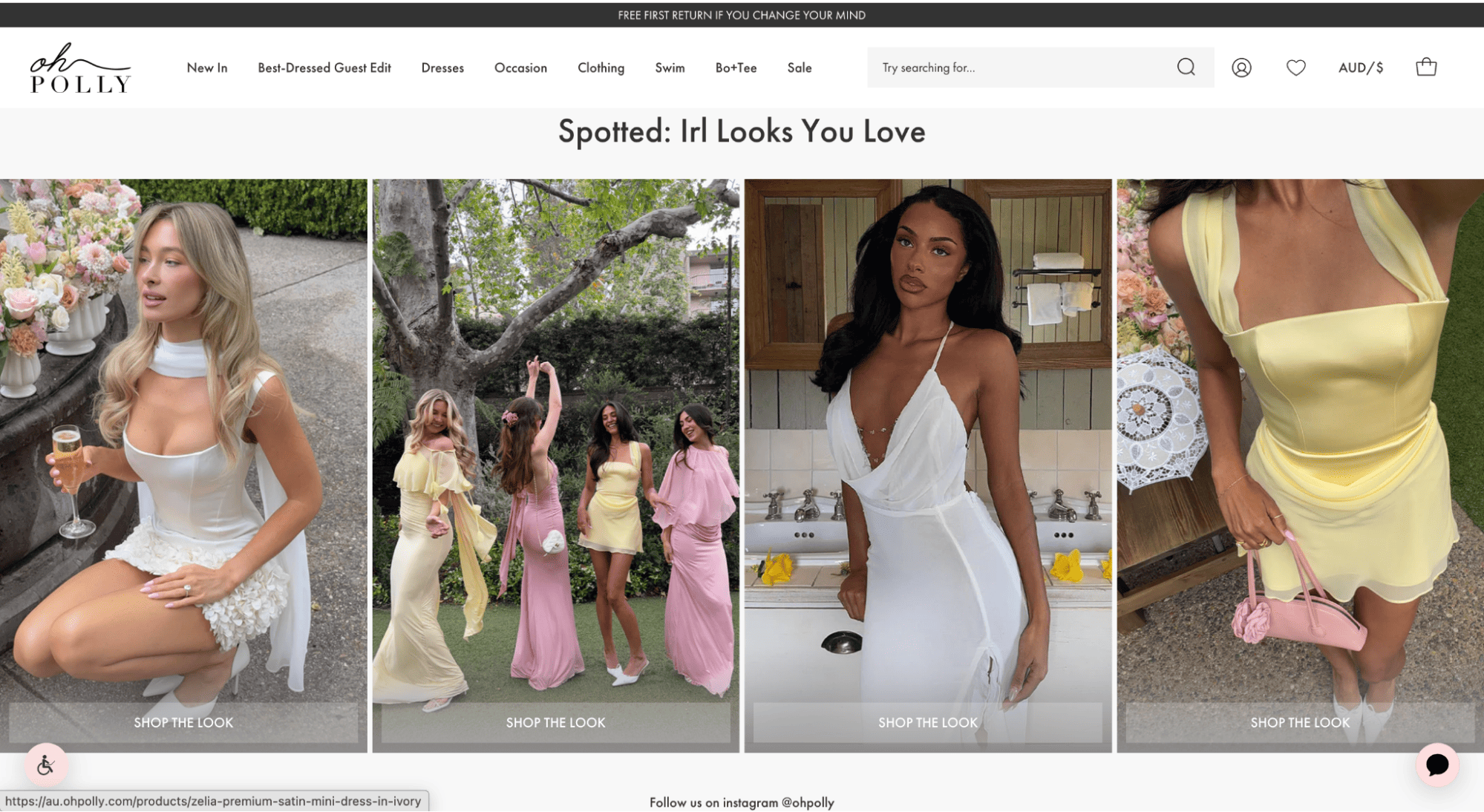
Oh Polly built its entire brand around user-generated content. The #ohpolly hashtag has racked up over 2.4 billion views on TikTok and 250,000+ posts on Instagram, all from customers, influencers, and "Oh Polly Girls" sharing their looks. The brand runs a "Shop Instagram" page on its website where visitors can browse the @ohpolly feed and shop the looks directly.
Oh Polly shows how a hashtag campaign can scale far beyond a single moment. By making UGC the primary marketing engine, the brand turns every customer post into free, ongoing content. If you can build a community around a clear identity (the "Oh Polly Girl" in their case), the hashtag becomes self-sustaining.
10. Harvard University: Social Walls Across Campus and Online
Harvard's schools display social media feeds on websites, campus TVs, and event screens. During commencement and other major events, hashtag-driven walls go live so students, alumni, and faculty see their posts appear on official channels in real time.
For schools and universities, Instagram feeds help engage prospective students, support current students, and keep alumni connected. The same approach works for any institution with an audience that extends beyond customers, including nonprofits, member organizations, and community groups.
How Marketing Teams Use Instagram Feeds Effectively
Marketing teams usually run Instagram feeds for one of four outcomes: longer time on site, more conversions, social proof, or traffic back to the Instagram account.
The layout you pick depends on the page and the goal:
- Grid: Product pages and Instagram-style profile views.
- Carousel: Homepage hero and mobile views with limited vertical space.
- Wall: Brand or community pages with a varied look.
- Slideshow: Event landing pages and digital screens.
Moderation is also worth considering up front. Hashtag feeds can attract spam or off-brand content, especially when a campaign goes wide. Tools like Flockler offer three moderation options:
- Manual approval for high-stakes content.
- AI-powered moderation through Garde AI is included on Business, Pro, and Premium plans.
- Auto-publish for trusted sources.
Tagging is one feature many teams overlook. By tagging Instagram posts with product names or campaign codes, you can filter the same content pool into different displays. The same set of customer photos can power a homepage gallery, a product page section, and an email block.
A few patterns worth borrowing from the brands above:
- Run a hashtag campaign tied to a clear identity (Oh Polly, GoPro).
- Tag products inside customer content to make the feed shoppable (Alo Yoga, Lulus, Linjer, Kylie Cosmetics).
- Feature real customers to add warmth to a global brand (Victoria's Secret, Reina Olga).
- Combine campaign visuals with UGC for inspiration-led feeds (Peppermayo, Lulus).
How Agencies Manage Instagram Feeds for Multiple Clients
Agencies usually manage Instagram feeds for many clients at once, each with its own brand guidelines, moderation rules, and reporting needs. The setup that works for a single brand can be hard to scale across 20 or 50 client accounts.
Most enterprise social media aggregators, such as Flockler, offer agency packages designed for this. Helpful features to look for include:
- One-click setup for new client social walls.
- Role-based permissions so each client can self-serve their own feed.
- Markup-friendly pricing for monthly client billing.
- A unified dashboard to monitor every client feed in one place.
- A dedicated agency account manager and priority onboarding.
For agencies billing clients monthly for social tools, the agency model is often simpler than having each client manage their own subscription. It also keeps moderation and reporting centralized when something needs to change quickly.
How Developers Build Custom Instagram Feed Experiences
For developers building enterprise products, a pre-built widget often doesn't go far enough. You may want full control over how Instagram content is fetched, filtered, and rendered.
There are two main paths. The first is Instagram's own Graph API, which gives you raw access but means you're responsible for everything yourself, including auth, refresh, moderation, and layouts. The second is going through a platform with an API layer, like Flockler's Content API. The platform handles the infrastructure, and you handle the rendering.
Flockler's Content API supports multiple Instagram filter types, including:
- Username: Posts from a specific account.
- Hashtag: Posts containing a tag.
- Business mentions: Mentions of your brand from other Instagram users.
- Business Stories: Your own brand's Stories.
You can filter by media type and route content into specific sections inside your account. The API returns structured JSON containing images, videos, captions, source URLs, tags, and metadata, so you can render the feed however you want. The Content API is available only on the Premium and Agency plans.
Note that business mentions and Stories require an Instagram Business Account linked to a Facebook Page.
Choosing the Right Setup for Your Use Case
The right setup depends on how many feeds you're running, whether you need moderation and accessibility features, and whether you need API access.
For most marketing teams, a no-code aggregator covers the need. They differ on:
- Number of feeds and accounts supported per plan.
- AI moderation availability.
- Accessibility features like automated alt text, which matter for compliance with the European Accessibility Act.
- Shopify and other e-commerce integrations for shoppable feeds.
- Agency packages for multi-client management.
- API access for custom builds.
A few things worth checking before you commit:
- Count your feeds carefully. Each Instagram account, hashtag, or mention source counts as one.
- For brands operating across multiple regions, check whether a single subscription can cover all sites.
- If your needs are simple, a free widget might be enough. For high-volume UGC or strict moderation needs, a paid plan is usually worth it.
FAQs
Can I Embed Instagram on My Website?
Yes. With a tool like Flockler, you can display unlimited Instagram feeds from multiple accounts in an engaging layout. You can also create shoppable Instagram feeds that link directly to product pages.
Do Embedded Instagram Feeds Help SEO?
Yes. Embedding Instagram feeds on a website makes pages more engaging and visual. Adding Instagram Reels and images can increase dwell time, which signals relevance to search engines.
What Tools Can I Use to Embed Instagram on My Website?
You can use Instagram's native embed for individual posts, but it's limited to one post at a time with little customization. Tools like Flockler let you display auto-updating feeds with full control over layout, design, and moderation.
Can I Show Instagram Reels and Stories on My Website?
Yes. Flockler supports Reels and Stories alongside regular posts. Stories require a connected Instagram Business Account linked to a Facebook Page. Reels are pulled in automatically once your account or hashtag feed is set up.
How Often Does an Embedded Instagram Feed Refresh?
Flockler refreshes feeds every 5 to 15 minutes, depending on the source and feed type. New posts, Reels, and Stories appear automatically.
Can I Make My Instagram Feed Shoppable?
Yes. With Flockler's Shopify integration, you can connect your store and tag products inside Instagram posts. When a visitor clicks a tagged image, they go straight to the product page. Lulus, Linjer, and Kylie Cosmetics all run shoppable Instagram feeds in their own way.
Maria Prakkat is a SaaS content marketing and SEO strategist with experience across SEO, GEO, and social media aggregation. She writes in-depth, research-backed content that helps businesses understand and apply solutions like social media aggregators, UGC platforms, and content distribution tools to improve visibility and engagement. Her work focuses on clarity, relevance, and long-term impact.
Infrastruttura sociale che si adatta a te.
Inizia la tua prova gratuita o lascia che ti mostriamo la piattaforma in azione.



