

February 7, 2024
Social Media Wall for Agencies: Use Cases, Examples, and API Workflows
X Minute gelesen


Soziale Infrastruktur, die mit Ihnen skaliert.
Starten Sie Ihre kostenlose Testversion oder lassen Sie sich von uns die Plattform in Aktion zeigen.
A social media wall for agencies has moved from a "nice-to-have" client deliverable to a recurring revenue stream. Marketing, development, and event agencies are using social walls to keep client websites fresh, drive engagement at live events, and ship custom social experiences without rebuilding the underlying infrastructure each time.
The challenge is doing this at scale. Managing one social feed is simple. Managing fifty across different clients, platforms, and brand requirements is a different operation. Agencies that get it right turn social walls into a margin-rich service. Others spend hours fighting platform APIs and answering client moderation requests.
What Agencies Get From a Social Media Wall
The value sits in three places for an agency running social walls as part of its service mix:
- The deliverable itself: A social media wall pulls posts from Instagram, TikTok, LinkedIn, and other platforms onto a client's website, event screen, or digital signage.
- Recurring work: Once a wall is live, agencies maintain it, run hashtag campaigns through it, and add new placements over time. This adds line items to the retainer rather than ending after launch.
- Positioning: Agencies that handle social walls in-house close more retainer work because clients see one less vendor to manage.
The demand behind this is real.
Based on a survey of 4,044 consumers, authenticity and relatability were the top two content traits consumers value from brands on social media, ranking ahead of polish and product-centric content. Agencies are the ones expected to translate that into something visible on a client's website, event, or campaign hub. A social wall does it directly by surfacing real audience and customer content instead of polished brand creative.
For enterprise clients, the bar is higher. They expect feeds that meet accessibility standards, comply with GDPR, and follow design systems built by their internal teams. A social wall for agencies serving this segment needs to support all three out of the box.
Use Cases for a Social Media Wall for Agencies
The right way to structure a social wall for agencies depends on the agency type and what the client needs.
Marketing and Brand Agencies
Marketing agencies use social walls to extend campaigns beyond paid media. A hashtag wall on a brand's homepage turns customer posts into permanent placements. During product launches, an agency can run a hashtag activation, moderate the entries, and surface the strongest content on the campaign landing page.
Common marketing agency placements include:
- Homepage feeds that mix brand-account posts with curated UGC for fresh on-page content.
- Product page walls that pull hashtag-tagged customer photos and reviews directly onto the product detail page.
- Campaign hub feeds that run for the duration of a launch, then archive when the campaign ends.
- Influencer program grids that consolidate creator content from Instagram and TikTok into one branded feed.
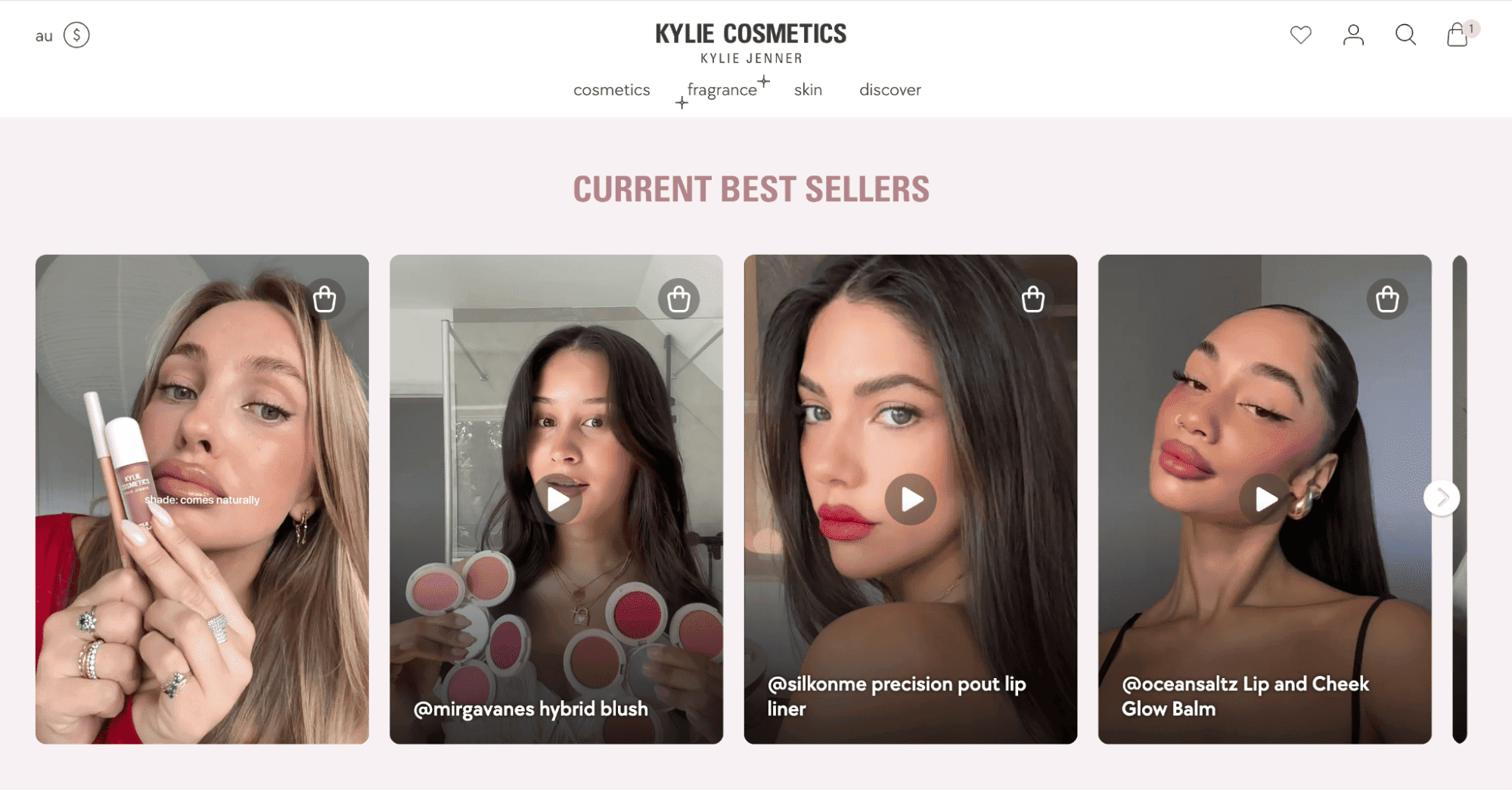
The recurring use case is the influencer program. A social wall consolidates creator content from multiple platforms into one branded grid. The brand sees the work without having to scroll through dozens of feeds, and the agency justifies the influencer investment with a visible owned-channel asset.
Event and Experiential Agencies
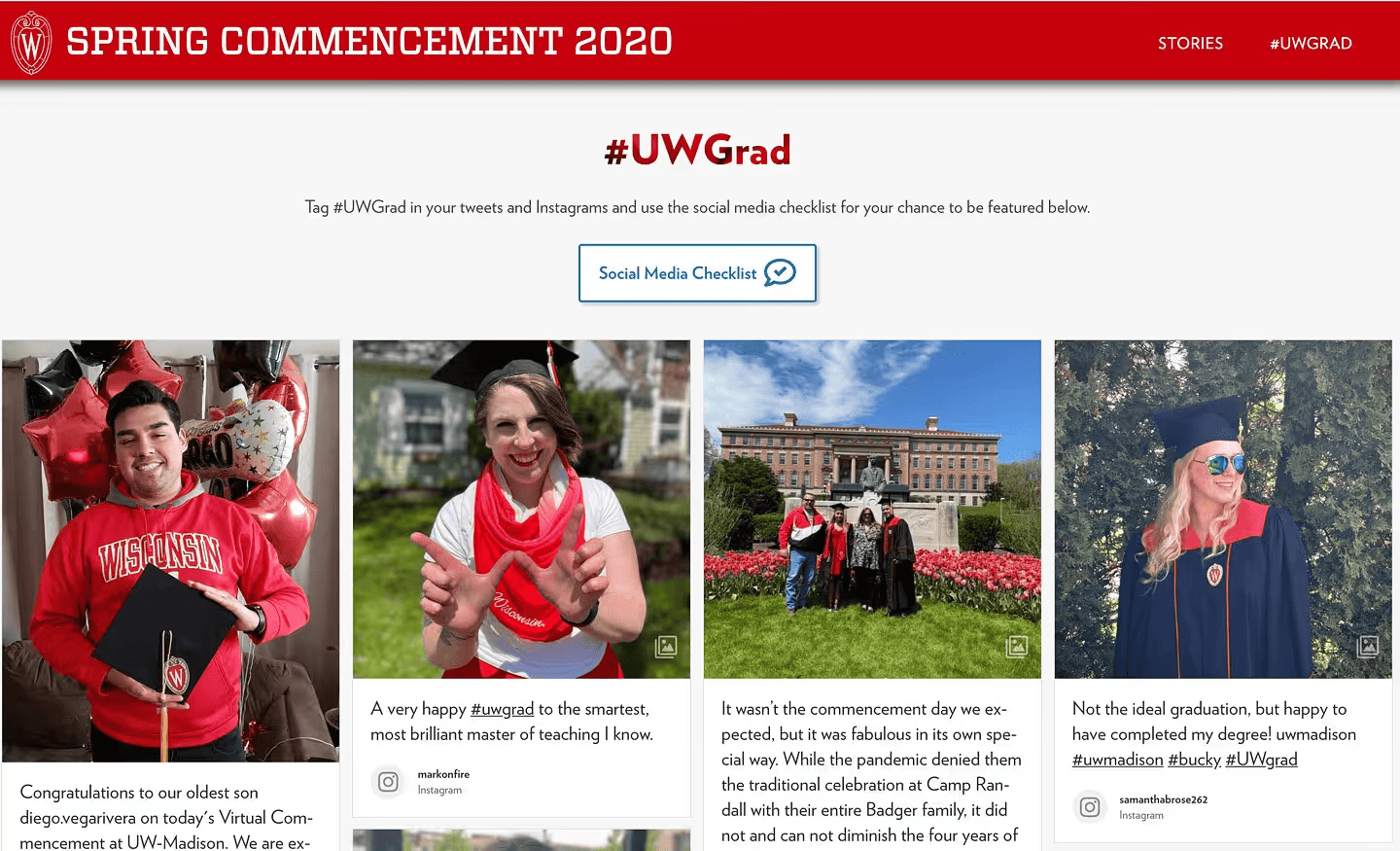
Event agencies use live social walls to drive engagement at conferences or activations. A screen showing tagged posts encourages attendees to share more, which in turn fuels the wall. The same content gets repurposed into the post-event recap page on the client's website.
Real-time moderation matters here because event content lands on screen within seconds. AI-powered filtering tools like Garde AI automatically review incoming posts for explicit content, profanity, and hate speech. This removes the bottleneck of manual approval during live events, where even a few minutes in the moderation queue makes the wall feel stale.
For agencies running multi-day or multi-venue events, slideshow layouts on lobby screens and ticker walls along main stages turn the same content into different placements. One feed, multiple displays.
Development and Digital Agencies
Development agencies need full design control. A standard widget rarely matches a custom-built site, especially for enterprise clients with strict design systems. This is where the social wall API becomes the entire deliverable.
The Koblenz-based agency 247GRAD is a good example. For their client Theater Koblenz, they used Flockler's API to build a custom carousel layout that filters Instagram posts by play-specific hashtags and assigns them to individual production subpages. The agency controls the design and front-end behavior. Flockler handles the social platform integrations behind the scenes.
For agencies managing dozens of client builds, this matters because social media platforms constantly update their APIs. Owning that maintenance internally is expensive. Outsourcing it to a stable abstraction layer is not.
Higher Education and Public Sector Agencies
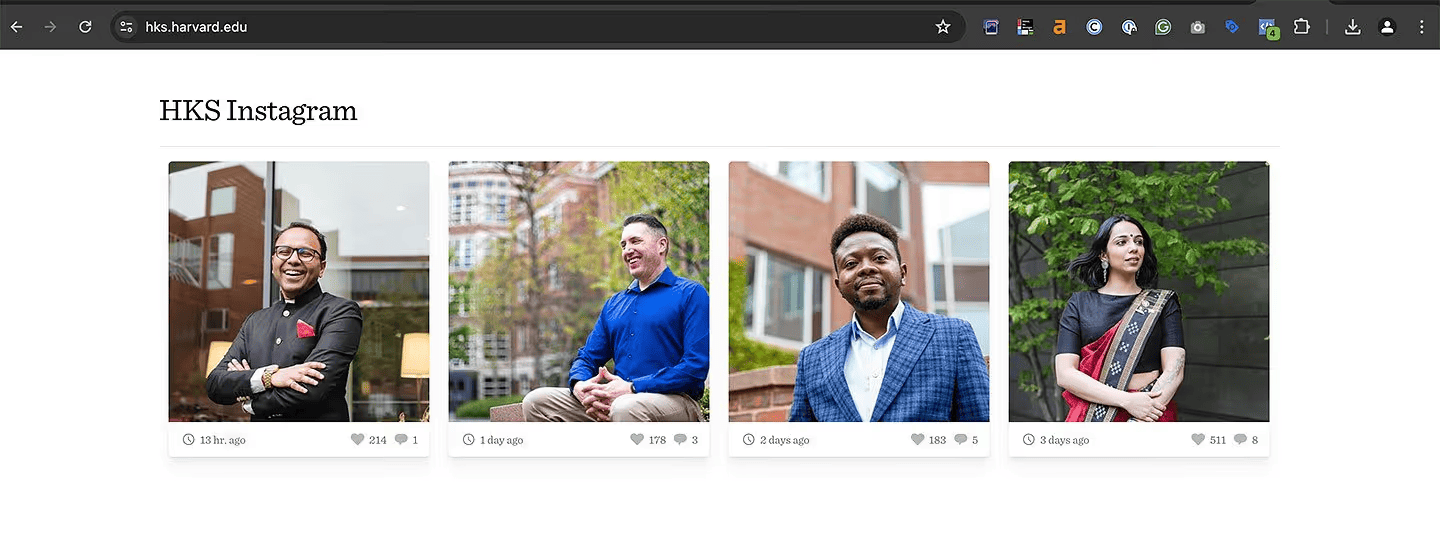
Agencies serving universities, museums, and government clients use social walls for employer branding, recruitment, and community updates. A careers page running an Instagram feed from current employees gives prospective hires a real look at workplace culture without ongoing copywriting. The same approach works for student campaigns, alumni networks, and public engagement initiatives.
These clients also tend to require accessibility-compliant feeds out of the box, which removes the WCAG conformance question from procurement entirely.
Where the API Fits Into Agency Workflows
Embed codes are fine for one-off client work. For agencies operating at scale, the API is what makes the model profitable.
Three patterns come up repeatedly across Flockler's agency customers:
Programmatic Feed Creation at Onboarding
When an agency signs a new client, the Bulk Feed API can create dozens of feeds in a single call, sourced from Instagram, Facebook, X, Pinterest, and RSS. For agencies running franchise, multi-location, or multi-brand client portfolios, this turns a multi-day setup into minutes.
Typical scenarios:
- A retail client opens 40 new store locations and needs an Instagram feed for each location to support their store finder pages.
- A franchise client adds a regional hashtag feed for every territory in their network.
- An events client needs feeds for ten concurrent venues during a multi-city tour.
Custom Front-End Experiences
Development agencies pull feed data through the Content API and render it inside the client's existing component library. The wall behaves like any other section of the site, not like a third-party widget bolted on top. This is the path most enterprise clients require because their design systems do not accommodate generic embed iframes.
The API also gives agencies control over layout behavior on mobile, lazy-loading rules, and interaction patterns that an embed cannot easily customize.
White-Label and Product Integrations
SaaS-style agencies and platform builders embed social aggregation into their own product. The end client sees the agency's branding. Flockler operates as the invisible infrastructure layer underneath. This is how some agencies turn social aggregation from a service line into a productized offering.
API access is available on Flockler's Premium and Agency plans, not the standard trial. For agencies evaluating the API, access can be requested at team@flockler.com during the 14-day trial period.
6 Features To Consider While Choosing a Social Wall for Agencies
Most social wall tools are built for single brands. Agency workflows have different requirements.
One Dashboard for Every Client
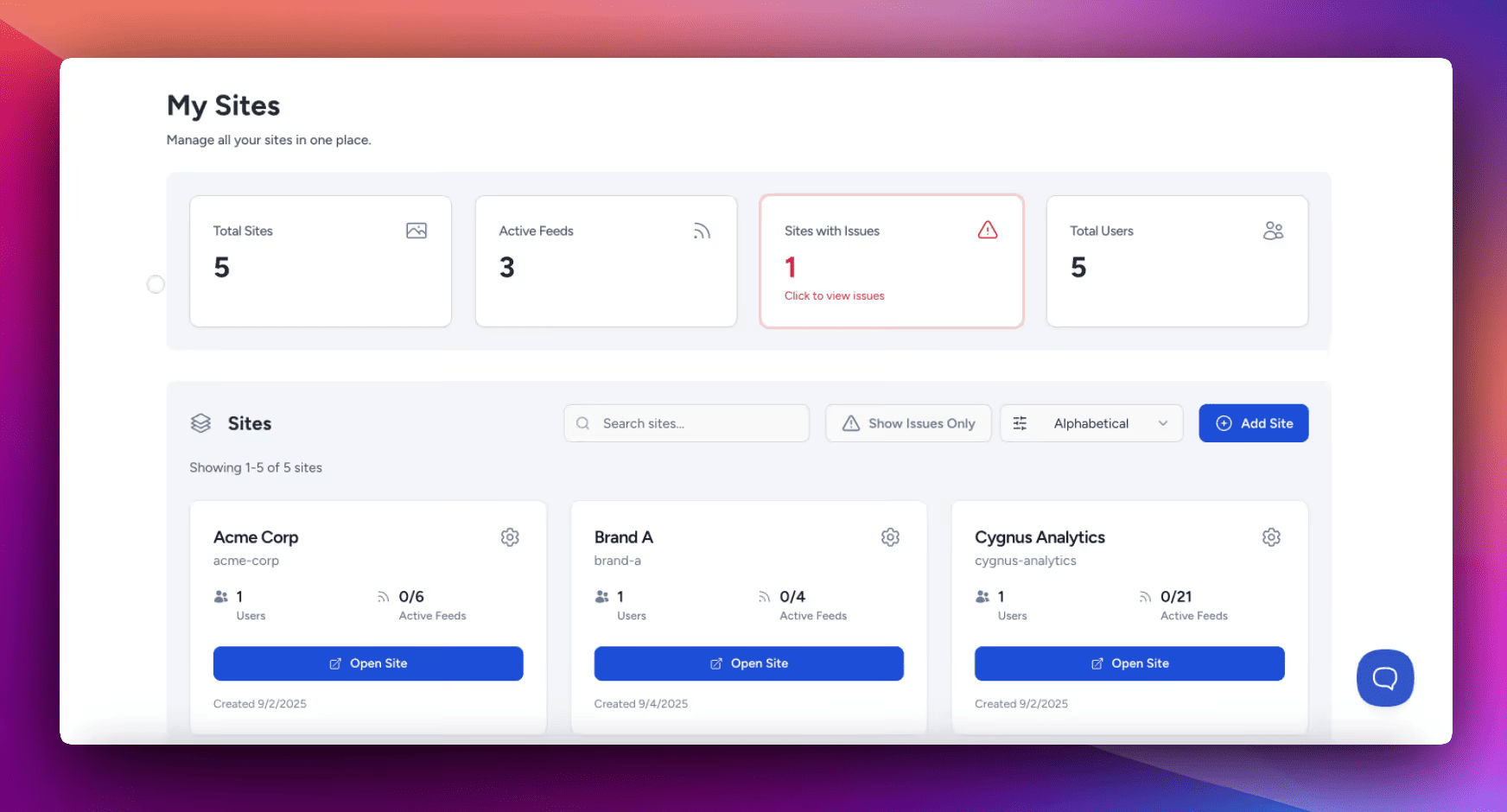
Agencies need one login that opens every client account. Switching between separate logins or browser sessions wastes time at scale. Flockler's My Sites dashboard consolidates every client workspace into a single interface, with one-click account switching.
What this looks like in practice:
- Sort clients by name, feed count, or status to spot active and inactive accounts.
- Get feed health alerts before clients report a broken integration.
- Onboard a new client in one click without admin reconfiguration.
- Manage billing across the whole portfolio from one place.
Role-Based Access
Internal teams, freelancers, and clients each need different permissions. A clean access model usually looks like this:
- Content managers get full editing rights across assigned client accounts.
- Junior team members get view or limited-edit access to specific clients only.
- Clients get a self-service area for their own feeds without seeing other accounts.
- Freelancers get time-bound access to a single client workspace.
Role-based permissions at both the team and client levels keep workflows clean and prevent accidental changes across accounts.
Branded Embeds Without White-Label Confusion
Flockler provides branded embeds that match each client's brand identity through custom CSS, fonts, and layouts. The platform itself is branded as Flockler in the back end, while client-facing displays carry the client's branding. This is worth verifying against your client's expectations before signing up, since some agencies expect full white-label admin panels.
AI Content Moderation at Scale
When a wall is live on a client's site, every post reflects on the brand. Manual review works on three or four clients. Past that, it breaks. Garde AI, available on Business plans and above, automatically filters violence, explicit content, profanity, and hate speech. Agencies can apply different moderation rules per feed:
- Auto-publish with AI filtering for high-volume UGC and event hashtag walls.
- Manual approval queues for sensitive client accounts and regulated industries.
- Auto-publish with keyword blocklists for trusted brand-account feeds.
- Combined moderation for hashtag campaigns where speed and brand safety both matter.
Markup-Friendly Pricing
Per-client or per-widget pricing erodes margins as agencies scale. Per-feed pricing lets agencies bundle social walls into client retainers and pause feeds when campaigns end. Flockler's standard plans break down as follows when billed annually:
- Basic: $110/month, 8 feeds.
- Business: $195/month, 15 feeds, includes Garde AI and automated alt text.
- Pro: $325/month, 30 feeds, includes priority support.
- Premium: custom pricing, unlimited feeds, Content API, Bulk Feed API, dedicated account manager.
The Agency plan is built on the Premium tier and adds one-click client onboarding, markup-friendly pricing, and priority onboarding designed for resale.
Accessibility and Compliance
Enterprise agencies working with EU or US public sector clients need GDPR and accessibility compliance built in. Flockler feeds meet WCAG 2.1 AA and EAA standards by default, with AI-generated alt text on Business plans and above. This removes a recurring procurement question for clients with formal accessibility audits.
How to Set Up a Social Media Wall With Flockler
Once an agency is on the Agency or Premium plan, the typical sequence runs as follows:
- Add each client as a separate site: Inside the My Sites dashboard. Every site has its own feeds, design settings, and user permissions. Clients only see their own workspace.
- Connect Platforms inside each client's site: Flockler supports 15+ platforms, including Instagram, TikTok, LinkedIn, X, YouTube, Facebook, Bluesky, Pinterest, Google Reviews, RSS, SoundCloud, and Flickr. The client handles platform connection inside their workspace, so the agency does not need admin access to the client's social accounts. This is a common procurement requirement for enterprise clients.
- Build feeds with filters: For each placement, create a separate feed with the appropriate filters (hashtags, usernames, keywords). Choose moderation per feed: auto-publish for trusted brand accounts, manual approval for hashtag campaigns, and Garde AI for high-volume UGC.
- Pick a layout or build custom: Flockler offers four standard layouts (Wall, Grid, Carousel, Slideshow) and full custom layouts via the Content API. The embed code works with WordPress, Shopify, Squarespace, Webflow, and custom HTML sites with no developer required. For dev agencies, the API replaces the embed entirely.
- Monitor performance: Once live, Flockler's analytics track views, engagement, and click-throughs. This data feeds back into client review cycles and justifies retainer fees.
Why Agencies Choose Flockler
Flockler is the social media aggregator for agencies trusted by George Washington University, Schudio, IKEA, and 2,000+ other brands and institutions worldwide. The Agency plan is built on the Premium tier and adds one-click client onboarding, the My Sites dashboard, role-based access, markup-friendly pricing, priority onboarding, and a dedicated agency account manager.
Enterprise extras included on the Agency tier:
- Content API and Bulk Feed API access.
- Security questionnaire and compliance documentation support.
- 98% uptime SLA.
- Architecture consultation for custom integrations.
- Priority response times on technical issues.
For agencies evaluating tools, the practical test is to set up a real client project. Flockler offers a 14-day free trial with no credit card required. API access for agency evaluation can be requested directly at team@flockler.com.
FAQs
What Is a Social Media Wall for Agencies?
A social media wall for agencies is a tool that aggregates posts from social platforms into one curated feed and displays it on client websites, event screens, or digital signage. It includes features built for multi-account workflows, such as role-based access, per-client workspaces, and a shared dashboard, which set it apart from single-brand widgets.
How Do Development Agencies Use the Social Wall API?
Development agencies use the Content API to pull feed data into custom front-end designs and the Bulk Feed API to programmatically create dozens of feeds. Common use cases include white-label client experiences, custom layouts that match client design systems, and integrations into proprietary agency tooling. API access is included on Flockler's Premium and Agency plans.
Can Agencies Manage Multiple Client Walls From One Dashboard?
Yes. Flockler's My Sites dashboard gives agencies one login to manage every client workspace. New clients can be added with one click, team members can switch between accounts without relogging in, and role-based permissions keep client data isolated.
Does Flockler Offer White-Label Options for Agencies?
Flockler provides branded embeds that match each client's brand through custom CSS, fonts, and layouts. The Flockler platform itself is branded as Flockler in the admin interface, while client-facing displays are fully customizable. Agencies expecting fully white-labeled admin panels should clarify requirements with the Flockler team before signing up.
How Much Does a Social Wall for Agencies Cost?
Flockler's standard plans start at $110/month for 8 feeds, $195/month for 15 feeds, and $325/month for 30 feeds, billed annually. The Agency plan is custom-priced based on the number of active client feeds across the agency portfolio and includes unlimited feeds, API access, security reviews, and a dedicated account manager.
Maria Prakkat is a SaaS content marketing and SEO strategist with experience across SEO, GEO, and social media aggregation. She writes in-depth, research-backed content that helps businesses understand and apply solutions like social media aggregators, UGC platforms, and content distribution tools to improve visibility and engagement. Her work focuses on clarity, relevance, and long-term impact.
Soziale Infrastruktur, die mit Ihnen skaliert.
Starten Sie Ihre kostenlose Testversion oder lassen Sie sich von uns die Plattform in Aktion zeigen.



