

June 23, 2026
How to Add an Instagram Feed to Joomla
X Minute gelesen

Soziale Infrastruktur, die mit Ihnen skaliert.
Starten Sie Ihre kostenlose Testversion oder lassen Sie sich von uns die Plattform in Aktion zeigen.
Joomla powers around 1.4% of all websites globally, with a particularly strong footprint in government, education, and enterprise organisations. If you're running a Joomla website and want to bring your Instagram content onto it, this guide walks you through exactly how to do that with Flockler.
With over 200 million business profiles on Instagram, the platform has become a central part of most brands' digital marketing setup. Embedding your Instagram feed on your Joomla site helps you put that content to work where it matters most, on the pages where visitors are deciding whether to engage with you.
In this guide, we'll walk you through adding an Instagram feed to Joomla in three steps, explore your layout options, and show you how to embed it on a specific page or across your whole site.
Why Should You Embed an Instagram Feed on Your Joomla Website?
Whether you're managing a university website, a government portal, or a brand site built on Joomla, embedding your Instagram feed can make a real difference to how visitors experience your site. Here are a few reasons why:
Social proof
When visitors see your active Instagram content directly on your website, it immediately establishes credibility. Instagram posts featuring real customers, product moments, or community content help build trust in a way that static copy simply can't.
Fresh content
With a live-updating Instagram feed, visitors always see current, relevant content without you having to update anything manually. Your website stays up to date every time you post on Instagram.
Increased engagement
Showing Instagram content on your Joomla site gives visitors a reason to stay longer, discover your profile, and follow your account, creating a natural connection between your website and your social presence.
More Instagram followers
Making your Instagram visible to website visitors who may not have found your profile organically is one of the easiest ways to grow your following without any additional effort.
How to Add an Instagram Feed to Joomla: Step-by-Step
Adding an Instagram feed to Joomla is straightforward with Flockler. Once you've decided what you'd like to display, here's how to get it live in a few minutes.
Note: Before getting started, sign up for Flockler's free 14-day trial. No credit card required, and you get full access to the platform from day one.
1. Collect Images and Videos from Instagram
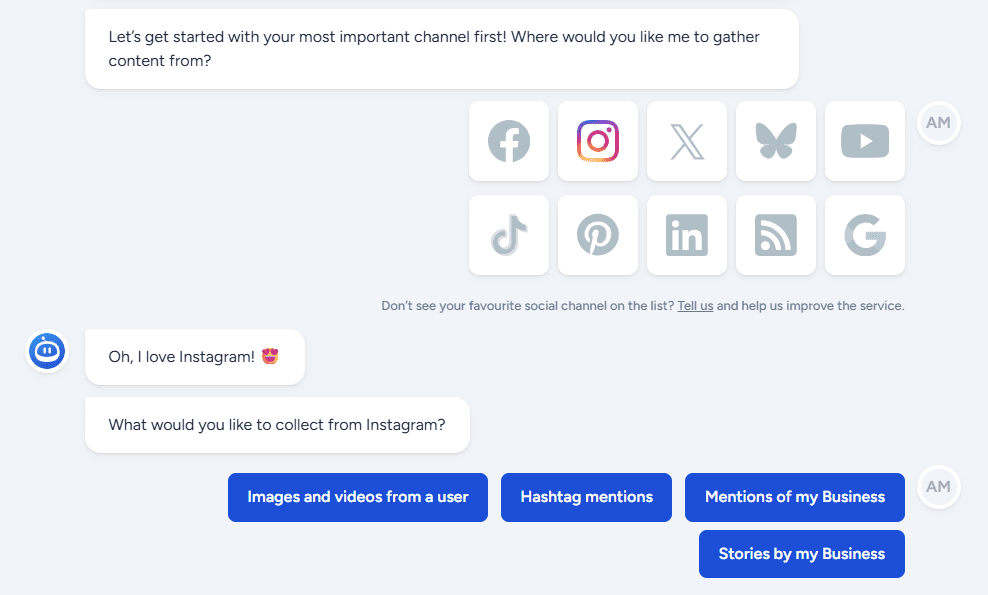
After signing up, Flockler's setup will guide you to connect your Instagram account. There are two ways to do this:
You can connect using your Instagram email and password, which lets you pull posts from that specific account. To unlock additional content types, including posts from any Business account, hashtag feeds, mentions, and Stories, you'll need to connect via an admin Facebook account for a Facebook Page linked to an Instagram Business account. Flockler won't store or display any of your personal Facebook data.
Note: You don't need to be an admin of the Instagram account you want to display, as long as you connect via Facebook. If you have a personal Instagram account rather than a Business account, convert it to a Business account first; it only takes a minute.
From Instagram, you can display:
- Images and videos from any Instagram Business account
- Hashtag feeds from all public users posting with a specific tag
- Mentions of your Business account, including tagged images
You can also combine Instagram content with feeds from other platforms. Flockler supports TikTok, LinkedIn, YouTube, Facebook, X, Bluesky, Pinterest, and more. If you want a single feed that pulls from multiple channels, you can combine them into a single display.
2. Choose an Instagram Feed Layout
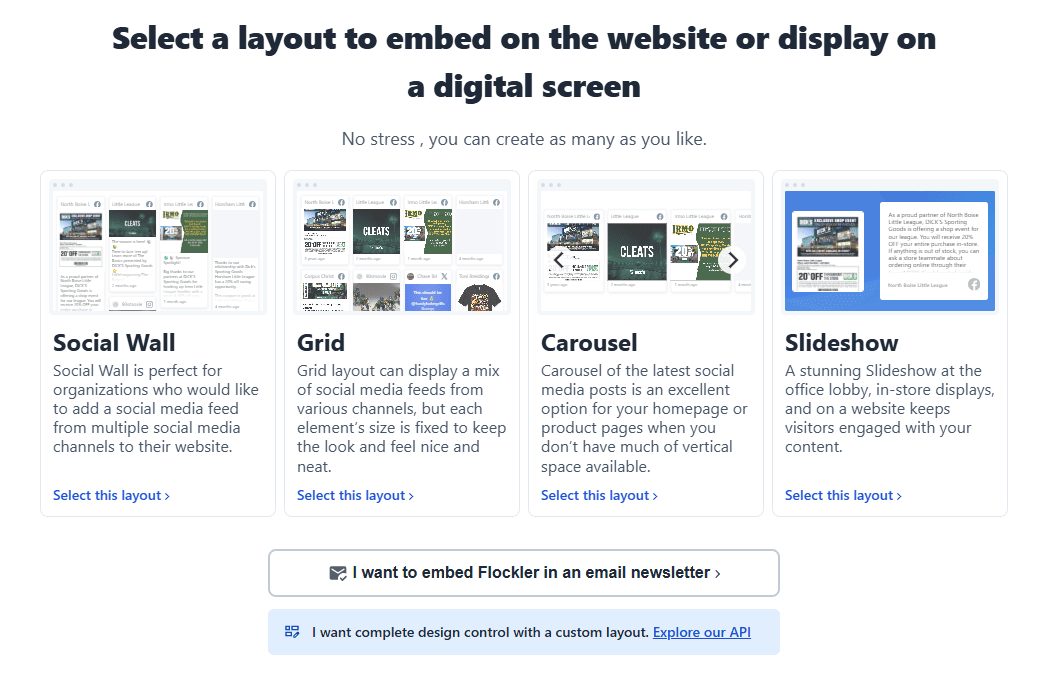
The next step is to choose a layout for your Joomla Instagram feed. From the Display tab in Flockler, you have four options: Social Wall, Grid, Carousel, and Slideshow.
Once you've selected your layout, customise it to your liking by changing the colours, fonts, spacing, and design elements to match your Joomla theme and brand. Click "Create" once done.
After creating your display, Flockler generates an embed code. Copy it and keep it ready for Step 3.
Good to know: With just one Flockler licence, you can create multiple layout versions and add them to an unlimited number of Joomla pages.
3. Embed the Instagram Feed on Your Joomla Website
The final step is to add the Flockler embed code to your Joomla site. There are two ways to do this, depending on where you want the feed to appear.
Add an Instagram Feed to a Specific Joomla Page
Use this method if you want the feed on a dedicated social wall page, a campaign landing page, or any specific article.
- In the Joomla admin panel, go to Content → Articles and click New.
- Add a title, then click the Source code button (< >) in the TinyMCE editor toolbar.
- A window opens with the HTML source. Paste your Flockler embed code and click OK.
- Click Save & Close. Add the page to your site navigation via Menus if needed.
- Visit the live page to check that the feed is displaying correctly.
Note: TinyMCE (Joomla's default editor) can sometimes strip embed code on save. If your feed doesn't appear, try switching your editor to None in your user profile settings, pasting the embed code directly, and then saving. You can switch back to TinyMCE afterwards.
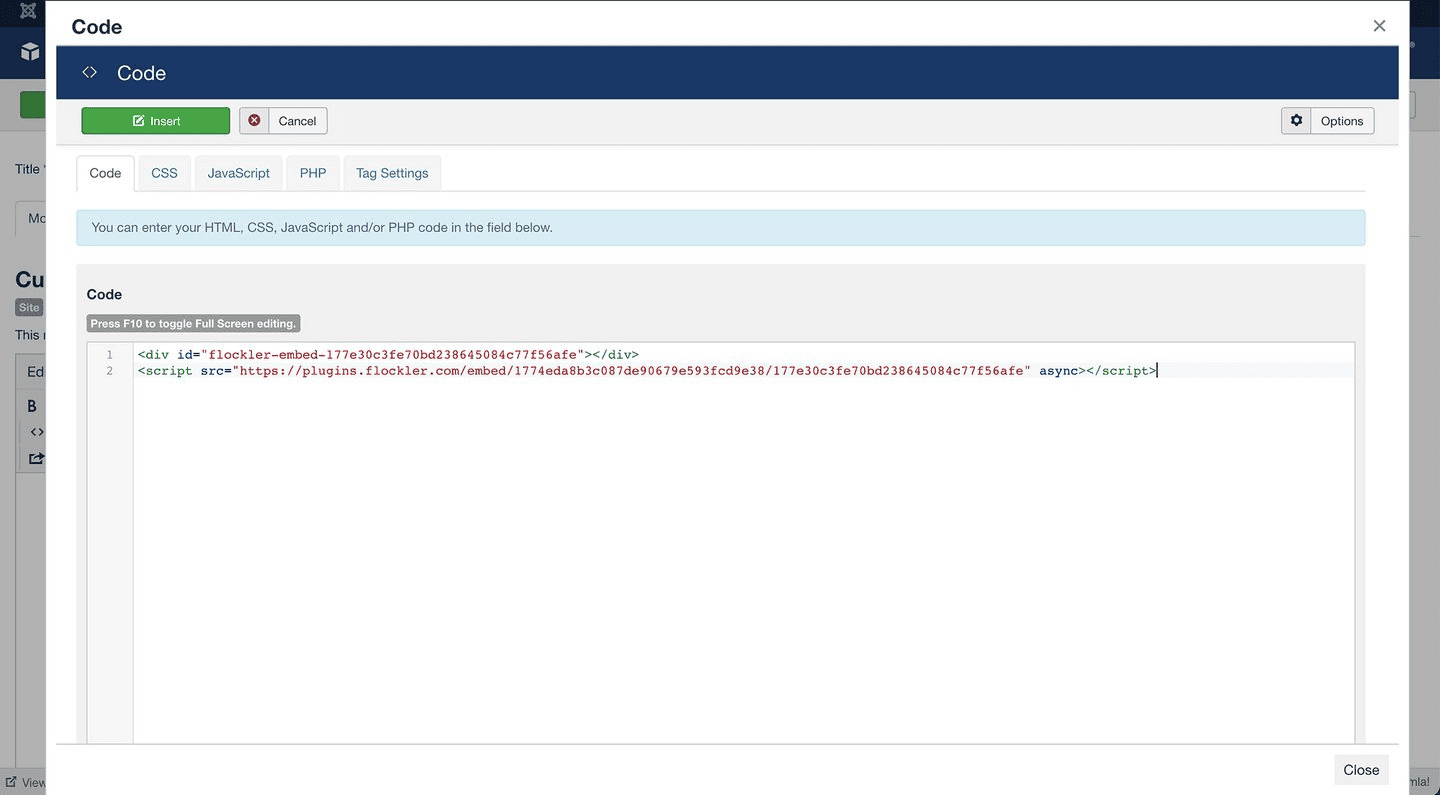
Add an Instagram Feed to All Joomla Pages
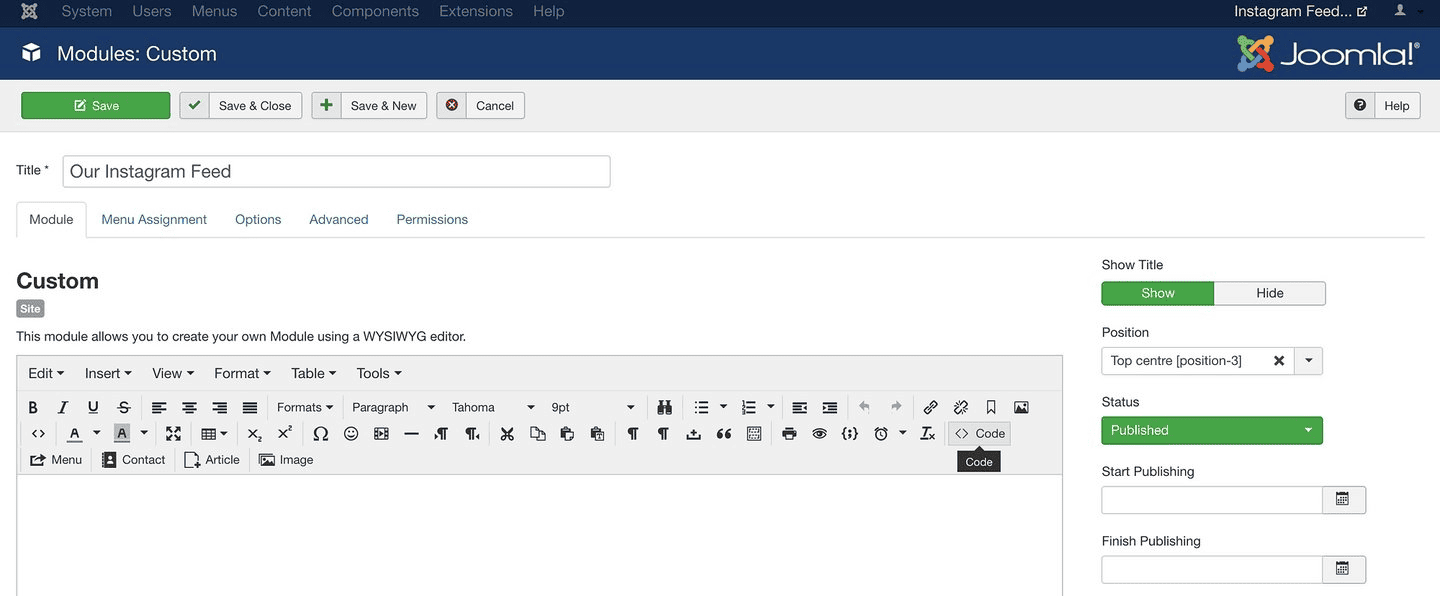
Joomla's Module system lets you place content in fixed positions that repeat across every page, footers, sidebars, and header areas. Use this method if you want the Instagram feed to appear sitewide.
- In the Joomla admin panel, go to System → Manage → Site Modules.
- Click the New button.
- From the module type list, select Custom HTML.
- Give the module a title, then click the Source code button in the editor toolbar.
- Paste your Flockler embed code and click OK.
- Select the position where the module should appear. If you're not sure which positions are available in your theme, your developer can help; some positions may already be in use.
- Click Save & Close. The feed will now appear in that position across your Joomla site.
That's it. Visit your site to confirm the Joomla Instagram widget is showing correctly. If you have any questions, click the chat button on the Flockler website for instant help.
Different Layouts to Use When Embedding an Instagram Feed on Joomla
Choosing the right layout affects how visitors engage with your content. Each of Flockler's four layouts serves a different purpose; here's a breakdown with examples to help you decide.
Social Wall
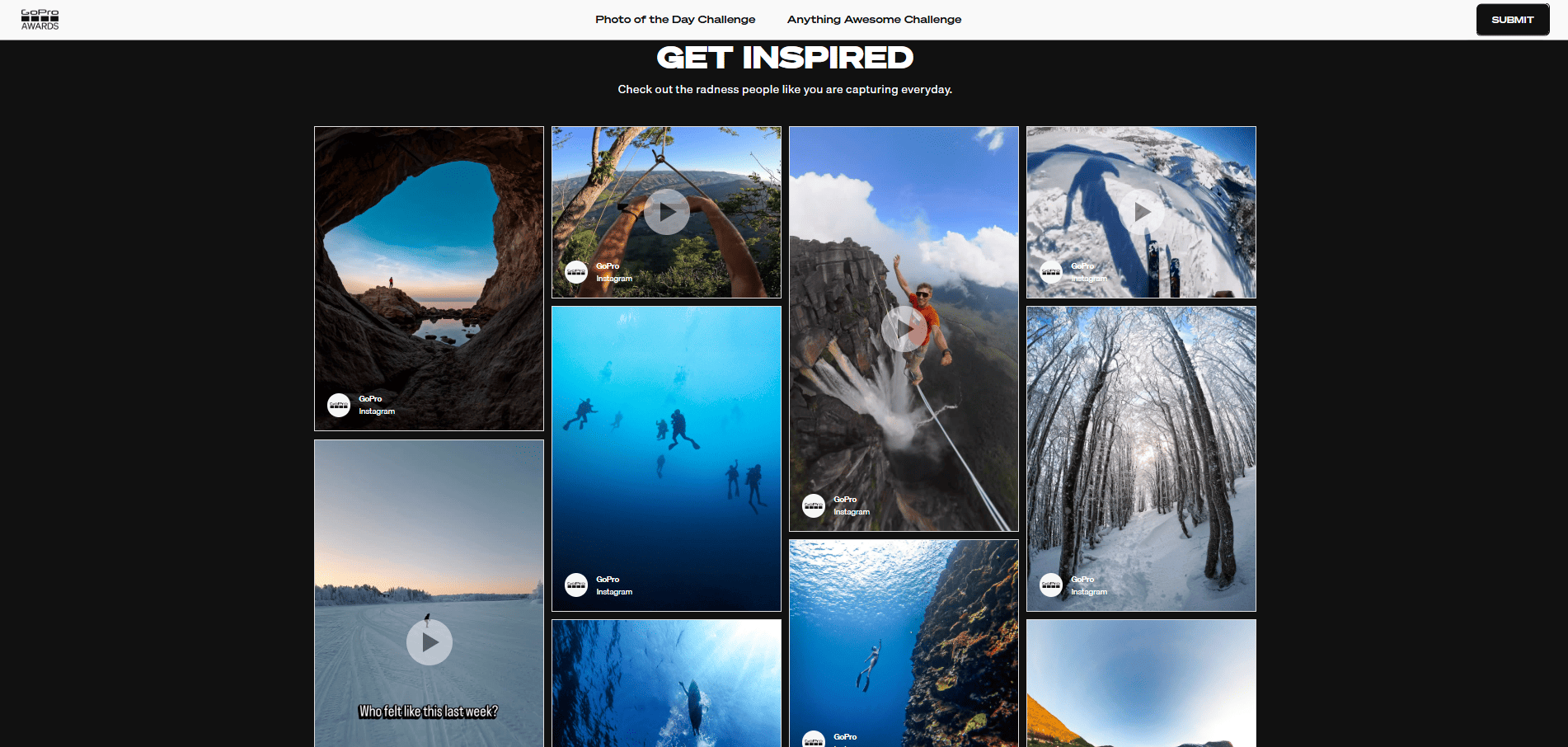
The Social Wall layout is the best choice when you're displaying content from multiple sources or want captions to show alongside images. The masonry-style grid adapts to different content sizes, giving you a dynamic and visually rich feed.
Examples of use cases:
- Event pages displaying a branded hashtag campaign
- Brand websites showcasing user-generated content
- Campaign landing pages built around community sharing
- Any page where you want a high-energy, mixed-content display
Grid
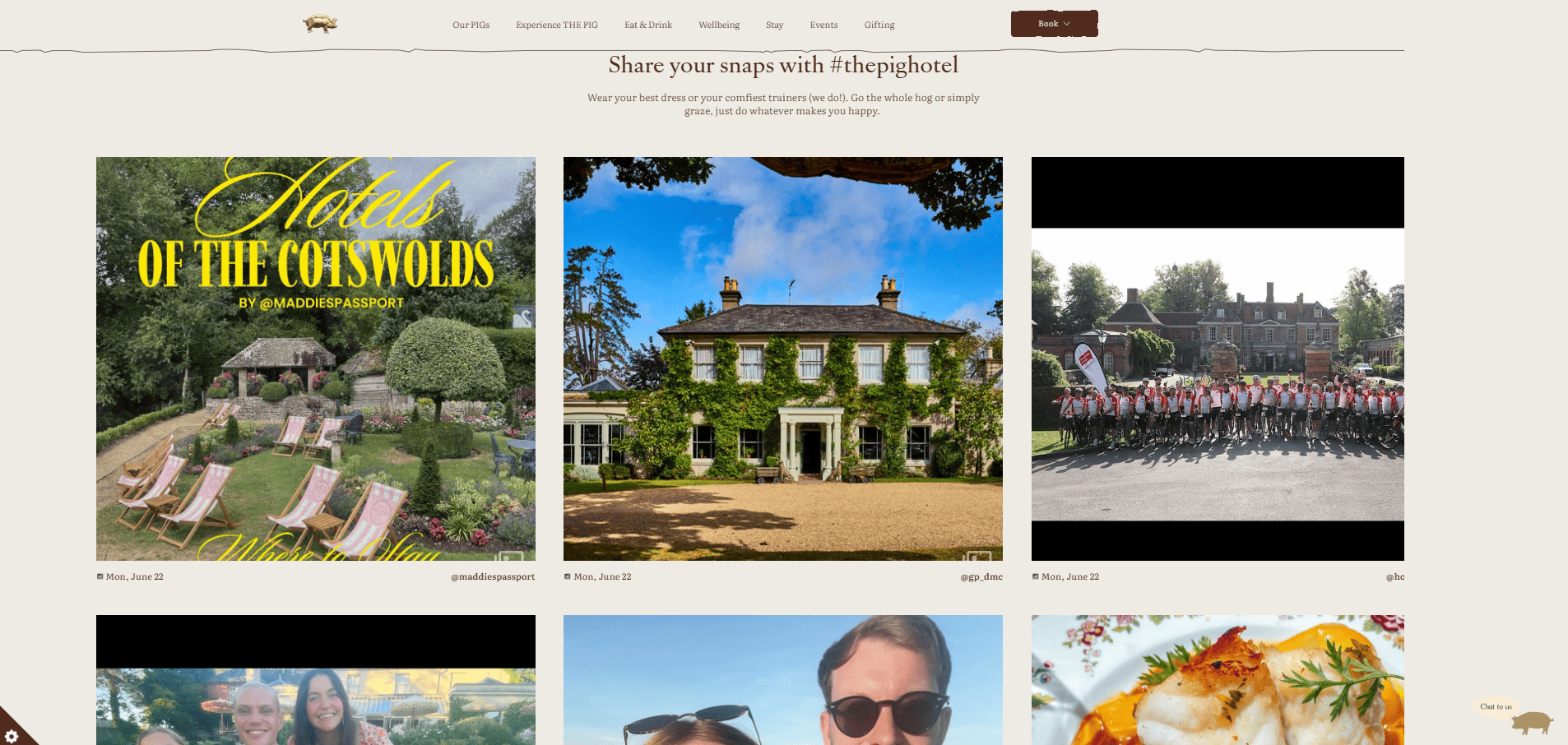
The Grid layout is the most popular option for Instagram feeds. It organises posts in a clean, uniform arrangement that mirrors the look of an Instagram profile, great for brands that produce consistent, high-quality visual content.
Examples of use cases:
- Homepages and brand pages
- Hotels and travel companies showcasing destinations
- Restaurants and food brands highlighting photography
- Any page where a structured, polished layout fits best
Carousel
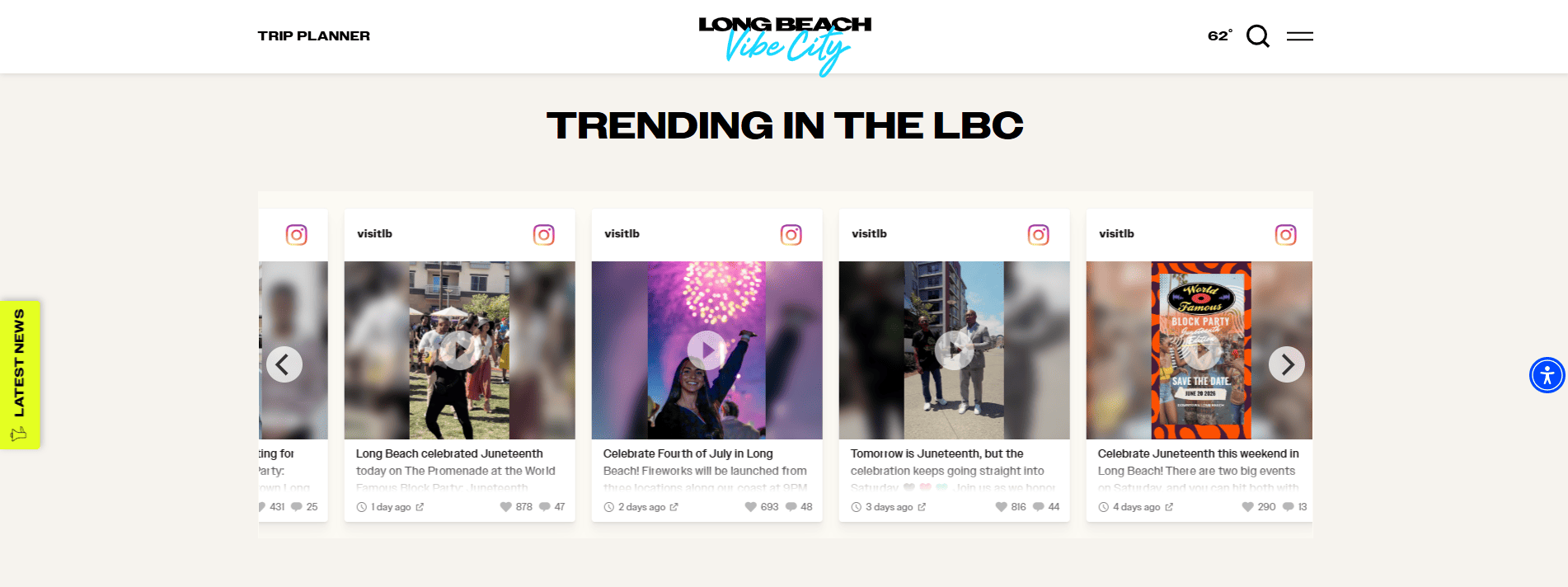
The Carousel layout is the right choice when vertical space is limited. Visitors scroll through posts horizontally, making it a natural fit for homepage sections, mobile views, and anywhere you want movement without taking over the page.
Examples of use cases:
- Homepage sections between content blocks
- Sidebar widgets showing recent posts
- Product pages displaying customer content
- Mobile-first layouts
Slideshow
The Slideshow cycles through posts automatically, giving Instagram content a prominent, full-width presence on the page. It's primarily used for digital screens and events, but it works well on web pages too when you want a bold visual display.
Examples of use cases:
- Digital screens and event displays
- Full-width homepage banners
- Kiosks and in-store displays
- Any context where you want content to move without user interaction
FAQs
Do I need a Joomla extension or plugin to add an Instagram feed?
No. Flockler works via a standard HTML embed code that you paste into Joomla's article editor or a Custom HTML module. There's nothing to install from the Joomla Extensions Directory and nothing to maintain on the CMS side.
Can I display Instagram content from more than one account or hashtag?
Yes. Flockler lets you pull from multiple Instagram accounts, combine hashtags, and mix Instagram content with other social platforms, all in one display.
Does the feed update automatically?
Yes. Once connected, Flockler pulls in new content regularly. Any post that matches your source settings automatically appears in the feed, with no manual uploads or updates required.
Can I show Instagram Stories on my Joomla site?
Yes, if you connect via Facebook and have an Instagram Business account that you administer. Stories from your own Business account can be collected and displayed alongside regular posts.
Can I embed the same feed on multiple Joomla pages?
Yes. Copy the embed code from Flockler's Display tab and paste it wherever you need it. The same display can run across multiple pages or even multiple sites under one Flockler licence.
Is this suitable for a Joomla site with a large number of pages?
Yes. For larger Joomla sites, Flockler's ability to create multiple displays with different sources and layouts lets you show the right Instagram content in the right places, rather than a single generic feed everywhere.
A true growth operator with extensive experience across crowdsourcing, affiliate programs, and social media aggregation. Brooke is the CEO if Flockler and cofounder of the marketing agency Northweather and has worked with global brands including LEGO. With international experience spanning SaaS, marketing, and product, she brings sharp expertise in strategy, execution, and driving results through global cross-functional teams.
Soziale Infrastruktur, die mit Ihnen skaliert.
Starten Sie Ihre kostenlose Testversion oder lassen Sie sich von uns die Plattform in Aktion zeigen.



