

March 3, 2026
Social Media API Integration: The Developer’s Guide
X minute de lecture

Une infrastructure sociale qui évolue avec vous.
Commencez votre essai gratuit ou laissez-nous vous montrer la plateforme en action.
Most developers underestimate social media API integration until they are three platforms deep. Instagram requires a Business Account linked to a Facebook Page. X puts basic read access behind a $200/month paywall. TikTok has its own developer review process. The Instagram Basic Display API, which many teams relied on for years, was fully deprecated in December 2024. It offered no backward compatibility.
Each platform changes its rules on its own schedule (and rarely with warning). If you build a product or website that pulls live social content, the maintenance burden grows with every new source you add.
This guide explains what direct social media API integration involves, why developers use an abstraction layer, and how Flockler’s Content API manages platform complexity for you.
Why Social Media API Integration Is More Complex Than It Looks
The core issue is that each platform operates its own API ecosystem, with no shared standard between them.
Meta (Instagram + Facebook)
Meta uses the Graph API. It follows a node, edge, and field model. Getting access to most data requires passing a formal App Review process. Instagram feeds require a connected Facebook account, a Business or Creator account, and a Facebook Page with admin access. Access tokens expire, and connections need to be refreshed regularly.
X (Twitter)
Moved to a tiered paid model. The free tier is largely write-only and not useful for content retrieval. The Basic tier runs $200/month and gives you limited read access. The Pro tier costs $5,000/month. If you built anything on the old v1.1 API, you've already gone through a migration.
TikTok & YouTube
TikTok has its own developer program, its own review process, and separate access for different types of data. YouTube requires a Google Cloud project with OAuth credentials and has its own quota system.
Directly integrating with multiple social APIs creates significant backend chaos. The practical solution is to use an API gateway or abstraction layer. It acts as a central hub to manage authentication, centralize rate limiting and caching, and transform disparate responses into a unified format. In short, it gives you one place to monitor and manage everything.
That is exactly the pattern developers use in other domains. You use Stripe, so you do not write payment processing logic for Visa and Mastercard separately. You use Twilio, so you do not negotiate directly with carrier networks. The same logic applies to retrieving social media content.
Disadvantages of Using Direct Social Media API Integration
When you integrate directly with a social platform, you take on several responsibilities that are easy to underestimate at the start.
- Authentication management: OAuth tokens expire. Instagram connection tokens tied to Facebook Pages need to be refreshed. Facebook feed tokens are valid for 48 hours. If you miss a refresh cycle, the feed can stop working.
- Rate limit handling: Instagram provides basic access with a limit of 200 requests per hour, and elevated access can reach up to 5,000 requests per hour. Each platform sets its own limits independently. You need separate rate limit logic per platform, plus caching to avoid burning through your quota.
- Data normalization: A post from Instagram and a post from YouTube share no structural features. Author fields, timestamp formats, media types, and engagement metrics all differ. Normalizing them into a consistent format for your frontend adds significant work.
- Keeping up with API deprecations: Keeping up with API deprecations is an ongoing task. Personal Instagram accounts are no longer supported via third-party APIs, and all integrations must migrate to the Instagram Graph API. These changes happen across platforms. If no one monitors developer changelogs, they can break your integrations.
- Content moderation - Direct platform APIs do not filter content for you. If you display social content publicly, you are responsible for building your own moderation layer to catch off-brand posts, spam, and inappropriate content before it reaches your users. That is additional infrastructure to build, test, and maintain.
Remember, none of these are one-time tasks. They require ongoing attention.
Social Media Integration API for Social Feeds
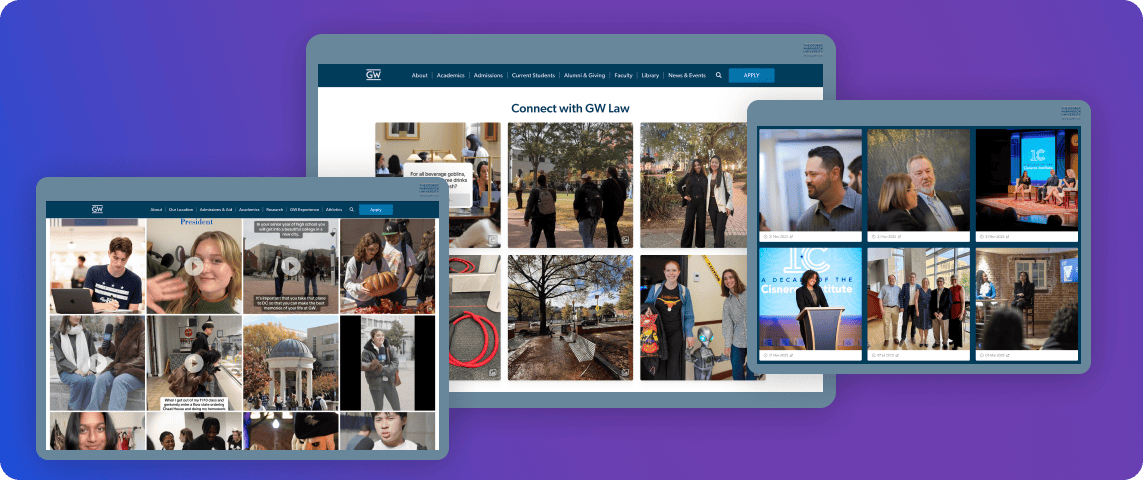
Direct integrations are expensive and hard to manage when you’re building a multi-feed social media wall. The alternative is to treat social content retrieval the same way you treat payment processing or email delivery. Use a purpose-built service that owns the integration layer and exposes a clean API to your application.
This is what Flockler’s Social Media Aggregator API does.
- It works as a Unified Social Media Integration API, sitting between your application and every platform you need to connect
- It connects to 10+ social platforms, handles authentication and token management per platform
- It normalizes content into a structured JSON format, and serves it through a single versioned endpoint
Flockler maintains all social media platform integrations. When Instagram, Facebook, or other platforms change their APIs, Flockler updates its infrastructure. Your integration continues to work without any code changes on your end.
From a developer's perspective, the interaction model is simple. You authenticate with an API key, specify your site UUID, and call a single endpoint to retrieve published posts across all connected platforms. You can filter by section, tag, platform, or feed.
How Flockler's Social Media API Integration Works

Flockler exposes two main capabilities through its API: content retrieval and programmatic feed management.
Content retrieval gives you access to published posts from all connected channels. Each post includes:
- Text content and captions, in both plain and rich formats
- Media files, including images and videos
- Author name, username, profile URL, and profile image
- Timestamps and source URL
- Tags and source platform identifiers
You control what gets published through Flockler's moderation layer.
Note: The API only returns content that has been set to a published state. Hidden or pending posts are not included.
Programmatic feed creation lets you create and configure social feeds without going through the UI. Feed creation via API is currently supported for Instagram, Facebook, X (formerly Twitter), Pinterest, and RSS feeds. For other channels, such as LinkedIn and YouTube, feeds are created through the Feeds tab in the Flockler app.
Worth noting: If your team does not need a fully custom build, Flockler works as a no-code social media feed widget. You can connect your social accounts, customize the layout, and embed the feed using an auto-generated embed code. No developer is needed.
How to Get Started With Flockler's Content API
To get started, here’s what you need to do:
Step 1: Sign Up and Start Your Free Trial

Go to flockler.com and start the 14-day free trial. No credit card is required. The trial gives you access to all standard features so you can connect accounts and test feeds before committing to a plan.
Step 2: Upgrade to a Premium Plan
The Content API is available only on the Premium plan. Once you upgrade, API access will be included in your plan.
Step 3: Generate Your API Key
Go to Settings in your Flockler account. Navigate to API Keys and generate a new key. This key authenticates all your API requests. You can pass it as a header using X-FL-API-Key or as a query parameter using ?api_key=YOUR_API_KEY.
Step 4: Locate Your Site UUID
Your Site UUID identifies your Flockler account in all API requests. You will need it to construct the correct endpoint URL.
Step 5: Make Your First API Call
Use your Site UUID and API key to fetch published posts from your connected feeds:
GET https://api.flockler.app/v2/YOUR_SITE_UUID/posts
From here, you can filter by section, tag, or platform using query parameters and start rendering content in your own frontend. For more details, check out the Content API documentation.
Enterprise Social Media Platform API Integration at Scale
For teams building enterprise social media platform integrations, connectivity is not the main challenge. Scaling up is. Managing dozens of feeds manually across regions, brands, or clients quickly becomes a bottleneck. Social media API integrations only work at volume when feed creation and deployment are automated.
Flockler's Bulk Feed API solves this. It lets you launch multi-feed integrations with a single API call. It allows your team to deploy campaigns in minutes rather than days.
This matters for:
- Multi-location businesses that need separate feeds per region or store
- Agencies managing multiple clients from one dashboard
- SaaS platforms that want to offer social feed embedding as a feature to their own customers
- Enterprise marketing teams running parallel campaigns across dozens of product lines
Flockler's Content API provides programmatic access to published posts and feed management capabilities. This includes advanced filtering across supported channels, including Instagram, Facebook, TikTok, YouTube, LinkedIn, X, Pinterest, and RSS, as well as tags and sections.
The API also handles GDPR compliance automatically. Social content collected through Flockler uses only publicly posted data. Flockler also manages consent and data processing requirements across all connected platforms.
What Developers Control With Flockler's API
Using an abstraction layer does not mean giving up control over the experience. With Flockler's API, you fetch raw JSON and render it however you want. You apply your own CSS, your own component logic, and your own display rules.
You can:
- Build fully custom frontends with Flockler
- Filter content by tag, section, or platform using query parameters
- Combine feeds from multiple platforms and retrieve them through a single request
- Use Flockler's moderation tools to control what content the API returns
The API gives you full control over how content looks and behaves on your site. You handle the frontend, the layout logic, and the display rules. Flockler handles aggregation, moderation, and keeping content up to date.
Social Media API Integration Pricing and Plan Access

While all other plans include access to Flockler's embed layouts and standard aggregation features, the content API plan is only available on the Premium plan.
Flockler currently offers four plans. Pricing is in USD and billed monthly, with an annual option available:
- Basic: $129/month, 8 feeds
- Business: $229/month, 15 feeds
- Pro: $379/month, 30 feeds
- Premium: Custom pricing with API access
All plans include unlimited layouts, page views, and users. Pricing is based on the number of active feeds, not the number of walls or widgets you create.
Flockler offers a 14-day free trial. You can connect your social accounts, test feeds, and explore the platform before committing to a plan.
For enterprise and agency needs, the Premium plan is built for organizations managing a global social presence across multiple brands. You can book a demo and receive a custom quote.
Unified Social Media Integration API vs. Building Direct
If you are deciding between a Unified Social Media API and direct integration, here is a clear comparison.
It is reasonable to consider building a direct integration if you need one platform, your use case is narrow, and you have the engineering time to maintain it. But for most teams building products that display social content across multiple channels, the maintenance burden is high.
The abstraction layer or Unified API model works well when:
- You need content from three or more social platforms
- Your team cannot monitor the platform API changelogs continuously
- You want content moderation built in, not added later
- You are building for clients or end-users and need reliable uptime
- You want to ship faster and revisit custom integration only if your needs outgrow the tool
If your goal is to spend engineering time on your product rather than keeping up with the deprecation schedule, the best solution is a Social Media Aggregation API.
FAQs
Can I Build a Fully Custom Frontend Using Flockler's API?
Yes. The API returns structured JSON that you render with your own components and styles. You are not required to use Flockler's embed layouts if you want full control over the display.
Does the Flockler API Serve Real-Time Content or Is There a Refresh Delay?
Content is not served in real-time. Flockler pulls new posts from connected social platforms by default every few minutes. The API then serves the content collected and approved up to that point. Note that X (Twitter) feeds follow a different update schedule based on the number of active feeds in your account.
What Is the Difference Between a Feed and a Section in Flockler?
A feed is the connection to a specific social source, such as an Instagram hashtag or a Facebook page. A section is a container that organizes collected posts. One section can hold content from multiple feeds, and you can use sections to filter what content gets pulled through the API.
Does Flockler Store the Social Content or Just Pass It Through?
Flockler stores the content it collects. When you call the API, you retrieve posts that Flockler has already pulled, moderated, and saved. This means your integration does not depend on the social platform being available at the exact moment a user loads your page.
A true growth operator with extensive experience across crowdsourcing, affiliate programs, and social media aggregation. Brooke is the CEO if Flockler and cofounder of the marketing agency Northweather and has worked with global brands including LEGO. With international experience spanning SaaS, marketing, and product, she brings sharp expertise in strategy, execution, and driving results through global cross-functional teams.
Une infrastructure sociale qui évolue avec vous.
Commencez votre essai gratuit ou laissez-nous vous montrer la plateforme en action.



