

April 7, 2026
How to Use Flockler as Your Social Proof Tool for Shopify
X minute de lecture


Une infrastructure sociale qui évolue avec vous.
Commencez votre essai gratuit ou laissez-nous vous montrer la plateforme en action.
A Shopify store with great products and strong ad spend can still struggle with conversions. For merchants looking to expand their product range and build a larger catalog, a multi-vendor marketplace app for Shopify lets you onboard multiple sellers under one storefront giving shoppers more reasons to buy and return.The reason is often simple: new visitors don't trust you yet. They landed on your site for the first time, they like what they see, but something holds them back from clicking "Add to Cart."
That something is usually a lack of social proof. Shoppers want to see real people using your products before they commit. A product photo tells them what the item looks like. A customer photo tells them what it looks like in someone's actual life. That distinction matters more than most store owners realize. In fact, 79% of consumers say user-generated content directly impacts their purchasing decisions.
For Shopify store owners, a social proof tool for Shopify takes the content your customers already create on Instagram, TikTok, and Google Reviews and puts it on your product pages, homepage, and checkout flow.
Why Social Proof Drives More Sales on Shopify
Most Shopify stores face a specific challenge. Most visitors arrive from paid ads, social media, or search. They have no prior relationship with your brand. Social proof bridges that gap by showing them that other buyers had a good experience.
The data backs this up:
- 82% of consumers are more likely to buy from a brand that features UGC in its marketing.
- Shoppers who interact with UGC on product pages convert at a rate 102% higher than average, based on an analysis of 1.5 million product pages.
- Social media posts with UGC drove 10x higher conversion rates compared to non-UGC posts in Q3 2025.
These numbers make a strong case for adding customer content to your store. The question is, what type of social proof works best, and how do you get it there?
Types of Social Proof That Convert on Shopify
Social proof on a Shopify store takes several forms, and each builds trust in a different way:
- Customer photos and videos shared on Instagram, TikTok, or Facebook show your products in real settings. They help visitors picture themselves using what you sell.
- Hashtag campaign entries create a community around your brand. When dozens of customers post with your branded hashtag, it signals popularity and loyalty.
- Influencer content adds credibility from trusted voices in your niche. Even micro-influencer posts can move the needle for new visitors.
- Google Reviews and star ratings answer specific questions about quality, sizing, and shipping directly on your product pages.
- Shoppable UGC galleries combine trust and convenience. Visitors click a customer photo and go straight to the product page.
The most effective Shopify stores don't always rely on one type. They combine customer photos on product pages, hashtag feeds on the homepage, and Google Reviews near the checkout.
What to Look for in a Social Proof Tool for Shopify
Many Shopify social proof apps focus on purchase notification pop-ups. Tools like Fomo, Nudgify, and Social Proofy display alerts like "Someone in New York just bought this item." Those create urgency, and they work well for stores with steady order volume.
Content-based social proof tools work differently. They pull real customer posts from social media and display them as visual feeds on your store. Visitors see actual photos, videos, and reviews from real buyers.
Both approaches have value. Many stores use them together. If you are looking for a content-based social proof tool for Shopify, here is what matters:
- Multi-platform content collection: Your customers post on Instagram, TikTok, YouTube, Google, and Facebook. The tool should pull from all of them.
- Shoppable feeds: The ability to tag products within social posts so visitors can click and buy directly.
- Content moderation: Manual approval, automated rules, or AI-based filtering to keep your brand image consistent.
- No coding required: Embed codes that work with Shopify's theme editor and popular page builders.
- Unlimited layouts and page views: No surprise costs during traffic spikes or product launches.
How Flockler Works as a Social Proof Tool for Shopify
Flockler is a social media aggregation platform used by over 2,000 brands, including GoPro and Harvard University. It collects, moderates, and displays social content across websites, apps, and digital screens. For Shopify store owners, it provides a complete workflow for turning social media content into on-site social proof.
Collect Content From 13+ Social Platforms
Flockler connects to Instagram, TikTok, Facebook, YouTube, LinkedIn, X (formerly Twitter), Google Reviews, Pinterest, Bluesky, and more. You choose what to collect:
- By username or handle: Pull posts from your brand accounts or specific influencer profiles
- By hashtag: Gather all posts from a branded or campaign hashtag
- By keyword: Filter content by relevant search terms
Worktop Express, for example, runs a hashtag campaign in which customers share photos of their kitchen projects. Flockler collects those posts and displays them as a social proof wall on its Shopify homepage. Cuts Clothing takes a similar approach with a live community feed.
Pick a Layout and Customize It

Flockler gives you four layout options:
- Social Wall: A dynamic multi-column feed, great for homepages and dedicated UGC pages
- Grid: A structured layout with fixed-size tiles for a clean, organized look
- Carousel: A horizontal scrolling feed, ideal for product pages with limited vertical space
- Slideshow: A single-post rotating display for focused storytelling
You can customize colors, themes, and visible elements. Custom CSS is also available for advanced styling. All plans include unlimited layouts across unlimited domains, so you can create separate feeds for your homepage, product pages, and blog without extra cost.
Moderate Content With Manual, Automated, or AI Filtering

Flockler offers three moderation approaches:
- Manual moderation: Posts go to an inbox for your approval before they appear on your store
- Automated moderation: Content refreshes every 5 to 15 minutes, and you can hide or block posts after the fact
- Garde AI: Flockler's AI moderation tool that automatically filters out off-brand, inappropriate, or irrelevant content
Garde AI is available on Business, Pro, Premium, and Agency plans. It saves significant time for stores running large-scale hashtag campaigns or collecting content from multiple sources.
Turn Social Feeds Into Shoppable Galleries

This is where social proof connects directly to revenue. Flockler integrates with Shopify, allowing you to tag products in social media posts. The setup is quick:
- Connect your Shopify store with your store URL and access token
- Choose which products or collections to display
- Select a social media post and tag it with a product
- Visitors click the tagged post and land on the product page
Sohome, a furniture retailer, uses this feature to power a "Shop the look" carousel on their homepage. Visitors browse customer photos of styled rooms and buy specific pieces directly from the feed. Kylie Cosmetics embeds a UGC wall where customers wearing their products are tagged with purchase links.
Embed on Any Shopify Page in Minutes
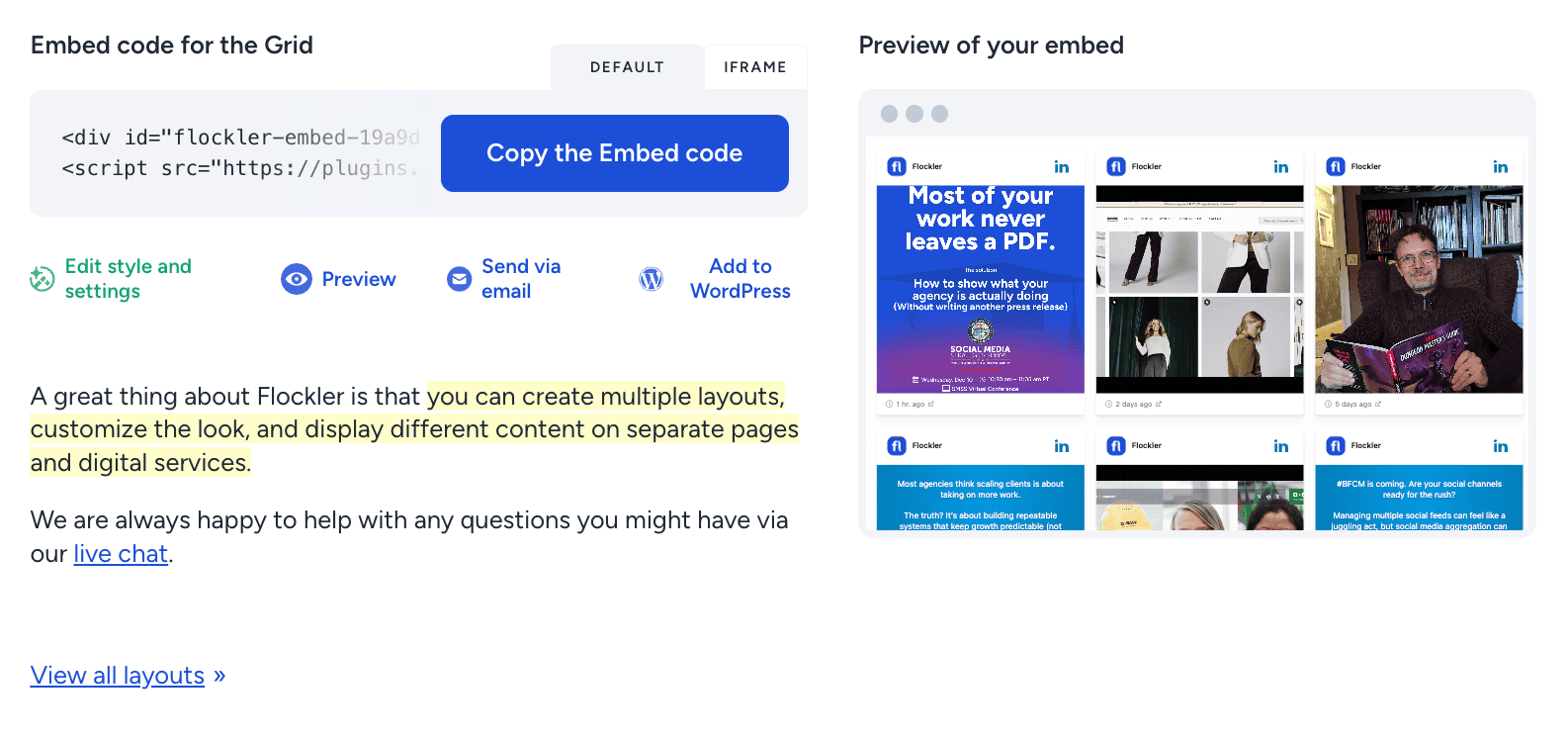
Adding Flockler to Shopify requires no coding. The process takes a few minutes:
- Copy the embed code from Flockler's Display tab
- In Shopify Admin, go to Online Store > Themes > Actions > Edit Code
- Create a new section (e.g., "flockler") and paste the embed code
- Edit the relevant template file (index.json for homepage, product.json for product pages) to position the feed
You can also add Flockler via drag-and-drop page builders such as Shogun, PageFly, or GemPages, using a custom HTML block.
Best Places to Add Social Proof on Your Shopify Store
Where you place social proof matters just as much as what you display. Here are the placements that drive the most impact.
Homepage
Your homepage shapes first impressions. A social wall or grid of customer photos, influencer posts, and UGC gives new visitors immediate proof that real people enjoy your products. Ekoi, a cycling gear brand, uses a Flockler Instagram feed on its homepage to keep visitors browsing longer.
Product Pages
This is where buying decisions happen. A carousel of customer photos showing a specific product in use addresses hesitations about fit, color, or quality. Shoppable feeds on product pages also help visitors discover related items.
Collection Pages
Collection pages group similar products together. A social proof feed filtered by relevant hashtags or product categories shows those products in everyday settings. This adds context that product photography alone cannot provide. For example, a "Summer Collection" page featuring customers wearing your seasonal items gives shoppers a realistic preview of how those pieces look and fit in daily life.
Dedicated Social Shop Page
Some Shopify stores create a standalone "Shop the Look" or "Community" page with a full shoppable UGC gallery. This creates a browsing experience more akin to social media, where visitors scroll through real customer content and shop simultaneously. It works particularly well for fashion, home decor, and lifestyle brands where visual inspiration drives purchasing behavior.
Flockler Pricing for Shopify Stores
Flockler's pricing is based on the number of active feeds (content sources), not page views or widgets. All plans include unlimited layouts, page views, and users.
Current pricing (billed annually):
- Basic: $110/month, 8 feeds
- Business: $195/month, 15 feeds
- Pro: $325/month, 30 feeds
- Premium and Agency: Custom pricing for larger needs
Monthly billing is available at slightly higher rates. All plans support Shopify integration and a widget with no extra charges for embedding on multiple pages.
Flockler offers a 14-day free trial with access to Basic plan features. No credit card is required.
For stores that mainly need Instagram UGC and Google Reviews, the Basic plan covers most use cases. If you run multiple hashtag campaigns or need Garde AI moderation, the Business plan or higher is a better fit.
Step-by-Step: Setting Up Flockler on Shopify
Here is the full setup process:
- Sign up for a free trial at flockler.com. No credit card needed.
- Create your first feed by choosing a social platform and connecting your account or entering a hashtag.
- Select a layout by choosing a Social Wall, Grid, Carousel, or Slideshow, then customize the design.
- Set up moderation. Choose manual, automated, or Garde AI moderation.
- Copy the embed code from the Display tab.
- Paste the code into Shopify through the theme editor or your preferred page builder.
A basic feed takes only a few minutes to set up. Adding shoppable product tags takes slightly longer since you need to connect your Shopify store and tag individual posts.
Make Customer Content Work Harder on Your Shopify Store
Most Shopify stores already have customers posting about their products on social media. That content sits on Instagram, TikTok, and Google Reviews, where it helps some shoppers, but it never reaches the ones browsing your product pages.
Bringing that content onto your store closes the gap between social engagement and on-site conversions. The setup with Flockler takes a few minutes, requires no coding, and works on any Shopify page. You can start with a 14-day free trial to test it on your own store.
FAQs
Does Flockler Work With All Shopify Themes?
Yes. Flockler uses standard embed codes that work with any Shopify theme, including Dawn, Prestige, Impulse, and custom themes. It also works with page builders like Shogun, PageFly, and GemPages.
Can I Combine Content From Multiple Platforms in One Feed?
Yes. You can mix content from Instagram, TikTok, YouTube, Google Reviews, Facebook, and other platforms into a single feed. This creates richer social proof than showing content from only one channel.
How Often Does the Feed Update?
Flockler refreshes automated feeds every 5 to 15 minutes. New social media posts appear on your Shopify store without any manual updates.
Can I Request Permission to Use Customer Content?
Yes. Flockler includes a UGC rights management feature that allows you to request usage rights and track approvals. This helps you stay compliant when repurposing customer content beyond your website.
Does Flockler Affect Shopify Store Speed Page Speed?
Flockler feeds the load asynchronously, so it doesn't block the rest of your page from rendering. This keeps your store performance consistent even with multiple embedded feeds.
Maria Prakkat is a SaaS content marketing and SEO strategist with experience across SEO, GEO, and social media aggregation. She writes in-depth, research-backed content that helps businesses understand and apply solutions like social media aggregators, UGC platforms, and content distribution tools to improve visibility and engagement. Her work focuses on clarity, relevance, and long-term impact.
Une infrastructure sociale qui évolue avec vous.
Commencez votre essai gratuit ou laissez-nous vous montrer la plateforme en action.



