

March 3, 2026
How to Use a Social Media Management API to Automate Content Feeds
X Minute gelesen

Soziale Infrastruktur, die mit Ihnen skaliert.
Starten Sie Ihre kostenlose Testversion oder lassen Sie sich von uns die Plattform in Aktion zeigen.
Your brand and customers' posts across Instagram, LinkedIn, TikTok, Facebook, and X. All that content lives on separate platforms, each with its own API, authentication flow, and rules.
Now imagine you need all of it on your website, your office lobby screen, your company intranet, and a live event wall. One way to make this happen is to connect and integrate with each platform’s API individually. With over 5.66 billion people on social media worldwide, managing content across channels through individual platform APIs is no longer practical. The most effective alternative is to use a social media management API.
It connects your application to multiple platforms through a single integration and displays content wherever your audience is. This is one of the best ways to engage with your existing and new customers at different touchpoints. We’ll explore how these Social media engagement APIs work, what features to evaluate, and how to set one up for your team.
What Is a Social Media Management API?
A social media management API lets your application pull content, analytics, and engagement data from multiple social platforms through one connection. It handles authentication, data formatting, pagination, and rate limits behind the scenes, so your team does not need to manage those for each network separately.
There are two types worth knowing about.
1. Platform-Native APIs
They come directly from social networks. Instagram has the Graph API. X has the v2 API. YouTube, TikTok, and LinkedIn each have their own. These give you access to the features of a specific platform, such as publishing posts, pulling analytics, or managing comments.
2. Unified APIs
These work differently. They sit between your application and multiple platforms, returning content from Instagram, TikTok, X, YouTube, LinkedIn, Facebook, and others in a single, consistent format. You build one integration. The provider handles the back-and-forth with each platform on your behalf.
For teams that need content from several channels displayed across multiple touchpoints, unified APIs save development time from the start and reduce maintenance later. When Instagram changes its API structure (which it has done multiple times since 2020), the provider handles the update. Your setup stays the same.
Why Use a Social Media Management API
These APIs do much more than simply create social media walls. Here is what drives adoption across marketing, content, and development teams:
Bringing Content Together From Multiple Platforms
Brands run hashtag campaigns on Instagram, post product demos on TikTok, share company updates on LinkedIn, and collect customer reviews on Google. A social media management API brings all of this content into one place through a single connection. From there, marketing teams can curate it for specific campaigns, filter by tag or channel, and push it to any digital touchpoint they need.
Showing Social Content Across Websites, Signage, Intranets, and Events
Social content has real value beyond the platforms where it starts. Retailers put user-generated content (UGC) on product pages to build buyer trust. Universities show student stories on admissions pages. Event organizers run live social walls during conferences. Corporate teams share the latest brand content on their SharePoint intranet.
A social media management API delivers content in a structured way that works across all of these environments: websites, mobile apps, digital screens in retail stores, kiosk displays, email templates, and event projections.
Tracking Social Media Engagement Across Channels
The social media analytics market is projected to reach $24.42 billion by 2031 at a 17.42% CAGR. This growth underscores the importance of cross-platform engagement tracking for marketing and business teams. But logging into each platform to check performance is slow and time-consuming.
A social media engagement API with analytics features lets you track the engagement of your social media walls and understand which campaign is driving the most or least engagement.
Keeping Content Brand-Safe With Automated Moderation
When you pull in UGC from public hashtags or brand mentions, not every post will be relevant or appropriate. Reviewing each one manually works when volumes are low. At scale, it slows everything down. The best social media management APIs include AI-powered content filtering or moderation. This means keyword blocking, spam detection, and approval workflows that keep your feeds clean without constant manual effort.
Key Features to Look for in a Social Media Management API
Not all APIs offer the same capabilities. If you’re evaluating options, these features are important to consider:
- Multi-platform coverage so you can aggregate content from major networks in one integration
- Content moderation and filtering to keep feeds relevant and brand-safe (AI-powered is a plus)
- Analytics and engagement tracking to measure performance across touchpoints
- Ready-made templates or layouts for quick launch
- Bulk feed management for multi-location brands and agencies
- Reliable uptime and version stability to prevent display disruptions
- Secure authentication, such as API keys and access controls
This checklist helps your team avoid switching tools later as requirements grow.
How Flockler's Content API Works
Flockler is a social media aggregation platform that brings content from multiple networks into one place and offers an API to automate how it’s displayed and managed.
Flockler's Content API is only available on Premium and Agency plans. Authentication uses an API key created in Flockler settings.
Once authenticated, the API supports:
- Fetching published posts from any feed with versioned, paginated requests
- Creating new feeds for Instagram, Facebook, X, Pinterest, and RSS via POST endpoints
- Filtering content by platform, tags, and sections
- Deploying bulk feeds at scale
Teams that prefer a no-code setup can use Flockler's automatic embed codes and layouts (available even during the free trial). Both the API and no-code paths draw from the same feed data. Developers and content managers can work in parallel without duplication.
Full documentation is available at developers.flockler.com/api.
Flockler API Setup: Step-by-Step
Here are the exact steps to get you started with Flockler’s Content API:
Step 1: Sign Up and Connect Your Social Sources

Start with Flockler's 14-day free trial at flockler.com. No credit card is required.
After signing up, connect your social accounts from the Sources section. Flockler supports 13+ platforms, including Instagram, LinkedIn, X (formerly Twitter), YouTube, Facebook, Google Reviews, TikTok, Pinterest, Bluesky, RSS, Custom Reviews, and more.
Set up at least one live-updating feed. Configure it to collect content by hashtag, handle, keyword, or brand page, depending on what you want to surface.
Note: The API isn’t available on the free trial. You can test the platform at this stage and even make feeds live using the embed codes.
Step 2: Generate an API Key
To use the API, you need to upgrade your plan. You can contact the Flockler team to discuss the best pricing for you. Once you have upgraded, go to your Flockler settings and create an API key. This key authenticates all Content API requests. You will also need your Site UUID, which is visible in the top left corner of your Flockler account. Both values are used in every API call you make.
Step 3: Fetch Your Content via the API
Send a GET request to the Feeds API endpoint, passing your Site UUID and API key. Specify which platforms you want to pull from using service filters. Remember, the API returns only published posts. Content that is hidden or waiting in the moderation queue is excluded.
Step 4: Filter Content by Platform, Tag, or Section
Use query parameters to narrow results by platform, tag, or section. This is useful when you need different content for different locations. For example, you can show TikTok and Instagram content on a product page while pulling LinkedIn posts for an intranet page, all from the same Flockler account. No duplicate setup is needed.
Step 5: Create and Manage Feeds Programmatically
On Premium and Agency plans, you can create new feeds via API endpoints without using the Flockler UI at all. Each POST request creates one feed, specifying the feed type, moderation setting, and source attributes.
Teams can script and automate this process to programmatically create and deploy hundreds of feeds across campaigns, locations, or clients. Programmatic feed creation is supported for Instagram, Facebook, X (Twitter), Pinterest, and RSS.
This is what makes Flockler practical for multi-location brands, global campaigns, and agencies managing many clients. You update all feeds the moment a campaign changes, across every touchpoint, without having to manually touch each one.
Step 6: Embed Content Across Your Digital Properties
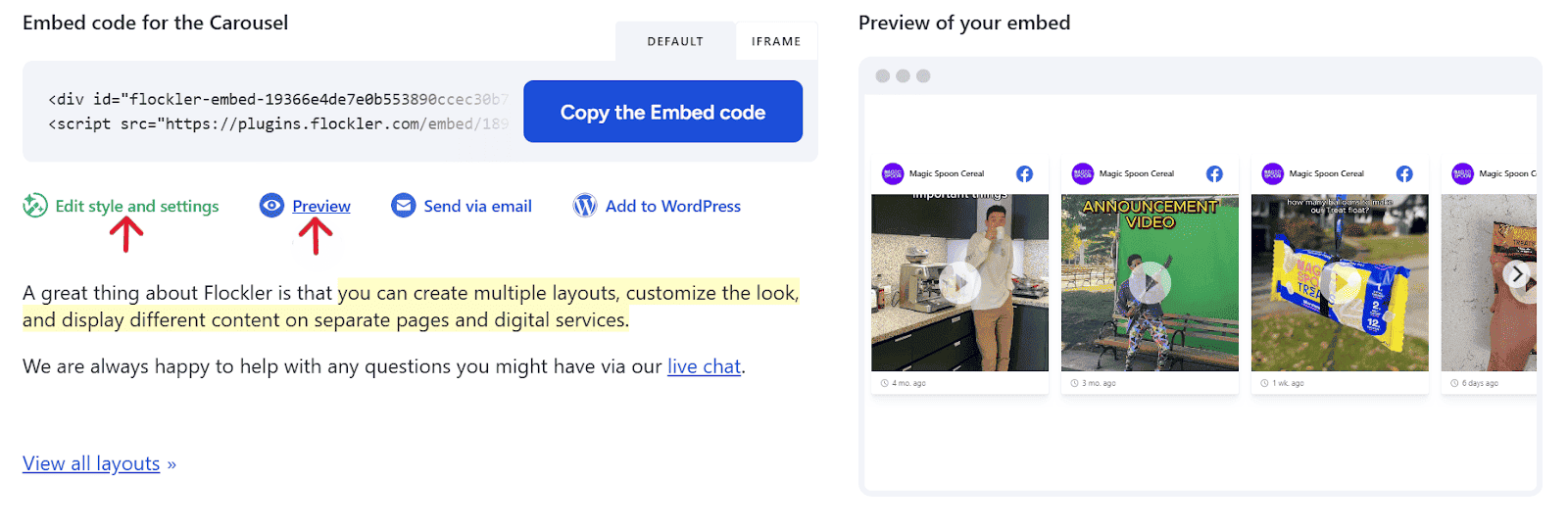
For teams that do not need full API control, Flockler generates embed codes automatically from the Display tab. Select a layout (Wall, Grid, Carousel, or Slideshow), customize the design with CSS, and paste the generated code wherever you need it. You can embed on websites, SharePoint intranets, digital signage screens, event pages, or mobile apps. There are no page view limits on any Flockler plan.
Where Can You Use a Social Media Management API
The value of a social media management API scales with the number of locations where social content needs to appear. These are some of the most common places where a social media feed is shared using a social media management or content API:
Websites and Product Pages

Embedding social feeds on websites, especially product pages, adds real customer content to the purchase decision. For instance, e-commerce brands use Flockler's API to pull UGC from Instagram and TikTok directly into product galleries. The feed updates automatically, keeping posts current without curation overhead. Flockler also supports shoppable UGC galleries, where products are tagged to embedded posts and linked directly to the product page.
Events and Live Activations

Event teams use social walls to display attendee posts in real time during conferences, award ceremonies, and activations. By filtering by a campaign hashtag, teams pull posts from X, Instagram, and LinkedIn and display them on venue screens or embed them on the event page.
Digital Signage

Retail locations, corporate offices, campuses, and airports use digital signage to display brand content and community posts on screens. A social media management API enables this without manual updates. Content teams configure the sources and moderation rules once. Screens then pull fresh content automatically during the configured refresh cycle, with no page-view restrictions.
Intranets and Internal Platforms
Organizations embed social feeds on intranets to share employee advocacy content, company announcements, and culture posts. Social media aggregators like Flockler integrate with internal platforms, including SharePoint. For large organizations such as multi-academy trusts managing dozens of schools or enterprises, this means aggregating multiple social outputs and displaying them across the broader internal network.
Agencies Managing Multiple Clients
Agencies managing social aggregation across many clients need centralized control without losing client-level customization. Flockler's Agency plan provides a unified dashboard for managing multiple organizations from one account, with unlimited user management and flexible source reassignment. When a campaign ends, the source slot can be reassigned to a new client and historical content continues to display without requiring a live-updating source.
Final Thoughts
Social content moves fast, but most workflows around it are still slow. When feeds are automated and centrally controlled, teams can respond to moments as they happen instead of trying to catch up. With a Social Media Management API, you can launch campaigns faster, make live events feel truly live, and bring fresh customer voices to every touchpoint without extra effort.
When the flow of content is reliable, teams gain the freedom to experiment, adapt, and scale what works.
FAQs
How Is a Social Media Management API Different From a Social Media Aggregator Tool?
A simple social media aggregator tool typically only provides ready-made widgets and dashboards for displaying feeds. A social media management API goes a step beyond and gives developers full programmatic control to fetch, filter, and deploy content across websites, apps, signage, and internal systems. Teams that need automation, customization, or large-scale deployment usually choose the API approach.
Do I Need Development Resources to Use Flockler’s API?
Yes, API implementation requires developer involvement for authentication, requests, and integration. However, content teams can still manage sources, moderation, and feed structure inside Flockler’s dashboard. For teams without developer support, embed codes and layout options provide a no-code alternative that uses the same feed data.
Can I Moderate or Filter User-Generated Content Before It Appears?
Yes. Flockler includes moderation workflows and automated filtering to keep feeds relevant and brand-safe. You can approve posts manually, block keywords, remove spam, or filter by tags and sources before content is published to your displays.
What Happens to My Feeds if a Social Source Is Disconnected?
Previously collected content remains visible in your feeds even if a source disconnects or a campaign ends. This lets you preserve historical content while reassigning source slots to new campaigns or clients.
Maria Prakkat is a SaaS content marketing and SEO strategist with experience across SEO, GEO, and social media aggregation. She writes in-depth, research-backed content that helps businesses understand and apply solutions like social media aggregators, UGC platforms, and content distribution tools to improve visibility and engagement. Her work focuses on clarity, relevance, and long-term impact.
Soziale Infrastruktur, die mit Ihnen skaliert.
Starten Sie Ihre kostenlose Testversion oder lassen Sie sich von uns die Plattform in Aktion zeigen.



