

March 23, 2026
What Is a UGC Embed Widget and How to Use It on Your Website
X minute de lecture


Une infrastructure sociale qui évolue avec vous.
Commencez votre essai gratuit ou laissez-nous vous montrer la plateforme en action.
Real customer content converts.
Product photos taken by actual buyers, reviews from verified customers, and Instagram posts tagging your brand all carry a level of trust that branded content struggles to match. A UGC embed widget takes scattered content and brings it onto your website as a live, automatically updating feed. You connect your sources, pick a layout, and embed a short code snippet. The feed does the rest.
For marketing teams looking to collect and display UGC across websites, e-commerce stores, or event screens, the right widget makes the process manageable. This article explains how it works, where to place it for best results, and what to look for in a platform.
What Is a UGC Embed Widget?
A UGC embed widget is a piece of code you add to your website that automatically pulls in and displays user-generated content from one or more sources. The content updates automatically, so your pages stay current without manual uploads.
The "embed" part refers to how the widget is placed. You copy a short snippet of code, paste it into your website's HTML or CMS, and the feed appears. Most platforms generate this code for you after you connect your social accounts and choose a layout.
UGC in this context typically includes:
- Customer photos and videos from Instagram, TikTok, or Facebook
- Product reviews and star ratings
- Hashtag campaign posts from X (Twitter), LinkedIn, or Bluesky
- YouTube videos mentioning your brand
- Google Reviews and custom review forms
The widget displays this content in formats like grids, carousels, walls, or slideshows. You control what gets shown through moderation settings.
Why Brands Use UGC Embed Widgets
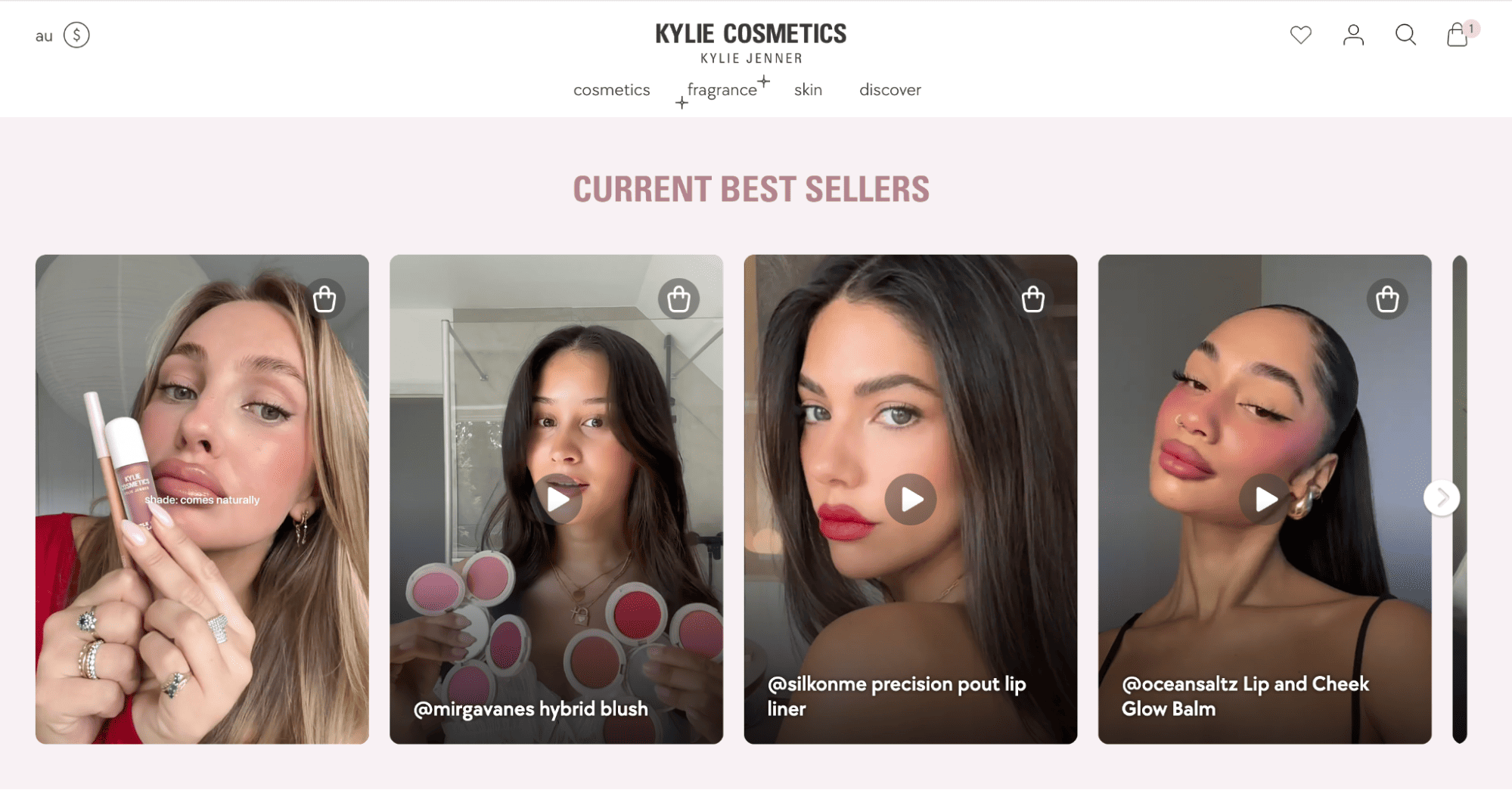
Brands use UGC because customers trust them. Around 84% of people are more likely to trust a brand when it features real customers in its marketing. That trust carries directly into purchasing decisions. Brands using UGC see 29% more web conversions compared to campaigns without it, and 79% of people say UGC influences their buying decisions.
Embedding UGC also solves a practical content problem. Running an active website or e-commerce store means you constantly need fresh, relevant visuals. Pulling from real customer content gives you a steady stream of on-brand material without relying entirely on your own production schedule.
There are a few specific scenarios where UGC embed widgets deliver clear results:
- Product pages: Showing real customer photos next to product descriptions gives shoppers context they can trust. A shopper comparing two similar items is more likely to convert when they can see how one looks on actual people or in real homes.
- Event pages and social walls: Displaying live hashtag feeds during conferences or product launches gives audiences a reason to post and keeps your event coverage up to date in real time.
- E-commerce stores: Shoppable UGC galleries let you tag products directly within customer posts, turning Instagram content into a browsable storefront.
- Digital signage: Brands running screens in retail spaces, stadiums, or corporate offices can display live social feeds, keeping content rotating without manual updates.
Where UGC Performs Best on a Website
Placing a UGC embed widget anywhere on a page is not the same as placing it where it influences a decision. The location matters as much as the content itself.
Here are a few locations where a user-generated content widget works best:
- Homepage: A UGC feed on the homepage provides immediate social proof for first-time visitors. A grid of real customer photos or a live feed from a branded hashtag shows the brand is active and that real people engage with it. Keep it visually clean, so it supports the page rather than competing with your primary message.
- Product and category pages: This is where UGC has the most direct impact on conversions. Shoppers on a product page are already considering a purchase. Seeing photos or reviews from customers who already own the product removes uncertainty.
- About and brand story pages: UGC works well here to show the community rather than tell it. Instead of a copy describing how customers love your brand, you display actual posts that demonstrate it.
- Campaign landing pages: If you run a hashtag campaign, embedding a live feed on the campaign landing page keeps the page active, gives participants a reason to check back, and shows new visitors the scale of participation.
- Checkout and cart pages: A small review widget near the checkout can address last-minute hesitation. A few short testimonials or star ratings visible at the point of decision can reduce abandonment.
The right placement depends on what you want the content to do.
- Social feeds build awareness and engagement.
- Reviews and ratings drive conversions.
- Hashtag feeds reward participation and signal community scale.
Matching the content type to the page goal produces better results than placing a generic feed everywhere.
What to Look for in a UGC Embed Widget
Not all embed widgets work the same way. The difference between a basic tool and a capable platform becomes clear once you go beyond a simple Instagram feed. Here are the features worth evaluating before you commit:
Platform Support
The more social channels and content sources a widget supports, the more flexible your UGC strategy can be. At a minimum, look for Instagram, Facebook, TikTok, YouTube, LinkedIn, and X. Platforms such as Google Reviews, Pinterest, Bluesky, and RSS feeds provide meaningful coverage for different use cases.
Also, check how the platform treats each source. Some tools list a wide range of platforms but only pull limited content types from each. TikTok is a common example. Many platforms restrict TikTok to your own account posts and do not support hashtag feeds, which matters if hashtag campaigns are part of your plan.
Moderation Controls
Displaying user content on your website means accepting some level of unpredictability. Good platforms give you multiple ways to moderate or manage this: manual approval queues, automated keyword and user blacklists, and AI-powered moderation that flags content before it reaches your pages.
For high-volume hashtag campaigns or always-on feeds, manual review at scale is not practical. AI moderation becomes necessary rather than optional.
Layout Options and Customization
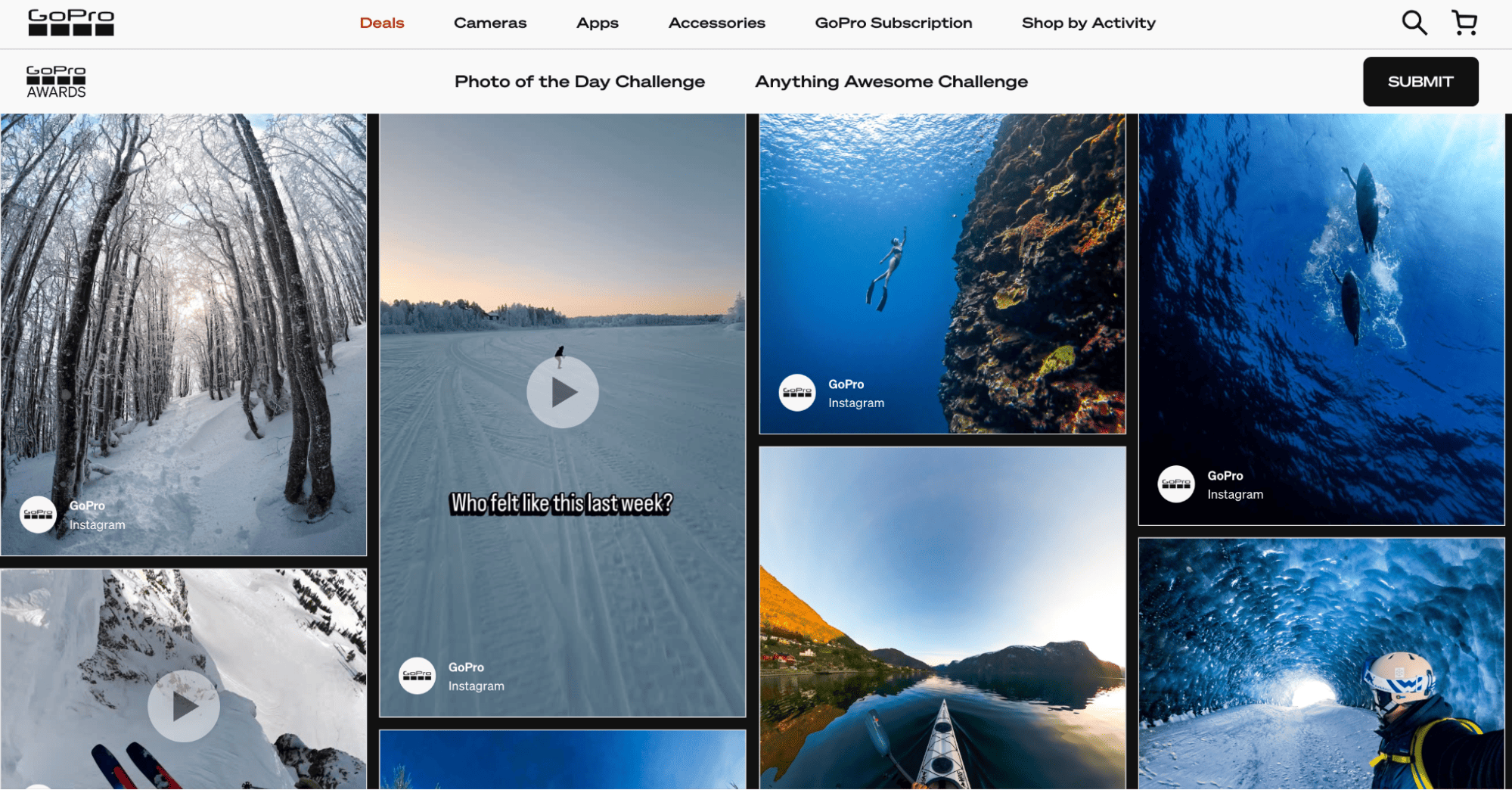
A UGC embed widget should match your site's design. Look for multiple layout formats (wall, grid, carousel, slideshow) and the ability to adjust colors, fonts, and spacing to fit your brand. Some platforms limit the number of widgets or layouts you can create per plan, which can become restrictive quickly if you run content across multiple pages or campaigns.
If you want company-level customization and API access, make sure the platform supports it, even if you do not need it yet. This prevents you from switching platforms as your needs grow.
Display Destinations
Websites are the obvious destination, but strong platforms also support digital signage, mobile apps, intranets, email newsletters, and event screens. If you plan to expand UGC beyond your homepage, check whether those destinations fall under the same subscription or require separate plans.
Rights and Compliance
Using customer content publicly requires correct permission handling. Look for platforms that support rights management workflows so you can request and document approval from the original creator before reposting. GDPR compliance and accessibility standards such as WCAG and EAA alt text requirements are also worth confirming, particularly if your audience is in the EU.
How to Collect and Display UGC with Flockler
Flockler is a social media aggregator and UGC platform that covers the full workflow: pulling content from 13+ social platforms, moderating it, and displaying it through a UGC embed widget on any digital surface. It is used by over 2,000 brands, including Harvard University, GoPro, and Oxford University.
The setup is straightforward. Here’s how it works:
Step 1: Connect Your Sources

Flockler offers a 14-day free trial with no credit card required. During the free trial, you get all the features of the Basic plan. Once you sign up, connect the social media accounts or platforms you want to pull from. You can configure feeds by username, hashtag, keyword, or mention. Each configuration uses one source slot.
Step 2: Choose Your layout

Flockler offers four display formats: Wall, Grid, Carousel, and Slideshow. You can create unlimited layouts from a single content source. That means a grid on your product page and a carousel on your homepage can both pull from the same feed. There is no limit on layouts or on the number of websites where you embed them.
Step 3: Set Up Moderation
You can review all content before it goes live, hide posts at any time, and create blacklists for specific users or keywords. From the Business plan upward, Garde AI handles automated moderation, flagging irrelevant or brand-unsafe content before it reaches your feed.
Step 4: Generate and Embed the Code
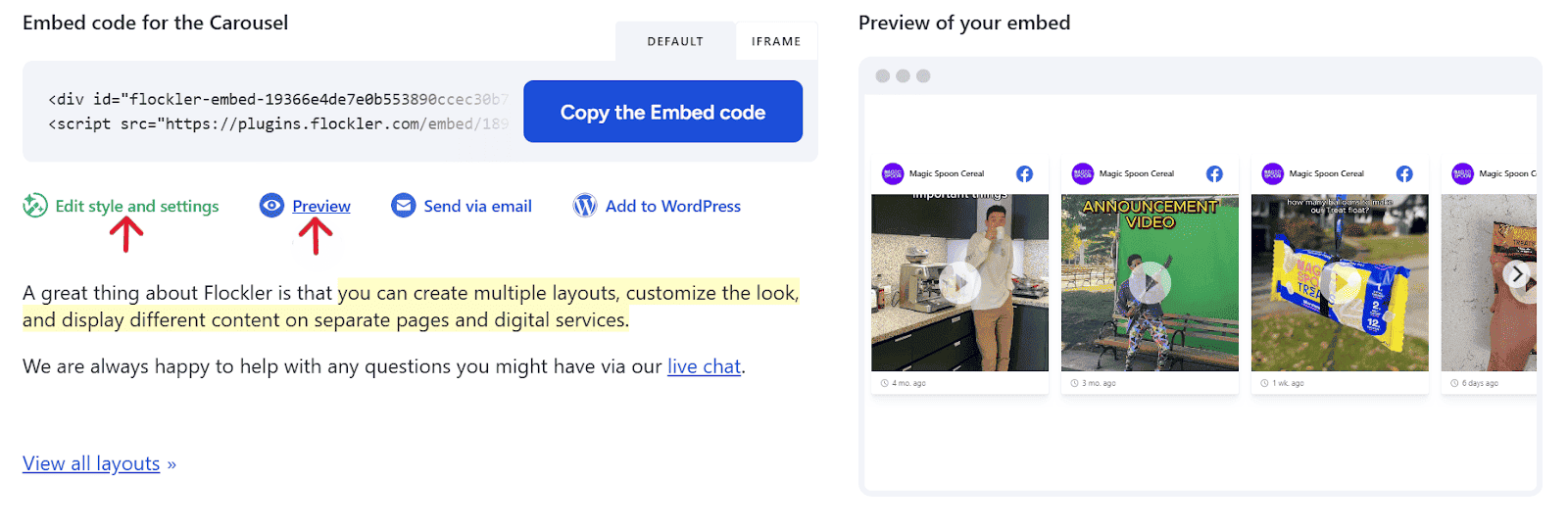
Flockler generates an embed code that works with any CMS. Paste it where you want the widget to appear. Standard setups need no developer. For WordPress users, Flockler offers a dedicated WordPress widget that makes installation even simpler. Teams that need deeper visual control can apply custom CSS, available as part of the Content API on Premium and Agency plans.
Step 5: Go Live and Monitor
Feeds update automatically every few minutes by default. You can pause sources at any time while keeping stored content visible, which is useful for seasonal campaigns or past events.
Flockler Features Worth Knowing
Flockler offers many features that make it an ideal platform for brands to use as a social media feed widget. Here are some of them:
- Shoppable UGC galleries: With the Commerce add-on, you can tag products from any webshop directly to Instagram feeds and create shoppable galleries on your homepage or product pages. No developer skills required.
- Custom review collection: Flockler's Customer Reviews service lets you collect text, images, star ratings, and contact details through forms on your website. This sits separately from pulling reviews from Google or Facebook.
- AI-generated alt text: Flockler automatically generates alt text for feed images to meet WCAG and EAA accessibility standards. From June 2025, EU businesses must comply with the European Accessibility Act.
- Rights management: You can request permission to reuse customer content directly through the platform, keeping your documentation in one place.
Flockler Plans and Pricing
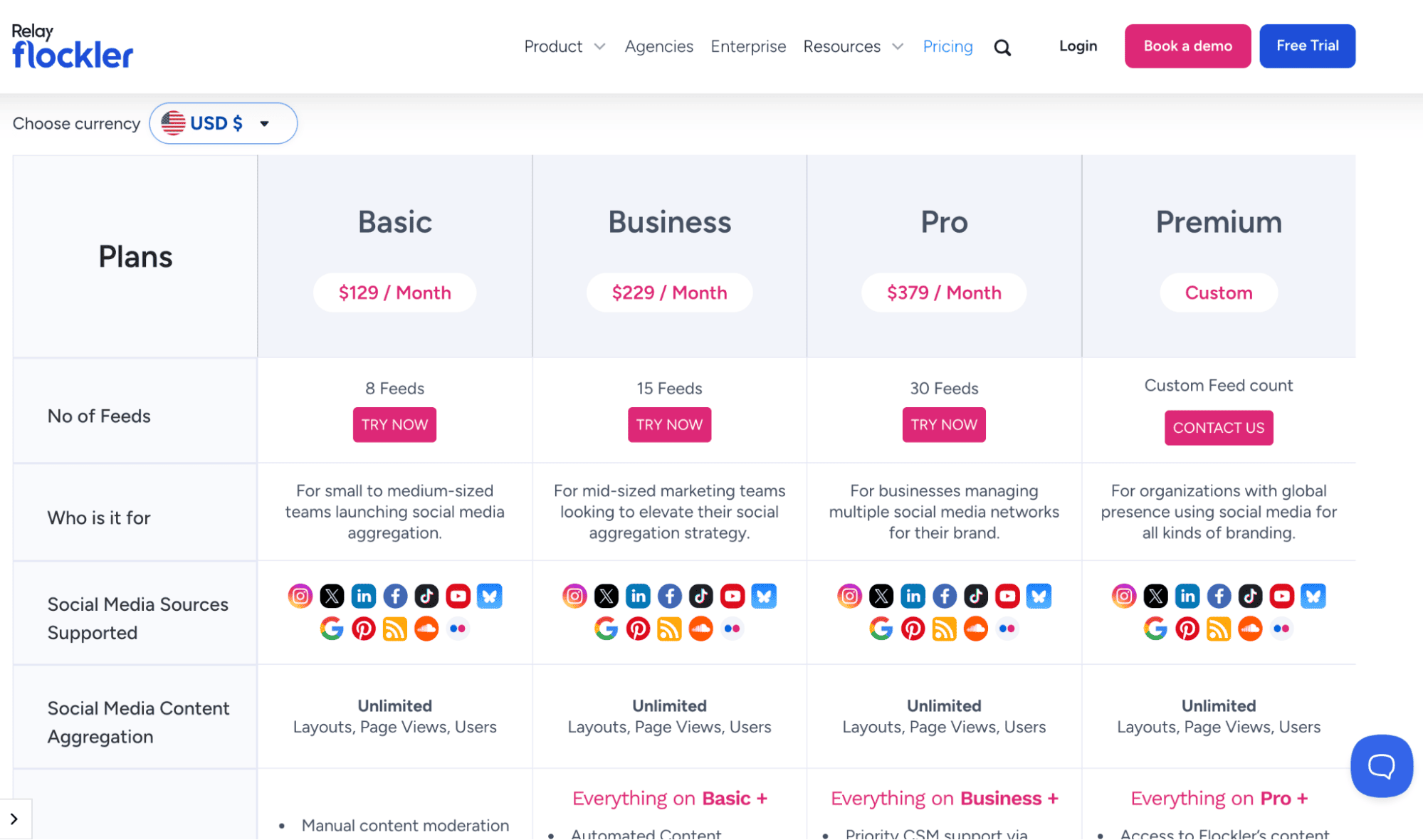
Flockler prices by active feed count, not by the number of widgets or page views. The Basic plan includes up to 8 feeds, the Business plan up to 15, the Pro plan up to 30, and the Premium plan comes with a custom feed count. Flockler Agency plans to suit larger-scale needs. Pricing starts at $129/month (monthly, if annual, it is $110/month). The 14-day free trial requires no credit card and gives you full access to the Basic plan features.
The Content API sits on Premium and Agency plans only. The free trial does not include the Content API. However, you can create unlimited layouts and embed them across unlimited websites and domains on any plan.
Final Thoughts
A UGC embed widget puts real customer content where it can do the most work. The setup is straightforward. You get more trust, better engagement, and stronger conversions by choosing the right platform and placing content where it actually influences decisions. If you want to collect and display UGC without managing multiple tools, Flockler is worth a look. You can start with the 14-day free trial and see how it fits your workflow.
FAQs
Do I Need a Developer to Set Up a UGC Embed Widget?
No. Platforms like Flockler generate embed codes that work with any CMS. You paste the code where you want the widget to appear, and the feed goes live. Flockler also offers a dedicated WordPress widget for even simpler installation. Custom CSS is available on Premium and Agency plans for teams that need deeper visual control.
Which Social Media Platforms Does Flockler Support?
Flockler supports 15+ platforms, including Instagram, TikTok, Facebook, YouTube, LinkedIn, X (Twitter), Pinterest, Bluesky, Google Reviews, RSS feeds, Flickr, and SoundCloud. You can also collect content through custom forms and QR codes directly on your website.
Does Displaying UGC Require Permission From the Original Creator?
Embedding publicly visible social media content follows each platform's terms of service. If you want to download and reuse customer content in paid ads or other marketing materials, you need explicit permission from the creator. Flockler includes a built-in rights management feature that handles requests and stores approvals in one place.
Can I Use a UGC Embed Widget on Shopify or WordPress?
Yes. Flockler's embed code works across Shopify, WordPress, Squarespace, Webflow, and most other popular platforms. For WordPress users, Flockler also offers a dedicated widget that further simplifies the installation process.
Maria Prakkat is a SaaS content marketing and SEO strategist with experience across SEO, GEO, and social media aggregation. She writes in-depth, research-backed content that helps businesses understand and apply solutions like social media aggregators, UGC platforms, and content distribution tools to improve visibility and engagement. Her work focuses on clarity, relevance, and long-term impact.
Une infrastructure sociale qui évolue avec vous.
Commencez votre essai gratuit ou laissez-nous vous montrer la plateforme en action.



