

March 23, 2026
What Is a User Generated Content API and How Does It Work?
X minute read


Social infrastructure that scales with you.
Start your free trial, or let us show you the platform in action.
If your team is exploring how to display customer photos, social posts, or reviews programmatically, you will come across the term ‘user generated content API’ fairly quickly.
The concept is simple.
A UGC API is an interface that lets your application request, receive, and display content created by real users, across your websites, apps, digital screens, and other marketing surfaces. When you use an API, you don’t need to build these connections from scratch.
Brands that use UGC well see real results. Websites that feature user-generated content see around 29% more conversions than those that do not. In this blog post, we’ll see how it works technically, how to set up one for your brand, and when it makes sense to use one versus building your own integrations.
How a User Generated Content API Works

A user generated content API sits between your website or application and the social platforms your customers use. Instead of connecting to Instagram, TikTok, YouTube, and other platforms individually, your application sends requests through a single API layer that handles everything upstream.
Here is the basic flow:
1. Content Collection
The API pulls posts automatically from connected sources. These can include social accounts, hashtag feeds, Google reviews, and custom submission forms. New content appears as it is published, with no manual importing needed.
2. Content Moderation
Content goes through a moderation layer before it becomes available via the API. Only posts you have approved and set to a published state are returned. Hidden or pending content never surfaces in your feed.
3. Content Delivery
Your application queries the API endpoint and receives clean, structured data ready to render. Your development team controls the layout, design, and interaction logic entirely.
The API does not provide any content that is hidden or waiting for moderation. It returns only content set to the published state. This matters because your application receives already-curated content, not raw, unfiltered social data that your front-end would otherwise need to sort through.
Why Not Connect Directly to Each Social Platform?
Many teams consider building their own direct integrations with Instagram, TikTok, YouTube, and other platforms. Most platform APIs are publicly documented. In theory, the approach seems reasonable.
But in practice, the ongoing maintenance creates real overhead.
Authentication across multiple platforms: Every platform manages login and permissions differently. Instagram requires a Facebook App review before you can access business account data. LinkedIn and TikTok have separate approval processes. YouTube uses API keys with usage quotas. Access tokens expire on different schedules, and each one needs refresh logic. Managing all of this across five or six platforms adds complexity that grows over time.
Rate limits and content gaps: Each platform imposes limits on how often you can request data. Instagram's Graph API enforces strict per-app and per-user limits. YouTube's Data API allocates a set number of daily request units, and a single misconfigured polling interval can exhaust them within hours. When limits are exceeded, your feed stops updating, and visitors see stale or missing content.
Frequent platform changes: Social platforms update their APIs regularly. When X (formerly Twitter) restructured its entire API pricing model in 2023, teams with direct integrations had to rebuild their integrations quickly or risk losing access. Every breaking change requires your engineering team to investigate and respond.
Different data structures across platforms: A TikTok video, an Instagram carousel, and a Google Review each return data in a different format. Converting that into a consistent structure that your website can display requires custom development that your team must maintain as platforms evolve.
A social media feed API handles the full pipeline, including collection and moderation, then hands off clean data for your team to build with. For most teams, that is a more practical and cost-effective path than maintaining separate platform connections.
What You Can Build with a UGC API for Websites
A user generated content API gives development teams the much-needed flexibility that standard embed widgets cannot match.
Here are the use cases where the API approach makes the most sense:
Custom Product Page Galleries
Pull customer photos from Instagram and TikTok that tag your products and display them directly on product pages. Your design team controls the layout completely. The API supplies the content. UGC influences the buying decisions of 79% of people, and real customer photos on a product page are considerably more persuasive than brand photography alone.
Multi-Surface Content Deployment
The same API can power your website, mobile app, in-store digital displays, and internal company intranet simultaneously. Each surface gets its own layout built by your team, while all of them pull from the same moderated content source. This is particularly useful for retail brands that want consistent UGC across online and physical touchpoints.
Enterprise-Scale Feed Management
Large organisations often need to manage content feeds across hundreds of pages, product categories, regional websites, or franchise locations. Using API endpoints, you can create and manage feeds programmatically without relying on a dashboard interface. Flockler’s Content Feed API, for instance, is a good example of social media APIs for enterprise-scale use cases where automation and scalability are essential.
Integration With Existing Website Platforms
Teams building websites on custom platforms or content management systems can pull UGC through the API and display it anywhere on their site, rather than being limited to where an embed code can be pasted.
Live Event and Digital Signage Displays
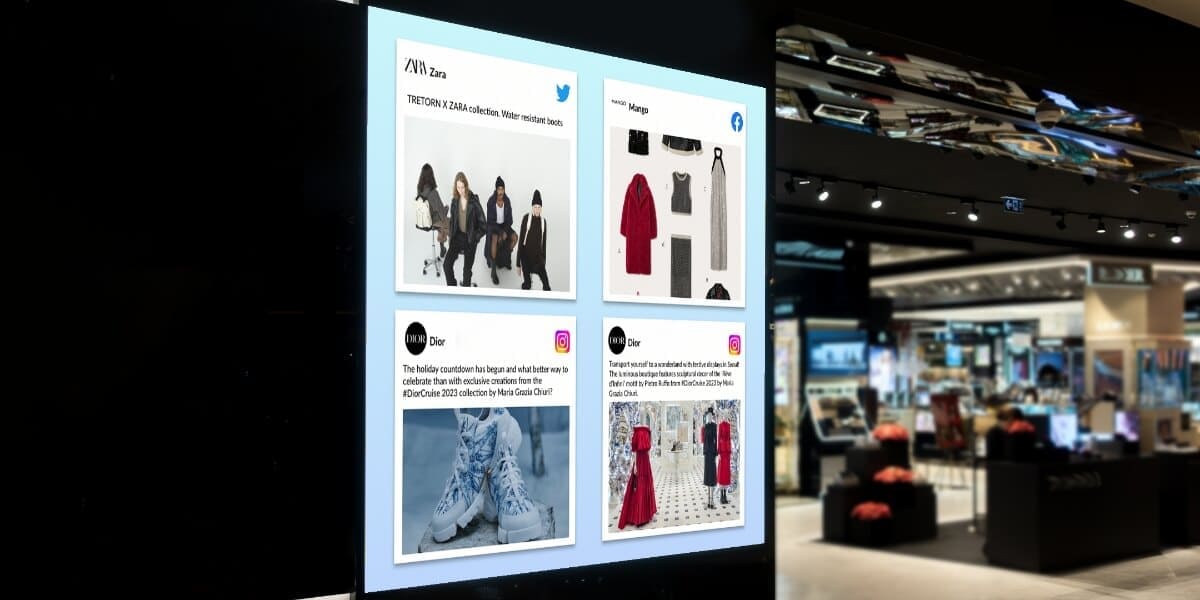
Event teams use UGC APIs to pull social posts tagged with a campaign hashtag and display them on large screens in real time. Content updates automatically as attendees post, with no manual refresh needed.
Setting Up Flockler's User Generated Content API
Flockler is a social media aggregation platform trusted by over 2,000 brands worldwide, including GoPro, Harvard University, and more. It collects, moderates, and displays UGC from 13 or more social platforms in one place. Flockler's Content API gives your development team access to that moderated, structured UGC through a single endpoint.
Here is how to get it running:
Step 1: Create a Flockler Account
Sign up at flockler.com and start the 14-day free trial. This gives you access to all Basic plan features so you can explore feed creation and moderation settings before committing to a plan.
Note: The Content API is not available during the free trial. You will need to upgrade to a Premium or Agency plan to access it.
Step 2: Connect Your Social Media Sources

In the Flockler dashboard, connect the platforms and accounts you want to pull content from. Supported sources include Instagram, Facebook, X (Twitter), TikTok, YouTube, LinkedIn, Pinterest, Google Reviews, Bluesky, and RSS feeds. You can add multiple sources from different platforms into a single feed.
Step 3: Configure Your Moderation Settings

Choose how content is approved before it becomes available through the API. You can set manual approval, where your team reviews each post before it goes live. You can also use automatic publishing with keyword filters to block specific terms. On Business plans and above, Garde AI handles moderation automatically, flagging and removing content that is offensive, irrelevant, or off-brand.
Step 4: Set up Your API
Once you upgrade, navigate to your Flockler settings to generate an API key. This key authenticates all requests your application makes to the API. You can generate and manage keys directly in your Flockler dashboard with role-based access controls.
Step 5: Query the API and Receive Your Content
Your application sends requests to the Flockler Content API endpoint using your site ID and API key. The API returns structured data for each post, including the post text, images, videos, source platform, author username and profile details, hashtags, and the date the content was published. You can filter responses by platform, hashtag, or content type to serve the right content to each specific page.
Step 6: Build your Display Layer

Use the data returned by the API to render posts in whatever layout your design team has created. You control the HTML, styling, and how content behaves on the page. The API does not impose any template or layout constraints.
Step 7: Go Live and Iterate
Deploy your feed, monitor performance, and adjust your moderation rules or source settings as needed. By default, sources update fresh content every 5 to 15 minutes.
Full developer documentation is available at developers.flockler.com.
Embed Code vs. Content API: Which One Do You Need?
Flockler offers two ways to display UGC. The right choice depends on your team's technical resources and the level of control you need over the final output.
- Embed codes work well for most teams. You connect your social accounts, choose a layout (Wall, Grid, Carousel, or Slideshow), adjust the design with CSS, and paste one line of code into your website. No developer skills are needed, and you can go live in minutes. Embed codes are available on all Flockler plans.
- The Content API is the right choice when your team needs to build a fully custom experience, integrate UGC into an existing website or app, or automatically manage large numbers of feeds. It requires a developer to implement, but gives you complete control over how content is displayed.
The API is the right choice in a few specific situations.
Use it when you want full control over the design of your social feed. It also works well when posts need to integrate with a website or app that your development team already manages the layout and behaviour for. If you want to automate or personalise content display beyond what standard layout settings allow, the API gives you that flexibility too.
Many teams start with embed codes and move to the API as their requirements grow. Flockler supports both approaches within the same account.
Flockler Plans and Pricing
Flockler's paid plans start with Basic at $129 per month for 8 feeds, Business at $229 per month for 15 feeds, and Pro at $379 per month for 30 feeds. Premium and Agency plans are available with custom pricing and include full Content API access.
A 14-day free trial gives you access to all Basic plan features with no credit card required. The trial lets you connect sources, test moderation settings, and explore embed layouts before committing to a plan.
For larger organisations with multi-brand management, high-volume feed creation, or custom support requirements, the Premium and Agency plans are designed for those needs. You can explore enterprise capabilities at flockler.com/enterprise.
Who Should Use a UGC API?
A user generated content API is the right tool for a specific set of teams and requirements. It is not always the starting point, but for certain use cases, it is the most practical option. Not sure if your team needs an embed code or API? Here’s where a user generated content API fits the most:
- Development teams building custom digital experiences: If your website or app has a design system that standard embed widgets cannot match, the API lets you integrate UGC natively without any third-party templates.
- E-commerce teams with product-level UGC requirements: Displaying tagged customer content on individual product pages, filtered by product or category, requires the query and filtering capabilities that only an API provides.
- Agencies managing UGC across multiple clients: Flockler's Agency plan supports a unified dashboard and volume pricing for teams managing feeds across many accounts. Creating feeds programmatically via the API eliminates the need to manually repeat setup work for each client.
- Enterprise organisations with multi-location or multi-brand deployments: Launching social feeds across thousands of pages, products, or locations with programmatic control is designed for multi-brand organisations, global enterprises, and e-commerce platforms that manage content at scale.
Getting the Most Out of Your UGC API
A user generated content API removes the technical complexity of managing multiple platform connections, giving your team the flexibility to display UGC exactly where and how your brand needs it.
For most teams, Flockler's embed codes are the right starting point. As requirements grow, whether that means custom layouts, deeper integrations, or managing hundreds of feeds programmatically, the Content API gives you the infrastructure to scale without rebuilding from scratch.
FAQs
What Is a User Generated Content API?
A UGC API is an interface that lets your application collect, moderate, and display content created by real users, including social media posts, customer photos, and reviews, from multiple platforms through a single integration. It removes the need to build and maintain separate connections to each platform.
Is a UGC API Different From a Social Media API?
A UGC API is built on top of social media APIs. It connects to platforms like Instagram, TikTok, and YouTube on your behalf, pulls content from all of them into one consistent format, and adds moderation and rights management on top. Rather than replacing social media APIs, it removes the need to manage each one separately.
Which Flockler Plan Includes Content API Access?
Flockler's Content API is available on Premium and Agency plans. All other plans, including Basic, Business, and Pro, include embed codes and full CSS customisation to display social feeds without custom development.
Can You Manage Feeds Programmatically With Flockler's API?
Yes. Flockler supports bulk feed creation via the API, designed for enterprise and agency use cases where large numbers of feeds need to be created and managed without the dashboard.
How Often Does Content Update Through the API?
By default, sources update fresh content every 5 to 15 minutes. For live events requiring faster refresh rates, Flockler's team can accommodate shorter intervals upon request.
Maria Prakkat is a SaaS content marketing and SEO strategist with experience across SEO, GEO, and social media aggregation. She writes in-depth, research-backed content that helps businesses understand and apply solutions like social media aggregators, UGC platforms, and content distribution tools to improve visibility and engagement. Her work focuses on clarity, relevance, and long-term impact.
Social infrastructure that scales with you.
Start your free trial, or let us show you the platform in action.



