

February 5, 2026
7 Digital Signage Content Strategies You Cannot Miss
X minute de lecture


Une infrastructure sociale qui évolue avec vous.
Commencez votre essai gratuit ou laissez-nous vous montrer la plateforme en action.
Screens are everywhere.
Retail stores, corporate offices, educational institutions, and public venues rely on digital displays to inform, engage, and guide audiences.
However, digital signage only works when the content behind it is intentional. If you fill your signage with random promotions and outdated visuals with poor copy, you won’t get the traction you need. Having a solid digital signage content strategy can fix this.
A digital signage content strategy outlines what you display, when you display it, and the results you want to achieve. Can you put up digital signage without a strategy? Yes. But will it work? Probably not. Your screens become static billboards that fail to connect with viewers.
With a structured strategy, digital displays can become powerful marketing assets.
In this blog post, we’ll walk you through the essential steps for building a content strategy that works. We will explore the best digital signage content-creation strategies and software.
Why Your Digital Signage Needs a Content Strategy
Digital signage hardware enables you to display content. A content strategy determines whether that content achieves your objectives.
Many organizations put up digital screens without a clear plan for what appears on them. The result, in most cases, is generic, repetitive messaging that viewers will either glance at or ignore.
Research shows that people spend between 1.5 and 4.6 seconds viewing digital content in passing. This brief window means your content must be catchy, clear, relevant, and purposeful.
A content strategy answers four core questions.
- First, what message do you need to communicate?
- Second, who needs to receive that message?
- Third, how to capture their attention?
- Fourth, what action should viewers take after seeing it?
Answering these questions helps prevent wasted screen time and ensures every piece of digital signage content serves a specific purpose.
7 Digital Signage Content Strategies You Cannot Miss
Most digital signage screens fail for one simple reason: the content does not change often enough or does not feel relevant to the audience. When screens repeat the same visuals day after day, they stop getting noticed.
Here are 7 strategies to keep digital signage useful, engaging, and low-effort to maintain.
1. Social Media Walls and User-Generated Content

Social media walls are among the most powerful content strategies in modern digital signage. By displaying live feeds from Instagram, Facebook, TikTok, and other platforms, you turn passive screens into dynamic and interactive displays. This approach keeps viewers hooked and encourages participation.
Benefits of social media feed walls and UGC content:
- Authentic content from real customers builds credibility more effectively than traditional advertising
- Live updates keep displays fresh without manual content creation or updates
- Hashtag campaigns encourage viewers to contribute their own content
How to implement a social media wall?
Social media walls aggregate content based on branded hashtags, account mentions, or specific profiles.
- Use Flockler's dedicated social widgets to pull in posts using specific hashtags or Google Reviews
- These tools simplify the process by automatically pulling content from multiple platforms
- Always enable "moderation" mode so you can approve posts before they go live on your screens to avoid inappropriate content
- Flockler also includes robust moderation controls to ensure brand safety. Plus, you get to customize your layouts to match your visual identity.
In retail environments, you can display customer photos and product reviews to influence purchasing decisions. In corporate settings, you can showcase employee achievements and company culture. Educational institutions use social walls to highlight student activities and build campus communities.
Event venues with digital signage typically showcase images from previous years' events and attendee posts to generate buzz and extend reach beyond in-person attendees.
2. Automated, Always-Up-to-Date Content

This is an automated strategy where content changes based on external data feeds rather than a manual schedule. This creates a "smart" environment. Another benefit is that if engagement rates drop, you can update content and continue measuring without hassle.
Common types of data-driven content:
- Weather: If it starts raining (verified via local weather API), the screen automatically switches to ads for umbrellas or hot soup (perfect for retail and restaurants)
- Transport: Displays train or bus timings, delays, and related information at stations
- Inventory: If the POS system shows you have an excess of croissants, the screens automatically promote a "50% off pastry" flash sale.
- Sales Performance: In a sales office, a screen automatically flashes a celebration video whenever a deal is marked "Closed-Won" in Salesforce or HubSpot.
Benefits of dynamic content:
- It reduces staff time spent on manual updates
- Ensures accuracy by pulling information directly from source systems
- Responds to changing conditions in real-time
- Maintains viewer interest through constantly refreshing information
The key is identifying which data sources matter most to your audience. Keep it simple and focus on information that influences decisions or provides genuine value.
3. Scheduled Content and Dayparting

Not all content makes sense all day long. Scheduling lets you display different content based on the time of day or day of the week. Instead of a single loop that repeats all day, this strategy breaks the day into "parts" (morning, noon, evening) and tailors content to the audience's mindset at each time of day.
Examples:
- 08:00 – 10:00 AM: Traffic/transit updates, weather, daytime clothing or products
- 12:00 – 02:00 PM: Canteen menus, restaurant lunch specials and offers
- 04:00 – 06:00 PM: Dinner menus, happy hour time and offers, exclusive sales and offers
This approach is especially useful in offices, retail stores, restaurants, and on campuses, where audiences and intent shift throughout the day.
Benefits:
- Increases content relevance by matching messages to audience needs at specific times
- Improves the impact of time-sensitive promotions and announcements
- Reduces viewer fatigue by changing or refreshing content throughout the day
- Improves operational efficiency by automating routine content changes
Implementation tips:
- Create content libraries organized by time segment
- Set automation rules that trigger content changes based on clock time
- Test different schedules to find optimal timing for your specific environment
4. Location-Based Content Targeting

Different screen locations serve different purposes and audiences. A screen near an entrance serves a different purpose than one near a checkout or break area. Treating every screen the same won’t reap the same benefits.
Location-based strategy examples:
- Entrance displays show sales announcements, new collections, welcome messages, and wayfinding information
- Product area screens show new offers and prices with social media content or images
- Checkout displays feature last-minute promotions and loyalty program reminders
This keeps content relevant and avoids repeating the same message everywhere.
Benefits of implementing location-based screens:
- Dramatically increases content relevance for viewers in each specific zone
- Improves wayfinding and navigation throughout your space
- Allows different teams to manage content for their areas independently
- Supports more targeted calls to action based on viewer context
Key considerations:
- Map all screen locations and define the purpose of each zone
- Identify the viewer's mindset and information needs at each location
- Maintain consistent branding while customizing messages by location
5. The Wait-Warmer Strategy

This strategy is used primarily in waiting rooms like healthcare facilities, automotive repair shops, and salons. It focuses on reducing perceived wait time through engaging content.
The content mix:
The rule of thumb is 40/40/20:
- 40% Value: Trivia, news tickers, weather, health tips, or community news
- 40% Brand: Services you offer that customers might not know about for upselling
- 20% Promotional: Hard offers or discounts
Why it wins:
If you only show ads, people tune out. If you engage them, they look at the screen and then see your ads. The infotainment approach transforms waiting time. It turns frustration into an opportunity for education and engagement.
Benefits of this strategy:
- Reduces perceived wait time by keeping viewers engaged
- Creates positive associations with your brand during potentially stressful waits
- Educates customers about additional services naturally through entertainment
- Improves customer satisfaction scores in waiting environments
Key considerations:
- Keep value content genuinely interesting and avoid filler material
- Rotate content frequently to serve repeat visitors who wait regularly
- Balance educational content with light entertainment to maintain attention
- Test different ratios to find what works best for your specific environment
It is important to maintain balance. Too much promotional content feels pushy and gets ignored. Too much entertainment without brand messaging wastes the opportunity. The 40/40/20 split ensures viewers receive value, learn about your services, and encounter promotional offers in a way that is not overwhelming.
It’s also best to refresh at least monthly to prevent regulars from seeing the same content on every visit.
6. Balanced Content Mix Strategy

Earlier, we covered the rule of thumb for the wait-warmer strategy.ns A similar mix is applicable to most, if not all, digital signage content creation strategies. A good digital signage system should include multiple content types to maintain viewer interest. A balanced mix also prevents monotony.
Note: This strategy is not applicable to all digital signage, especially for social media feed walls or automated content updates.
Recommended content distribution:
- 40% informational content that educates and informs viewers
- 30% promotional content that drives sales or participation
- 20% social or user-generated content that builds trust
- 10% entertainment content that maintains attention
Content types to include:
- Informational content provides value through wayfinding, schedules, announcements, industry news, and educational material.
- Promotional content highlights products, services, events, special offers, and calls to action. Social content features customer posts, reviews, employee spotlights, and community engagement.
- Entertainment content includes trivia, quotes, fun facts, and seasonal themes.
The specific ratio differs by environment and your objectives. Retail environments lean more heavily on promotional content during sales periods, whereas corporate offices emphasize informational content.
Rotate content types throughout the day to maintain freshness. Viewers who pass the same screen multiple times should ideally see different content each time. This avoids cognitive blindness, where repeated exposure causes them to stop noticing displays.
7. The Gamified "Scan-to-Win" Strategy

This strategy moves viewers from passive watchers to active participants by using the screen as a hook for mobile engagement.
This is how it works:
- The screen displays a partial story, a riddle, a "Spin the Wheel," or simply a QR code
- Users scan the code to reveal content, enter contests, or unlock rewards
- The interaction captures customer data for your CRM while providing immediate value
- Screens serve as the gateway to deeper engagement on personal devices
Benefits of the scan-to-win strategy include:
- Converts passive viewing into active participation
- Captures valuable customer contact information for future and ongoing marketing
- Creates memorable brand interactions
- Provides measurable engagement data through scan tracking
Key considerations:
- Ensure rewards are attractive enough to motivate scanning action
- Keep the scanning process simple with clear instructions and prominent QR codes
- Respect customer data by being transparent about how information will be used (very important)
- Rotate offers regularly to encourage repeat participation
The gamification element makes the interaction fun rather than transactional. People enjoy the element of chance and the satisfaction of unlocking something exclusive.
The result is a win-win scenario. Customers receive entertainment value and tangible rewards. Your organization gains contact information, engagement metrics, and opportunities for ongoing communication.
Privacy and trust are critical to this strategy. Be transparent about what data you collect and how you will use it. Offer clear opt-out options.
How to Implement Your Digital Signage Content Strategy?
Moving from strategy to execution requires systematic planning. Here are a few steps to deploy effective digital signage that delivers results.
Step 1: Evaluate Your Current Setup
Document your existing infrastructure:
- Screen locations and technical specifications
- Current content approaches and effectiveness
- High-traffic areas versus specialized zones
- Hardware capabilities and media player compatibility
Step 2: Build Your Content Framework
Establish a clear set of guidelines for what content appears on your screens:
- Define content sources (Instagram for visuals, LinkedIn for professional content, TikTok for creative posts, Facebook for community engagement or other visuals)
- Set moderation standards and approval workflows
- Determine content cadence and update frequency
- Balance promotional, informational, and social content ratios
Step 3: Set Up Flockler for Content Aggregation

For organizations using social media content in their digital signage strategy, Flockler can help create and display your social media feed walls. Sign up for Flockler's free 14-day trial to get started.
Configure your content collection:
- Add social media sources using branded hashtags (like #YourBrand2026) or specific trusted accounts
- Set up Garde AI moderation to automatically flag inappropriate content before it reaches your screens, or do manual moderation
- Design custom layouts (grids, carousels, walls, slideshows) that match your brand identity
- Create keyword-based approval rules that auto-approve content from verified sources
- Build moderation queues where your team reviews posts before display
Flockler handles content from Instagram, Facebook, TikTok, YouTube, LinkedIn, and other platforms in a single unified dashboard. Test your setup thoroughly by submitting sample content through each source to verify that moderation works correctly.
Step 4: Design Layouts for Different Zones
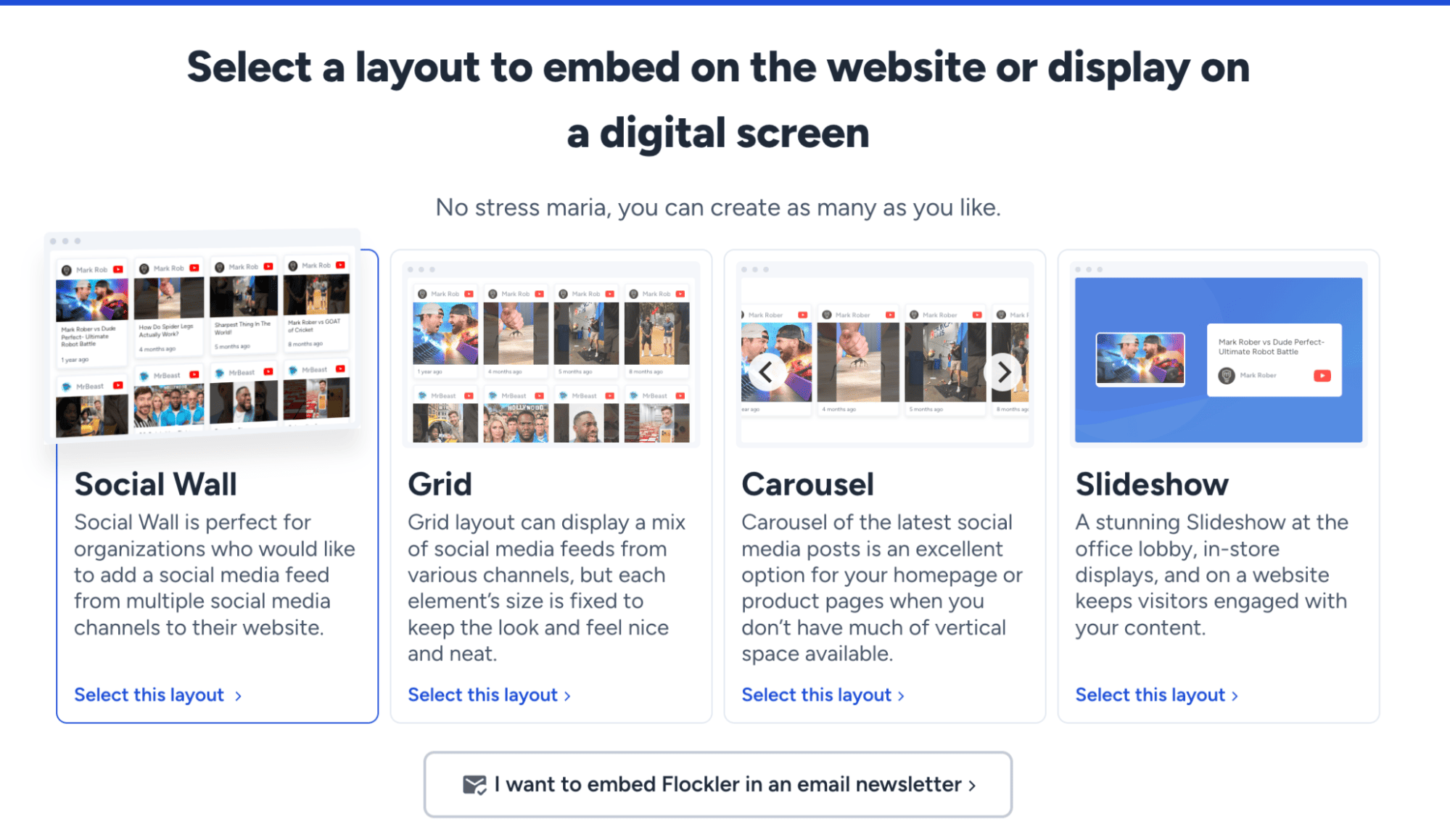
Flockler offers multiple layout options to match each screen location:
- Grid for high-traffic areas needing quick-scan formats
- Social wall for lobbies and engagement spaces
- Carousels for smaller screens or sequential messaging
- Slideshow formats for mixing social content with announcements
Choose the layout depending on your signage or screen configuration. You can also customize them further to match your brand.
Step 5: Deploy Content to Your Screens

Once your Flockler layouts are complete, it’s time to push them to your screens
- Generate embed codes or links from Flockler for each layout
- Open the link on screens connected to your digital signage setup
- Start with pilot screens before full network rollout
- Test visibility, readability, and content rotation at each location

Gather viewer feedback during testing to identify what resonates and what needs adjustment.
Step 6: Set Up Content Governance

Create an oversight team with defined roles:
- If you’re doing manual moderation, assign moderators to review Flockler's moderation queues regularly
- Define who creates, approves, and schedules content
- Set up regular content audits to remove stale material
- Monitor which social sources provide the highest quality content
Step 7: Monitor Performance with Flockler Analytics

Use Flockler's built-in analytics to track content performance:
- Monitor which posts generate the most engagement
- Identify top-performing social sources
- Track content refresh rates and viewer patterns
- Measure QR code scans and hashtag participation
- Compare performance across different screen locations
Conduct monthly reviews to identify what works. Make incremental improvements based on data, and adjust your content strategy as audience needs evolve.
Common Challenges in Digital Signage Content Strategies
Even well-run digital signage setups hit issues. What matters is fixing them quickly.
- Content bottlenecks: Too few people managing content slows everything down. Use editable templates, automate feeds from existing sources, and share ownership across teams with basic guidelines
- Inconsistent messaging: Multiple contributors cause brand drift. Lock in brand rules, use a central platform, and run quick screen audits
Outdated content: Stale screens hurt credibility. Set expiration dates, use automated social media feeds, and assign clear ownership - Technical issues: Broken screens cause damage. Choose reliable hardware and digital signage software, monitor remotely, and use fallback content
- Low engagement: Ignored screens waste space. Test formats, track performance, and adjust based on real data
- Limited resources: Start with high-impact screens, prove results, and scale only what works
Final Thoughts
Digital signage only works when there is a clear reason for what shows up on the screen. Screens that repeat the same messages or show irrelevant content are quickly ignored. A clear digital signage content strategy helps avoid that by assigning a role to each screen and an objective to achieve.
Strong digital signage content creation comes down to relevance and consistency. Content should change often, reflect what is happening in the space, and be easy to update. Content automation for digital signage makes this possible without adding more work for already busy teams.
You do not need to do everything at once. Pick what fits your setup, test it, and adjust as you go.
FAQs
Which is the easiest digital signage content strategy to start with?
Social media walls are the easiest because they update automatically, stay relevant, and reuse content from platforms your audience already trusts. This works especially well in retail, offices, and events where freshness matters. With moderation in place, you stay in control while letting real customer or employee content keep screens active.
What is the best digital signage content strategy software?
There is no single “best” tool, but a strong setup combines playback and content sources. Platforms like ScreenCloud, Yodeck, and OptiSigns manage screens, schedules, and devices. Tools like Flockler complement them by powering live, moderated social and UGC content.
How should digital signage content creation work in 2026?
Digital signage content creation in 2026 should be automated, contextual, and low-maintenance. Instead of manual uploads, teams rely on scheduled playlists, live data feeds, and reusable templates. As a bonus, content should adapt to the time of day, screen location, and audience intent.
Do small teams need dedicated signage managers?
No. Most small teams struggle because signage is treated as a manual task. With clear content rules, templates, and automation, a single person can efficiently manage multiple screens. Centralized platforms handle scheduling and updates, while automation keeps content fresh. The key is to reduce decision-making and repetitive work, not to add more people to the process.
Maria Prakkat is a SaaS content marketing and SEO strategist with experience across SEO, GEO, and social media aggregation. She writes in-depth, research-backed content that helps businesses understand and apply solutions like social media aggregators, UGC platforms, and content distribution tools to improve visibility and engagement. Her work focuses on clarity, relevance, and long-term impact.
Une infrastructure sociale qui évolue avec vous.
Commencez votre essai gratuit ou laissez-nous vous montrer la plateforme en action.



