
January 16, 2026
How to Embed a Live Hashtag Feed on Your Website
X minute de lecture


Une infrastructure sociale qui évolue avec vous.
Commencez votre essai gratuit ou laissez-nous vous montrer la plateforme en action.
Hashtags create an online buzz for your brand, and they are no longer just for social media. Hashtag posts serve as social proof, with people sharing user-generated content around your hashtag and products.
When embedded on websites, these live hashtags help new visitors trust your brand and feel more confident about buying from you.
In this blog, you’ll learn what a live hashtag feed is, how it works, and how to embed it on your website and event screens to boost engagement.
What is a live hashtag feed?
A live hashtag feed is created by collecting and showcasing all social posts with a common hashtag from different sources related to a specific brand marketing campaign.
The brand itself initially creates these hashtag feeds. The brand chooses a creative, trendy hashtag that resonates with its audience.
The brand promotes this campaign by actively posting and reposting such content and, in some instances, encouraging participation with certain rewards.
The marketing team collects these posts and displays them across multiple touchpoints to showcase its loyal community, helping build confidence among potential customers.
For instance, GoPro displays a long curated live hashtag feed wall on its website.

GoPro uses the hashtag #GoProAwards for a competition in which users actively participate and share UGC on social channels. This creates credible publicity for the brand and also establishes a loyal community.

A live hashtag feed wall can also be displayed on digital signage at events and retail stores.

Benefits of a live hashtag feed for businesses
1. Turns passive visitors into active participants
A live hashtag feed encourages people to do more than just browse.
When visitors see real posts from others using your hashtag, it creates a natural urge to join in. Instead of consuming content quietly, they feel invited to participate.

This works especially well for campaigns, events, and launches where visibility motivates users to post, tag your brand, and become part of the story.
2. Builds instant social proof without feeling forced
Seeing real people talk about your brand in real time builds trust faster than polished marketing copy ever could.
A live hashtag feed acts as social proof by showcasing genuine posts, photos, and videos from your audience.
This makes your brand feel active, credible, and relevant, helping new visitors feel more confident about engaging, following, or taking the next step with you.
3. Keeps your content fresh automatically
Websites and screens often go stale because updating them takes time. A live hashtag feed solves this by continuously pulling in new content as it’s posted.

Every refresh shows something new, without your team needing to upload or redesign anything.

This keeps your pages dynamic and visually engaging while saving time and reducing the effort required to maintain fresh content.
4. Extends the life of campaigns and events
Campaigns and events usually peak for a short time, but a live hashtag feed helps extend their impact. By collecting posts before, during, and after the moment, the feed becomes a living archive of engagement.

Brands can reuse this content on recap pages, event websites, and digital displays, making a single hashtag valuable long after the campaign ends.
5. Makes your brand feel more human and relatable
A live hashtag feed adds personality to your digital presence by highlighting real voices instead of brand-only messaging.
User-generated photos, reactions, and stories make your brand feel approachable and community-driven.

This human element helps visitors connect emotionally, especially when deciding whether to trust your brand, attend your event, or engage with your product or campaign.
6. Works across websites, events, and screens
A live hashtag feed is highly flexible and can be displayed across multiple touchpoints. The same feed can power a website section, an event wall, an in-store display, or an internal screen.
How to choose your hashtags and how they work on the platforms?
To choose your hashtags for your next live hashtag campaign:
- Understand your audience well enough to know which hashtags will resonate most with them. It is not about choosing the most popular or unique hashtags, but about choosing relevant hashtags around your target audience’s problems, human emotions, or personal experiences. For example, #Thefaceof10 (of Dove), #ShareaCoke (of Coca-Cola), and #Justdoit (Nike).
- Perform competitor research to identify which hashtag campaigns they have used in the past, how those campaigns performed for them, and which channels they used.
- Once you've narrowed down your options to a few, use the search bars on various social platforms to verify whether the hashtag is already in use. You can also use a hashtag aggregator tool for deep research, trend analysis, and performance measurement.
- You can also create one broader tag and three to four niche or specific tags to target a smaller and more engaged audience.
Here is how they work on platforms:
- Choose which platforms you want to use for your hashtag campaigns. Create a set of rules around them. For example, you should decide the maximum number of hashtags to include in your posts, which hashtags are essential, which ones are optional, and where they should appear in the caption.
- Start pushing your hashtag content on the selected platforms via your account and collaborate with influencers early on. You can also announce participation rewards; this brings more attention to your hashtag campaigns.
- Make sure you repost or respond to all the UGC content, at least in the initial phase. This creates a positive emotional response among creators and encourages other users to participate.
- Using hashtags in your posts makes them more discoverable, as the platform categorizes your hashtag content into broader groups, which exposes it beyond your follower list. Platform algorithms also pick up your content and push it to more relevant users.
Common use cases of live hashtag feeds
E-commerce and brand campaigns
Live hashtag feeds help brands showcase authentic social proof directly on homepages, campaign pages, or product landing pages. This makes potential customers more confident in their purchase decisions.

Sports engagement
Live hashtag feeds on sports websites or stadiums help showcase fan reactions, match-day photos, celebrations, and commentary in real time. This encourages more fan participation and amplifies emotional engagement.

Events and Conferences
Event organizers use live hashtag feeds to collect and display posts from attendees during conferences, trade shows, and meetups. These feeds highlight key moments, speaker quotes, and audience reactions.

Digital Signage and Screens
Live hashtag feeds work well on office screens, retail displays, in-store TVs, and public screens. They add dynamic, real-time content to otherwise static displays.

Corporates
Corporations use live hashtag feeds to strengthen internal communication and employee engagement. These feeds are commonly displayed on office screens, intranets, town halls, and internal events to showcase employee posts, company culture moments, CSR initiatives, and leadership updates.

Tourism and hospitality
In tourism and hospitality, live hashtag feeds help destinations, hotels, and travel brands showcase real guest experiences in real time. Displaying traveler photos, reviews, and stories on websites, booking pages, lobby screens, or digital signage builds trust and inspires future visitors.

How to display live hashtag feeds at multiple touchpoints?
To display live hashtag feeds on your website, apps, or digital signage, use a social aggregator tool like Flockler.
With Flockler, users can easily collect hashtag feeds and display them in visually appealing designs and layouts in just a few steps.
Follow these steps:
Step 1: Sign up for your Flockler account or 14-day free trial.
The trial provides access to all advanced Flockler features, including AI moderation, UGC rights management, analytics, and live support.
For the trial period, you require no credit card information
Step 2: Connect your sources and profiles.
Choose which platforms you want to extract hashtag feeds from. Flockler supports over 13 social platforms, including Instagram, Facebook, YouTube, and Bluesky.
Next, connect your account and start pulling multiple pieces of content simply by entering hashtags. You can collect both images and videos.

Flockler also offers custom CSS for handling unique customization needs.
Step 3: Add moderation to your hashtag feeds
Use the moderation feature to automatically refresh your feeds and block off any inappropriate feeds from appearing on the wall.

Flockler offers three kinds of moderation:
- Manual moderation for approving content manually before publishing
- Automated moderation for refreshing content automatically
- AI moderation (Garde AI) for removing any off-brand posts automatically.
Step 4: Customize the look of your hashtag feeds wall
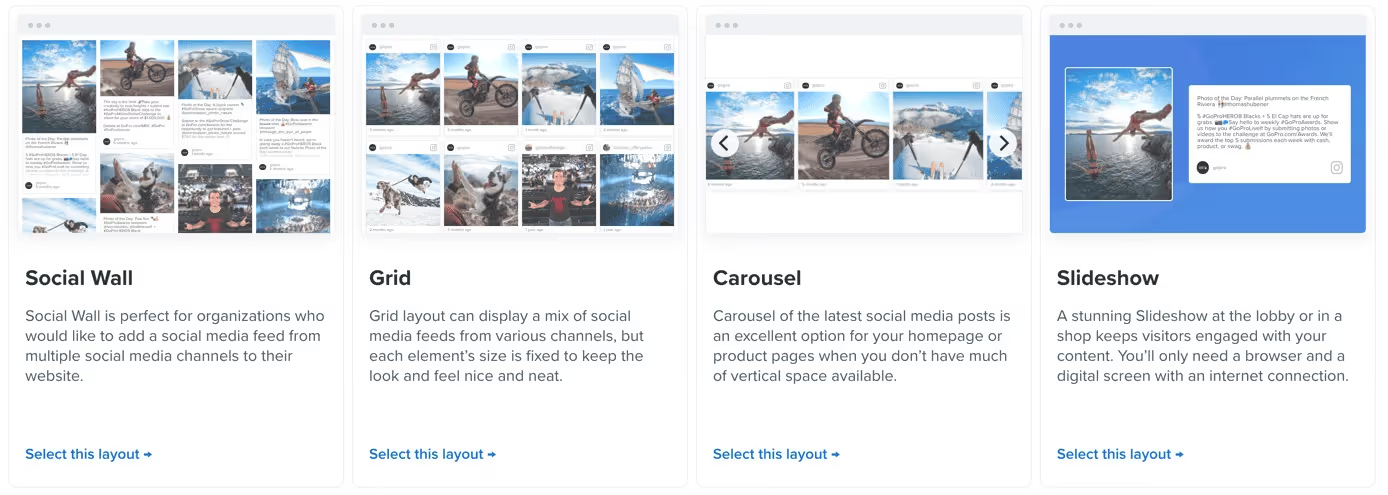
Customize your hashtag feeds' outlook with engaging layouts such as Grid, Carousel, Social Walls, or Slideshows. You can also further customize the fonts, colors, and design.
Step 5: Copy the auto-generated embed code and paste it into your website CMS

Flockler offers compatibility with:
Start embedding your live hashtag feeds in engaging layouts without coding. Try Flockler’s 14-day free trial to access AI moderation, customization, and analytics with no credit card required.
FAQs
Do you need permission to display user-generated posts in a live hashtag feed?
Yes, for some posts, brands do require getting permissions before using the UGC feeds. With a social media aggregator tool like Flockler, users get an in-built tool to manage permissions automatically. With this, marketers do not need to invest any manual effort in tracking rights and save their company from unwanted fines.
How often does a live hashtag feed update with new posts?
It depends on the social aggregator tool and the plan you have chosen. For example, you can choose a plan with a 60-minute, 30-minute, or 15-minute refresh rate. Flockler offers automated moderation with a 5 to 15-minute refresh rate. Flockler also offers AI moderation to its users, which automatically blocks off any inappropriate posts from your embedded social wall.
How do brands prevent spam and off-brand content in high-volume hashtag campaigns?
To prevent spam and off-brand hashtag feeds from appearing on your embedded social wall, use Flockler’s AI moderation. Garde AI is an AI-powered moderation tool from Flockler that instantly blocks inappropriate posts during automated wall refreshes. This ensures no negative or off-brand posts appear on your website or digital screens at events.
Avika Dixit is a B2B SaaS and e-commerce writer with expertise in social media marketing, content strategy, and customer engagement. Over the past three years, she has created long-form, SEO-driven content that helps businesses understand and leverage tools like social proof platforms, UGC aggregators, and digital experience solutions.
Une infrastructure sociale qui évolue avec vous.
Commencez votre essai gratuit ou laissez-nous vous montrer la plateforme en action.



