

January 16, 2026
What Is a Social Media Feed API and How to Use It
X minute de lecture

Une infrastructure sociale qui évolue avec vous.
Commencez votre essai gratuit ou laissez-nous vous montrer la plateforme en action.
Social content doesn’t stop at likes and comments. It’s one of the strongest trust signals you can show on your website.
But collecting posts from multiple social platforms and moderating them is not an easy job to do manually.
That’s where a social media feed API comes in.
In this blog, learn about the social media feed API, how it works, and why brands use a third-party tool for curating and embedding social feeds across multiple touchpoints.
What is a social media feed API, and how does it work?
The social media feed API lets you collect and display online posts from multiple social platforms using a single structured connection.
With it, marketers can easily pull hashtag posts, UGC, reviews, or videos and display them on websites, apps, product pages, digital signage, or event screens.
This is how a social media feed API works:
- First, you sign up for a third-party tool and connect your social accounts
- You can then collect posts via hashtags, keywords, or handles from multiple profiles at once.
- Next, you add moderation and customization to your embedded social media feeds
- Finally, you use the auto-generated embed code to display feeds on multiple touchpoints.
For a deeper look at how the aggregator layer works within this flow, check out this social media aggregator API guide.
Why Use a Social Media Feed API?
Many brands, such as GoPro, Worktop Express, Urban Decay, Anfisa Skin, Kora Organics, and more, use the Social Media Feed API to embed UGC posts on their homepages, making their websites more meaningful and engaging.
Here are some of the reasons why they are using it:
1. Aggregate content from multiple platforms for one fee
Embedding social media feeds using different platforms' APIs, such as the Instagram API, TikTok API, or YouTube API, is a technical and time-consuming process.
To use the native platform’s API, you need to create a developer’s account, implement an authentication flow, use the API’s endpoints to fetch content, and use custom HTML and CSS to design your social feeds.
With a third-party social media feed API, the process becomes much shorter and simpler.
You only have to sign up for the tool, and you can easily collect posts from these platforms using keywords or hashtags.
2. Maintain full control over moderation and brand safety
With the native platform’s API, you get very limited moderation control, and marketers have to approve/reject posts or filter spam manually.
With the third-party tool, moderation becomes automatic. This means you no longer have to worry about inappropriate posts being displayed on your website.
The aggregator tool automatically deletes any off-brand posts from your embedded social wall.
3. Design and display feeds exactly how you want
With native embeds, users can only do basic layout, design, and theme customizations. This makes it difficult for marketers to align the embedded social wall with their website’s overall design.
The third-party tool offers multiple layouts and custom CSS for customizing your social media wall to match your website's themes, fonts, colors, and styling.
It also adjusts your embedded social feeds for multiple touchpoints, such as websites, mobile, email, or digital signage, without needing to redesign them each time.
4. Improve performance and scalability
Native embeds only offer basic analytics such as views, likes, or shares, and even those metrics are tied to the social platform.
A social media aggregator tool goes a step further by offering performance-optimized feeds with caching and load control, along with detailed analytics on impressions, interactions, clicks, and feed performance across pages and campaigns.
It helps brands understand what content works, where it performs best, and how social feeds contribute to engagement and conversions.
Social Media API vs Social Media Feed API
Non-negotiable features to look for in a Social Media API
1. Platform coverage
A strong social media aggregator API should support all major platforms, including Instagram, X, YouTube, TikTok, and others.
Broad platform coverage allows brands to pull content from multiple sources into a single feed without building or maintaining separate integrations.
As your social strategy grows or shifts to new platforms, the API should scale with you rather than become a limitation.
Learn about all 13 social platforms supported by Flockler here.
2. Real-time or near real-time updates
Social content is most impactful when it’s fresh. An effective API continuously refreshes feeds so new posts, mentions, or hashtags appear quickly without manual intervention.

This is especially valuable for live campaigns, events, product launches, or time-sensitive promotions where outdated content can reduce relevance and engagement.
3. Content moderation and approval workflows
Built-in content moderation tools allow teams to review, approve, or reject posts before they go live. Advanced filtering automatically removes spam, offensive language, or off-brand content.

This level of control protects brand reputation while still allowing teams to confidently scale UGC usage.
4. UGC rights management
Reusing user-generated content requires clear permission from content creators. A reliable aggregator API supports UGC rights management by helping brands request consent, track approvals, and document usage rights.

5. Custom API access and custom CSS
Customization is a key advantage of using an aggregator API over native embeds.
Full API access allows developers to control how and where content is rendered, while custom CSS lets marketers match feeds to brand fonts, colors, layouts, and UI patterns.
This ensures social feeds feel like a natural part of the website or product, not an external embed.
6. Native analytics
Built-in analytics help teams understand how social content performs on their own digital properties.
Instead of just tracking likes or views on social platforms, native analytics show impressions, interactions, clicks, and performance by feed or campaign.
7. Shoppable posts
For eCommerce brands, shoppable social feeds turn inspiration into action. This feature enables brands to directly tag products in social posts and link them to product pages.

By connecting UGC with shopping experiences, brands can shorten the customer journey and increase conversion rates from social content.
8. Live support
Even with an easy-to-use API, access to reliable live support matters. Live support helps teams onboard faster, resolve issues in real time, and reduce dependency on engineering resources.
This is especially important for marketing teams that want to move quickly without technical bottlenecks.
Many tools keep this feature exclusive, but Flockler offers live chat support across all plans, from Basic to Custom.
How Flockler works as a Social Media Feed API
Flockler is an advanced social media aggregator tool that requires no coding to integrate with over 13 social platforms.
It offers automated content moderation, a UGC rights management tool, social analytics, and live support for its users.
With Flockler, you can also personalize your embedded social feeds using customizable layouts and designs and display them in your local language.
To use Flockler to embed a social media feed, follow these steps:
Step 1: Sign in to your Flockler account or start Flockler’s 14-day free trial with no credit card required. With a free trial, you can access all Flockler features.
Step 2: Choose the platform from which you want to collect social feeds and connect your account with Flockler in a single step.

You can now pull UGC content using hashtags, accounts, or mentions.
Step 3: Next, choose the moderation type to apply to your embedded feeds. Flockler offers three moderation types:

- Manual moderation to manually filter posts for display
- Automated moderation to refresh content automatically in five minutes.
- Garde AI (an AI-intelligent moderation tool) that automatically deletes any inappropriate posts from your refreshes.
Step 4: Customize the look of your social wall. Start by choosing one of four layouts: Grid, Carousel, Social Walls, or Slideshows. You can also change fonts, colors, themes, and designs to match your demands.
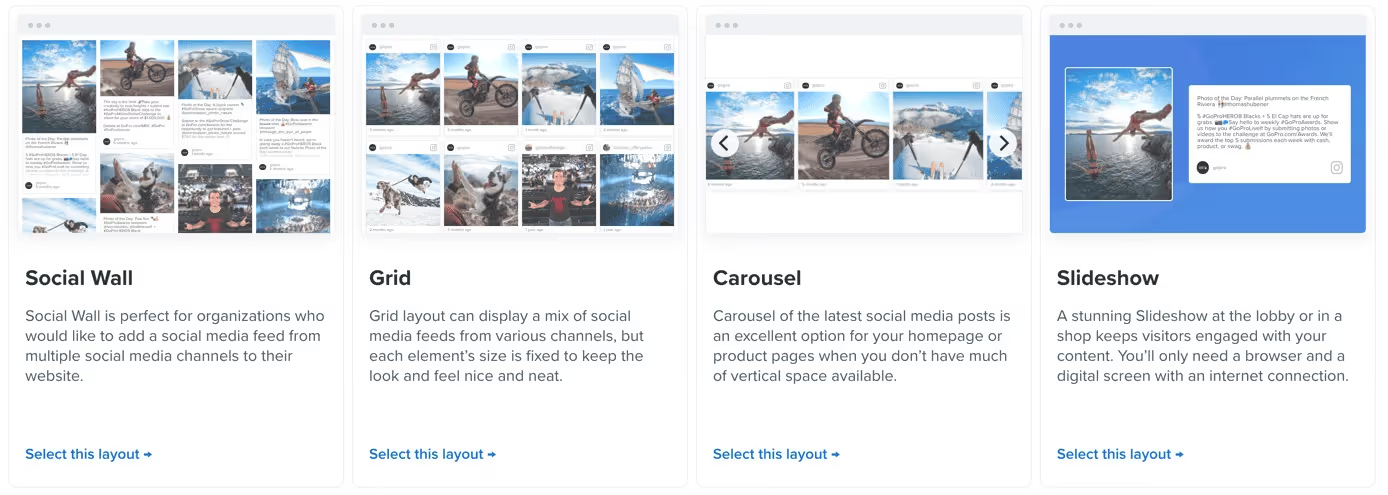
In addition, Flockler offers custom CSS for advanced customization where needed.
Step 5: All that’s left to do is to check the preview of your created social wall and copy the auto-generated embed code to paste it in your website CMS, mobile applications, intranets, digital screens, and more. No developer required.

Flockler offers compatibility with the following websites and e-commerce platforms:
Best practices for using a Social Media Feed API
- First, your overall experience and ease of embedding social media feeds depend on choosing the right social aggregator tool. Make sure that the tool has all the non-negotiable features mentioned earlier. Take free trials and demos to test the tool's intuitiveness before making a final choice.
- Choose relevant and contextual social posts to enhance the impact of your website. For example, place UGC posts on product pages, add influencer or social proof feeds on your homepage, and display hashtag campaigns on digital signage to highlight your community. The goal is to guide your audience toward a purchase in a way that feels natural and genuinely helpful.
- Avoid over-fetching data. Do not simply fill your website pages with contextual social posts, either. This approach will reduce the impact of these posts, as they can overwhelm users and lead to content fatigue. Another reason is that too many posts can clutter the interface, which disrupts the overall website experience.
- Moderate your social media feeds before publishing. This is a very important step, as any off-brand posts on your marketing touchpoints can damage your brand reputation. Use AI-powered moderation filters and add all relevant keywords to automatically block such posts, as relying on manual review can lead to errors.
- Match your social feed wall design with your website UX. It should come across as an extension of your website content, not an external add-on. Align layouts, fonts, colors, and spacing with your existing brand design and UX patterns.
- Choose a social media aggregator tool with built-in analytics. It must provide advanced analytics, such as views, likes, interactions, click-throughs, and more, to help you understand the performance of your embedded social media posts.
FAQs
Do I need developer support to use a social media feed API?
No, with a social media aggregator tool, you only need to sign up. Once you have signed up, you can easily collect and add social media feeds from different sources using keywords, hashtags, or handles. You do not require any coding knowledge or developer support to embed social posts.
Is using a social aggregator tool compliant with platform policies?
Yes. Choose a popular, reputable social aggregator tool that follows platforms' policies and data compliance requirements. Flockler complies with over 13 platforms' policies and also offers UGC rights management. With the UGC rights management feature, marketers can automatically send and track permissions without any manual effort.
How often do social media feeds update when using a feed API?
With a social media aggregator tool, users get an in-built automated moderation feature that automatically replaces old content with new content. These tools offer different plans with varying update frequencies. For example, the starter plan may offer a 60-minute refresh time, whereas a custom plan may offer up to 5 minutes.
A true growth operator with extensive experience across crowdsourcing, affiliate programs, and social media aggregation. Brooke is the CEO if Flockler and cofounder of the marketing agency Northweather and has worked with global brands including LEGO. With international experience spanning SaaS, marketing, and product, she brings sharp expertise in strategy, execution, and driving results through global cross-functional teams.
Une infrastructure sociale qui évolue avec vous.
Commencez votre essai gratuit ou laissez-nous vous montrer la plateforme en action.



